

Gaspard LEZIN
Stripe vs PayPal: Best for Global Business in 2026?
Deciding between Stripe vs PayPal for your global business? Compare fees, features, and international capabilities to choose the best in 2026.
If you're comparing Stripe vs PayPal, you're probably not deciding between two logos. You're deciding what happens when a customer in one country pays in one currency, your business operates in another, and your team still needs clean reconciliation, predictable payouts, and enough margin left at the end of the month.
That's where most comparisons fall short. They fixate on the checkout fee and ignore the rest of the operation. For an international business, the visible fee is only one line item. The harder costs often show up later, in currency conversion, payout timing, fragmented balances, and manual work when your finance team has to move money across systems.
Primer put this point clearly in its analysis of global payout and FX complexity in Stripe vs PayPal. The short version is simple: a business can lose more to FX spread and payout fragmentation than to the advertised transaction fee difference. That's the core decision frame.
Stripe and PayPal were built for different strengths. Stripe is the infrastructure-first choice. PayPal is the consumer-trust-first choice. There's also a newer category of provider built around flexible acceptance and settlement, where the business can separate how the customer pays from how the business receives funds. That model matters more once you sell internationally.
Table of Contents
Introduction Beyond the Headline Fees
Stripe vs PayPal at a Glance
The visible fee is only the start
Where international businesses feel the pain
A more workable settlement model
Reach and operational fit are different decisions
Payment method coverage affects more than checkout conversion
Global sales create back-office consequences
What to check before you expand
Stripe is built for builders
PayPal is easier when customization is not the priority
What technical teams should evaluate
SaaS and subscription businesses
Cross-border ecommerce brands
Agencies freelancers and creators
Can I use both Stripe and PayPal on my website
Which platform has better fraud protection for sellers
How hard is it to switch from PayPal to Stripe
What should international businesses compare first
Introduction Beyond the Headline Fees
The headline fee is usually the first thing merchants compare, and it's rarely the thing that decides long-term fit.
A founder sees one provider charging a lower base rate, another offering familiar buyer trust, and assumes the lower line item wins. Then international volume grows. Customers pay in different currencies. Payouts arrive on different schedules. Finance exports CSVs from multiple dashboards. Support tickets appear when buyers prefer a local method that your checkout doesn't handle well. The original comparison no longer looks complete.
That's why the Stripe vs PayPal decision needs a broader lens. Stripe tends to fit businesses that want control, API depth, and broader currency support. PayPal tends to fit businesses that value brand recognition, quick setup, and a checkout option many consumers already trust. Both can work. The question is what they cost you operationally after the first hundred or thousand international transactions.
Practical rule: If you sell across borders, compare settlement flow before you compare headline price.
A useful way to think about this is total payment operations cost:
Processing cost: What you pay per successful charge.
Cross-border cost: What happens when the buyer's card, country, or currency differs.
FX cost: What you lose when funds are converted before they reach the account you use.
Payout cost in time: How long your money sits in transit before you can use it.
Admin cost: How much manual work your team does to reconcile, dispute, refund, and report.
For a domestic business, those costs can stay manageable. For an international one, they usually don't.
Stripe vs PayPal at a Glance
A quick summary is useful, but the actual difference shows up after you start selling across borders and collecting in more than one currency.
Category | Stripe | PayPal |
|---|---|---|
Best fit | Businesses that want control over checkout, payments logic, and back-office workflows | Businesses that want a familiar wallet and a faster path to launch |
Core strength | Payment infrastructure that can be shaped around your product and operations | Consumer recognition and a checkout option many buyers already trust |
Standard online pricing | Lower standard online card pricing than PayPal, based on a comparison from Outseta | Higher standard online card pricing than Stripe in the same Outseta comparison |
Currency support | Broader presentment support, with Stripe handling more currencies than PayPal in a comparison from Spreedly | Narrower currency support in the same Spreedly comparison |
Merchant reach | Available in fewer merchant countries than PayPal, which can matter if your entity structure is spread across regions | Broader merchant-country availability, also noted by Spreedly |
Payment flexibility | More configurable checkout and wider payment-method support, according to Dokan's comparison | More standardized checkout flow and less flexibility in the same Dokan comparison |
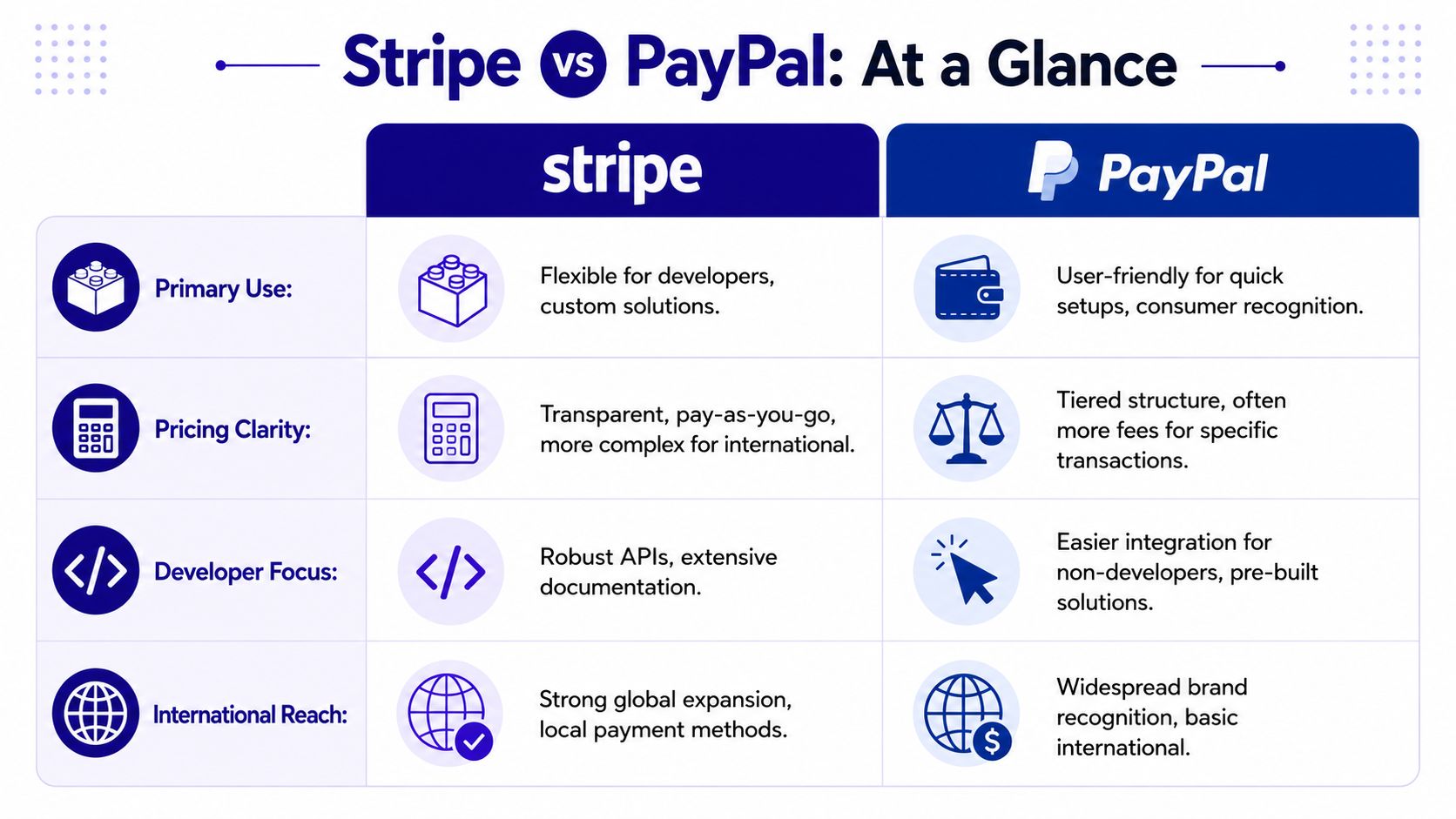
The practical split is straightforward. Stripe usually fits businesses that treat payments as part of the product and want tighter control over subscriptions, local methods, invoicing flows, and reporting. PayPal usually fits businesses that care more about buyer recognition at the moment of purchase and want less setup work up front.
For international sales, that top-line comparison is only half the job. A platform can look cheaper on the pricing page and still cost more once FX spreads, currency conversion rules, reserve policies, and payout timing start affecting cash flow. Teams that need to hold, route, or reconcile funds across currencies should also check how PayPal currency conversion works in practice before assuming the wallet balance gives them enough control.
One pattern shows up often in practice. PayPal can help conversion if your audience already trusts the brand, especially in consumer markets. Stripe usually gives finance and operations teams a cleaner long-term setup if the business needs more control over how money is accepted, converted, reported, and paid out.
Unpacking the Real Costs Pricing Fees and FX
A merchant sells a 1,000 euro order to a customer abroad, sees the payment clear, then finds out the final payout is smaller and slower than expected. That shortfall usually does not come from one obvious fee. It comes from a stack of smaller decisions around cross-border charges, currency conversion, dispute costs, and how the platform releases funds.
Base processing rates still matter, but they are only the starting point. Stripe is often presented as the lower-cost option on standard online card pricing, while PayPal often starts higher on the headline transaction fee. As noted earlier, that gap can add up over a year for businesses with steady volume. The bigger issue for international sellers is that the advertised rate rarely reflects what lands in the bank after cross-border markups and conversion.
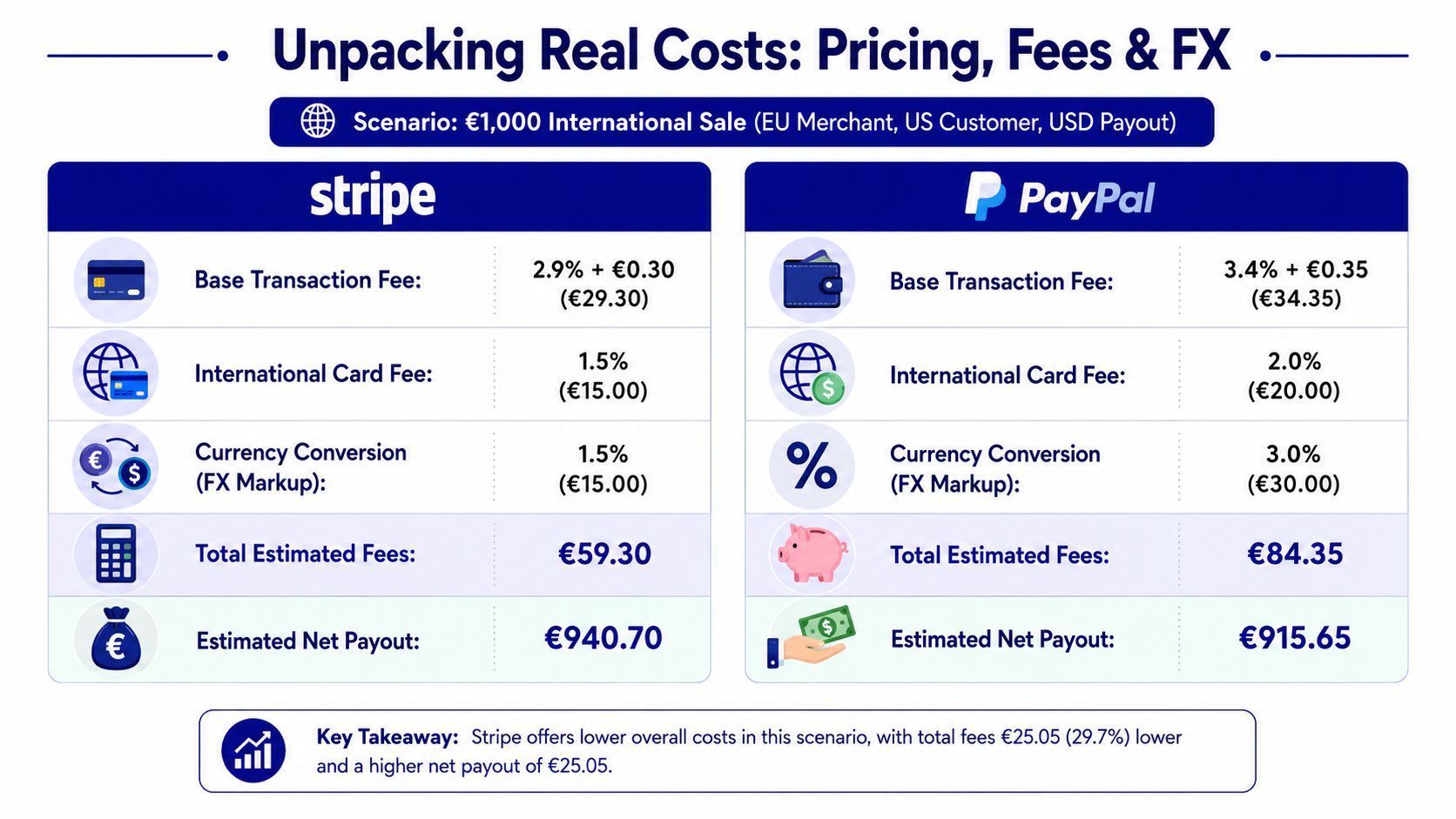
The visible fee is only the start
For a domestic sale, fee math is fairly easy to model. For an international sale, the meaningful question is broader: what does it cost to accept the payment, convert it, settle it, reconcile it, and deal with exceptions?
Stripe usually gives merchants more clarity if they want to price in one currency, settle in another, and connect that flow to their own reporting systems. PayPal can be simpler at the checkout stage, especially when the buyer already trusts the brand, but the operational cost can rise if the merchant has to manage wallet balances, manual conversions, or country-specific fee logic after the sale.
Dispute handling matters here too. Cross-border commerce tends to bring more “item not received” and authorization disputes, especially for digital services, subscriptions, and remote fulfillment. Stripe's dispute fee structure is often easier to absorb if the business wins cases regularly, because the fee can be returned. PayPal's dispute costs can be harder on margins when chargeback volume rises.
A useful model includes five separate cost lines:
Base processing fee: The published card or wallet rate.
Cross-border surcharge: The extra charge tied to customer location or card origin.
FX spread: The margin built into currency conversion.
Dispute cost: Fees, staff time, and recoverability if the case is won.
Payout friction: Delays, reserve holds, and manual treasury work.
That last item gets ignored too often.
Where international businesses feel the pain
Cash flow pressure shows up fast in cross-border operations. A business may need to reorder stock, pay affiliates, release contractor payments, or cover ad spend before the payout arrives. Stripe often fits this better for merchants that want a more predictable payout workflow and tighter system integration. PayPal can still work well, but the finance burden is higher if funds arrive later or require extra steps before they are usable in the right currency.
The operational difference is not just speed. It is also labor.
A finance team that has to export balances, check conversion rates, move funds manually, and explain payout gaps every month is paying an internal cost on top of the processor fee. That cost rarely appears in comparison tables, but it is one of the first things I look at for a business selling across multiple markets.
If your team still handles wallet balances by hand, this guide on how to convert currency in PayPal without unnecessary friction gives a practical view of how fast settlement admin can pile up.
A more workable settlement model
Some international businesses are starting to separate how they accept money from how they receive it. The customer might pay by card, wallet, bank transfer, or crypto. The merchant then chooses settlement based on treasury needs instead of default platform rules.
That is where newer payment setups can be useful. Suby offers an API for accepting card and crypto payments, plus integrations with Discord and Telegram for subscriptions, paid access, and online communities. The practical difference is settlement choice. A business may accept payment one way and receive funds in a bank account or in USDC, which can reduce an extra FX step for teams operating internationally.
That does not replace Stripe or PayPal in every case. It does show the broader point. For a global business, the better platform is often the one that lowers total operating cost after conversion, payout timing, reconciliation, and treasury handling are included, not the one with the cheapest headline fee.
A quick explainer may help if you're comparing the models visually:
Global Reach and Payment Method Support
A UK-based software company selling in Europe, the Gulf, and Southeast Asia can process the same €49 subscription three very different ways. One setup lets the customer pay in a familiar local method, settles funds in a useful currency, and keeps finance work contained. Another gets the charge through but leaves the team handling conversion losses, delayed payouts, and awkward reconciliation across markets. That is the fundamental global payments question.
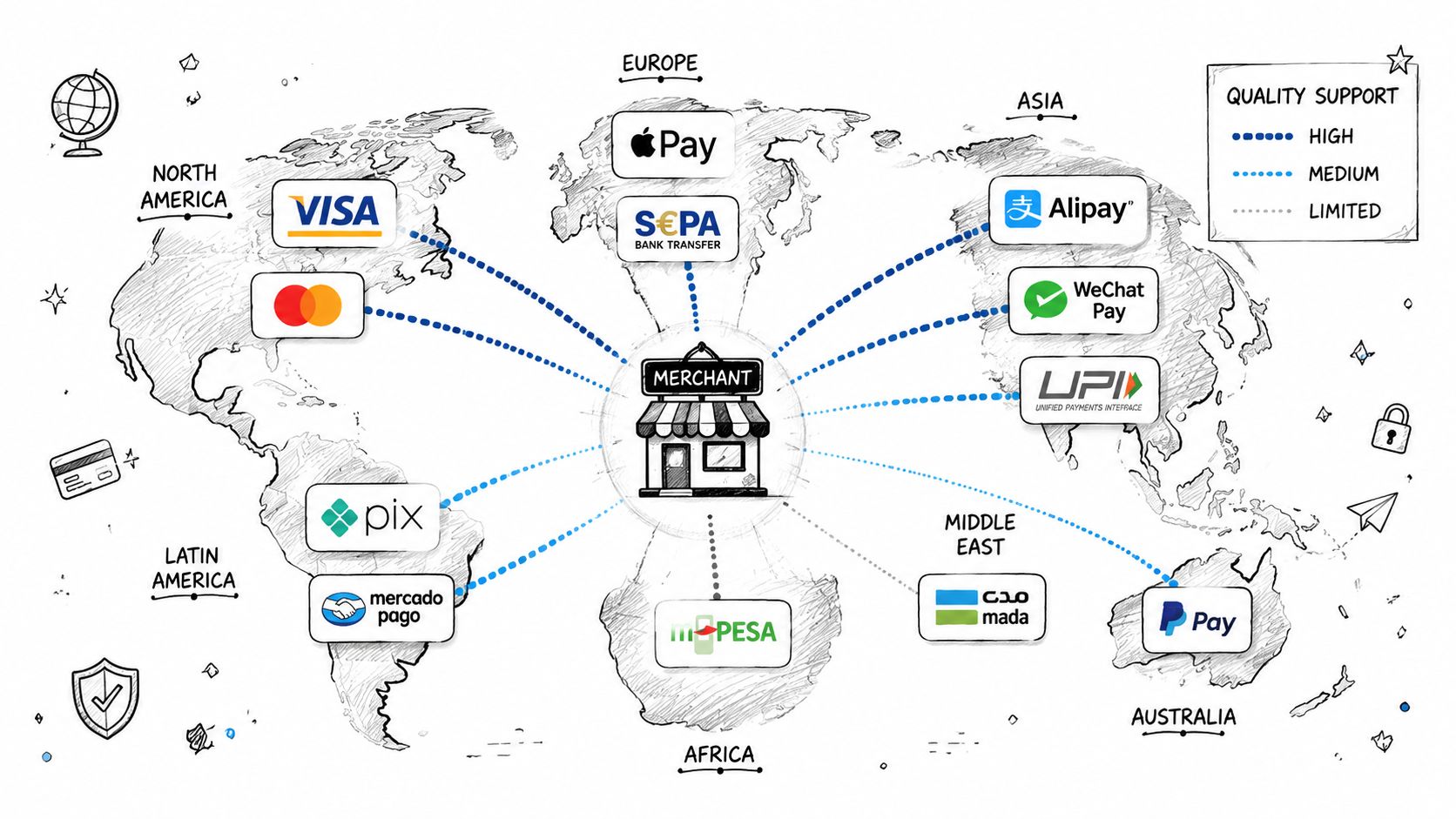
Reach and operational fit are different decisions
PayPal has wider name recognition and broad merchant availability across many markets. Stripe is often stronger on currency presentation and payment method range. Those are not the same advantage, and businesses regularly treat them as if they are.
For international sales, the practical question is not whether a provider is available in a country. It is whether the provider supports how customers in that country pay, and whether the merchant can receive funds without creating extra FX and treasury work.
That distinction shows up quickly in day-to-day operations. A merchant may be able to sell into a market with either platform, but still run into friction around local payment preferences, payout options, or the number of currencies finance has to manage after checkout.
Payment method coverage affects more than checkout conversion
Stripe usually suits businesses that want a broader mix of local and card-based payment methods across regions. PayPal usually suits businesses that benefit from a checkout brand many buyers already trust, especially in markets where PayPal usage is established.
Neither model is automatically better.
If a business sells high-intent products to customers who already expect PayPal, familiarity can help conversion. If the business is expanding into countries where bank-based methods, domestic wallets, or region-specific options matter, payment method depth starts to affect both approval rates and support volume. Customers abandon carts for simple reasons. Their preferred option is missing. The fallback method triggers a foreign card decline. The final charge appears in a currency they did not expect.
For a grounded example of how local method expectations shape setup decisions, this guide to choosing an international payment gateway for India is useful because it looks at country expansion through settlement and customer behavior, not just a coverage map.
Global sales create back-office consequences
Payment method support is only half the job. The harder part often starts after the payment succeeds.
A platform can offer strong buyer coverage and still create expensive internal work if your team has to reconcile multiple currency balances, wait longer than expected for payouts, or accept forced conversions at the wrong step. That is why I separate customer reach from operating reach. Customer reach answers, “Can buyers pay?” Operating reach answers, “Can the business collect, convert, and close the books efficiently?”
Stripe tends to fit teams that want more control over how an international checkout is configured across markets. PayPal tends to fit teams that value quick deployment and buyer recognition, but may accept more constraints in how money moves afterward. The better choice depends on whether your main bottleneck is checkout trust or post-payment operations.
What to check before you expand
These are the five questions that usually expose the difference:
Where can your entity onboard? Country availability for merchants is different from country availability for buyers.
Which currencies can customers pay in? Local pricing affects both trust and conversion.
Which methods do buyers expect in each target market? Cards may be enough in one region and weak in another.
How do payouts arrive? Timing, destination currency, and bank compatibility affect working capital.
How much manual work lands on finance? Every extra conversion, exception, and wallet transfer adds cost.
A provider can look global in a product page and still be expensive to run internationally.
Developer Experience and Custom Integrations
If your payments setup is simple, developer experience may not be your first concern. If your product has subscriptions, custom onboarding, embedded billing, platform logic, or region-specific checkout behavior, it becomes one of the first concerns.
That's where Stripe and PayPal feel very different in day-to-day use.
Stripe is built for builders
The cleanest description of Stripe is that it operates as API-first payment infrastructure. In the comparison summarized by Dokan, Stripe is described as highly customizable and able to support complex flows with 100+ payment methods. That matters because international payment flows are rarely uniform. A SaaS product may need one checkout path for card subscriptions, another for local bank debit, and another for high-value invoices.
Stripe tends to work well when a team needs to control:
Checkout logic: Different methods by country, order type, or customer segment.
Backend events: Webhooks for retries, plan changes, disputes, and internal automation.
Product alignment: Payments that adapt to the app rather than forcing the app to adapt to the processor.
For technical teams evaluating alternatives, this overview of a Stripe payment API is helpful because it highlights what builders usually look for in a payment integration: event structure, payment method flexibility, and the amount of control you keep after implementation.
PayPal is easier when customization is not the priority
PayPal's standard strength is speed and familiarity. It's usually easier to add a known checkout option than to architect a custom payment layer. That's useful when your main goal is simple deployment or when your customer base already expects PayPal.
The trade-off is that PayPal's standard model gives merchants less room to shape the full payment flow. For non-technical businesses, that can be a feature. For software companies, marketplaces, and teams with non-standard billing logic, it often becomes the limitation.
If your team keeps saying “we need the payment flow to work like the product,” you're usually in Stripe territory.
What technical teams should evaluate
A practical developer comparison isn't about which docs look nicer. It's about how much friction you'll face six months later.
I'd evaluate these areas:
Technical question | Why it matters |
|---|---|
Can you orchestrate multiple payment methods cleanly? | Important for international checkout logic |
Are webhooks and event flows reliable enough for automation? | Essential for subscriptions, retries, and internal tooling |
Can finance and support teams operate from the dashboard without engineering involvement? | Reduces ticket load on product teams |
Does the payment system fit your billing model? | Critical for usage-based, recurring, and hybrid revenue |
PayPal is often sufficient for straightforward checkout acceptance. Stripe is usually the better fit when payments are part of product design, not just order collection.
Which Platform Should You Choose
A business can process the same international order through Stripe or PayPal and end up with very different downstream costs. The difference often shows up after the sale, in FX spread, settlement timing, dispute handling, and how much manual work finance absorbs each month.
SaaS and subscription businesses
For SaaS with customers across multiple countries, Stripe is usually the better primary platform.
The main reason is operational control. Subscription businesses rarely struggle with basic card acceptance. They struggle with billing edge cases, failed payment recovery, currency handling, and tying payment events back to product access. Stripe is better suited to that kind of workflow, especially if you need custom fraud rules through Radar or want to build financial operations around card issuing and programmable payment flows.
That matters more once revenue is international. If you bill in one currency, settle in another, and pay vendors or staff in a third, the headline processing fee stops being the whole story. Teams need to look at how often funds are converted, how quickly payouts arrive, and how much reconciliation work lands on finance.
Cross-border ecommerce brands
For ecommerce, the best choice depends on what hurts more today. Conversion friction or operating friction.
PayPal can help when buyers already trust it and want a familiar checkout option. Stripe usually becomes the better core payment rail when the store is selling across regions and needs tighter control over currencies, local payment methods, and checkout logic. That is often the difference between a store that can enter new markets cleanly and one that keeps patching around settlement and reporting problems.
If you are still deciding how the storefront, checkout, and payment stack should fit together, these steps for your online shop are a useful planning reference. Payment processing works best when it is designed with catalog structure, tax handling, fulfillment, and back-office workflows in mind.
Agencies freelancers and creators
For agencies and freelancers, the practical question is simple. Do you want a familiar way to get paid, or a payment setup that is easier to systematize as volume grows?
PayPal is often fine for one-off invoices and clients who already prefer paying through PayPal balances or saved methods. Stripe is usually the cleaner choice when you want payment data to feed reporting, automate invoicing steps, or reduce manual bookkeeping across currencies and payout schedules.
Creators and community businesses can have a different requirement altogether. Sometimes the actual problem is not accepting payment. It is letting customers pay one way while the business settles another way. Suby fits that use case. It offers APIs for card and crypto payments, plus native Discord and Telegram flows for subscriptions, paid access, and community monetization. That can be useful if your audience is international and your treasury or payout preferences do not line up neatly with a standard card-only setup.
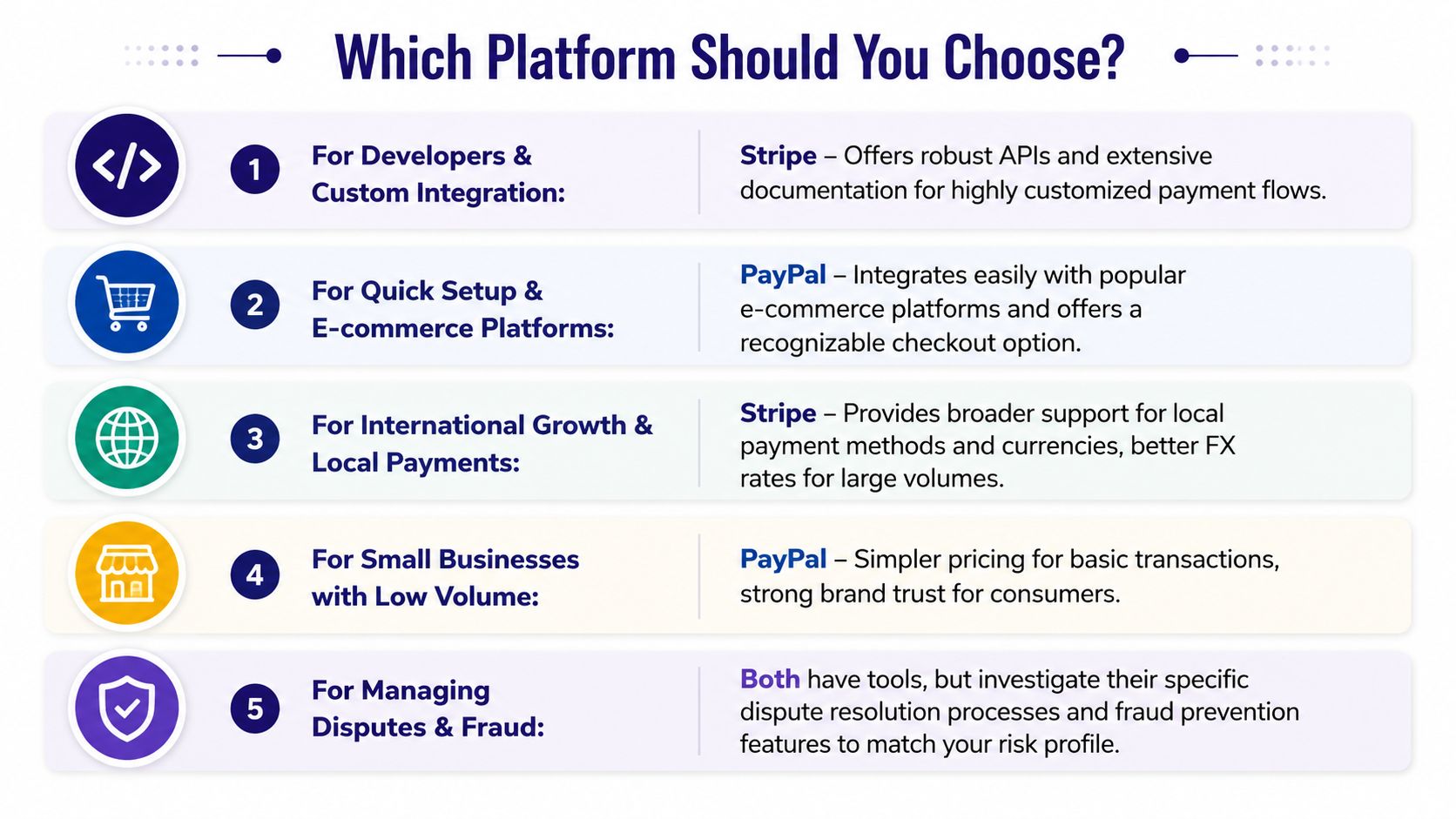
My short recommendation looks like this:
Choose Stripe if your business needs custom billing logic, better control over international payment operations, or a payments stack that can support product-specific workflows.
Choose PayPal if buyer familiarity is likely to lift conversion and your operation can live with less control over checkout, settlement, and back-office flexibility.
Choose a flexible settlement model if your biggest pain point is multi-currency treasury management, payout preference, or community monetization rather than basic payment acceptance.
Frequently Asked Questions
Can I use both Stripe and PayPal on my website
Yes. Many businesses do. It can make sense when you want Stripe for the primary payment stack and PayPal as an extra checkout option for customers who already prefer it.
Which platform has better fraud protection for sellers
For sellers that need deeper control, Stripe is usually the stronger fit because its fraud tooling is more configurable and better suited to custom workflows. PayPal leans more on buyer familiarity and platform trust.
How hard is it to switch from PayPal to Stripe
The technical difficulty depends on how much of your billing logic lives inside PayPal today. If you only use it for one-off payments, switching is usually manageable. If you use it extensively for subscriptions, invoicing, and operations, the migration needs planning across checkout, reconciliation, customer communication, and payout flow.
What should international businesses compare first
Start with settlement, FX handling, and payout timing. The headline fee matters, but it usually isn't the cost that creates the most pain once cross-border volume grows.
Suby is a payment gateway. Your customers pay with card, bank transfer, Apple Pay, Google Pay, Klarna, and more, or stablecoins, and you get paid out to your bank account, or directly in stablecoins (USDC, EURC) to your wallet, anywhere in the world, no bank account required. It gives you an API and native Discord and Telegram monetization flows for subscriptions and paid access. In the Stripe vs PayPal decision, it separates how customers pay from how you settle, so the FX spreads, payout timing, and reconciliation work that drive real cost stop eating your margin on cross-border sales.
