

Gaspard LEZIN
Stripe Payment API: A Developer's Guide for 2026
A complete guide to the Stripe Payment API. Learn core objects, integration flows, webhooks, and security. See how modern APIs solve global payment challenges.
Most advice about the Stripe payment API treats payments like a front-end task. Add a checkout form, send a request, handle success, ship the product. That works for a demo, but it breaks down fast when your business sells across borders.
The hard part usually starts after the first successful payment. You still need to deal with changing currencies, settlement timing, payment state changes, retries, support questions, and finance reconciliation. A clean API call doesn't remove those operational problems. It just gets you to them faster.
Stripe became the reference point for developer-friendly payments for a reason. Its API design is clear, its docs are strong, and its testing model is thoughtful. But if you're building for a global internet business, the deeper question isn't only how to charge a card. It's how to turn payment acceptance into predictable revenue.
Table of Contents
The hidden work starts after checkout
Why this matters for internet-native businesses
Think in resources, not screens
The five objects you need to understand
Customer
PaymentMethod
PaymentIntent
Charge and Refund
Keys are permissions, not just passwords
When a hosted checkout is the right call
When a custom API flow earns its complexity
A practical decision table
What belongs in the browser
What belongs on your server
A simple request flow
Why the success page is not your source of truth
A real fulfillment example
Webhook rules that save you later
PCI is about reducing exposure
SCA changes the shape of your payment flow
What to design for
Where developers get stuck
The business problems behind the API
Why predictable settlement matters more than feature count
The API is only half the system
What modern internet businesses actually need
Beyond the Button Why Payment APIs Are Not a Solved Problem
A payment API is just a programmable way to create, confirm, track, and reverse money movement. That's the technical definition. The business definition is harsher: it's the system your team depends on when revenue, fulfillment, customer support, and accounting all collide.
That gap is why payments still aren't a solved problem.
A junior developer often sees the happy path first. Customer enters card details. The API returns success. The order is marked paid. Done. But a senior developer learns to ask different questions:
What happens if authentication is required later
What if the payment sits in processing
How do support staff know whether to grant access
What currency does the business receive
How long until funds are usable
Those aren't edge cases. They're daily operations.
The hidden work starts after checkout
For a local business with one product and one market, payment complexity can stay hidden for a while. Once you expand internationally, friction shows up everywhere. Customers pay in one currency, your processor settles in another, and your finance team reports in a third. Refunds and disputes add more moving parts. Support asks whether a failed payment should trigger access removal. Product asks whether subscriptions should retry automatically.
A payment button solves collection. It doesn't solve operations.
This is also where a lot of Stripe payment API content stays too shallow. It teaches the request that creates the charge, but it doesn't spend enough time on state changes, settlement friction, or the visibility business teams need once money starts moving.
Why this matters for internet-native businesses
If you're building SaaS, digital memberships, gated communities, or global online services, the goal isn't only to accept payments. It's to receive revenue in a form that's simple to use, simple to reconcile, and simple to predict.
That's why payout design matters as much as checkout design. Some businesses now prefer systems where users pay with cards and the business receives USDC, because that removes a chunk of the old banking friction around currency conversion, FX exposure, and payout delays. In that model, the payment API isn't just a collection tool. It becomes part of a cleaner revenue pipeline.
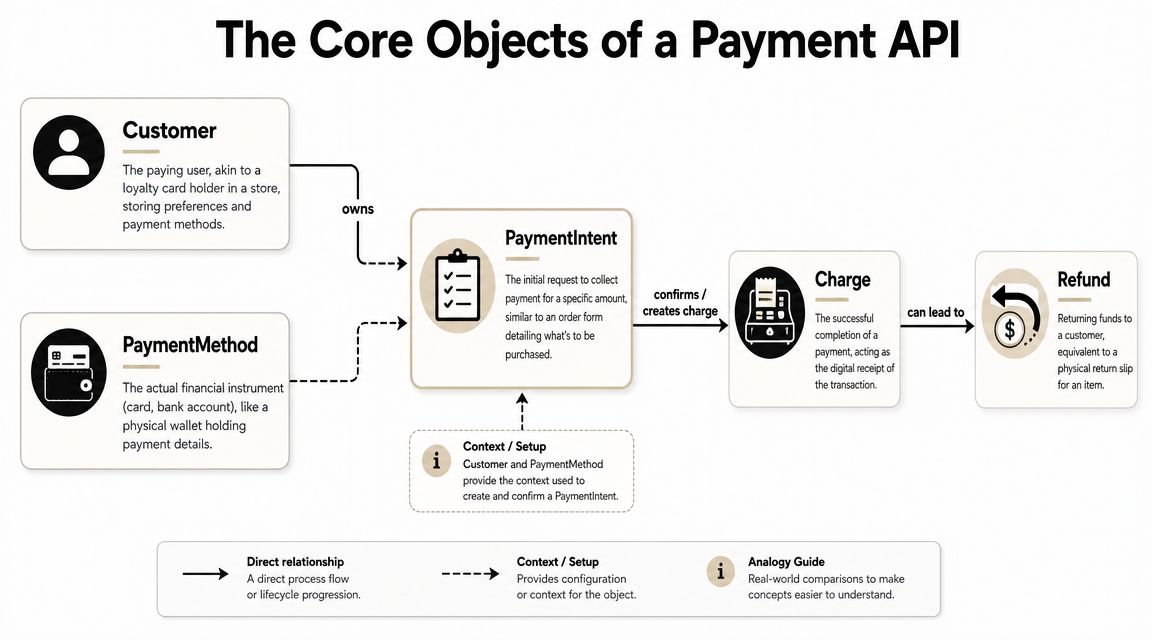
The Core Objects of a Payment API
If payment APIs feel confusing, it's usually because people learn them as UI features instead of data objects. Don't start with the checkout page. Start with the resources.
Stripe's API is built as a REST interface with resource-oriented URLs, form-encoded request bodies, and JSON-encoded responses. It also separates publishable and secret keys, distinguishes test and live modes, and supports restricted API keys with scoped permissions, all of which are documented in the Stripe API reference.
Think in resources, not screens
A checkout form is only the surface. Under it, a modern payment API is a set of records that change over time.
A useful mental model views it as a small database with business meaning attached to each row. If you already work with APIs outside payments, Wistec API insights are a good refresher on how integration patterns map to real business systems.
Here's a stripped-down JSON shape you might see from a payment API:
Each field matters:
id tells you which record you're dealing with
object tells you the resource type
amount and currency define what you're trying to collect
status tells you where the payment is in its lifecycle
customer links this payment to a user record
The five objects you need to understand
Let's translate the jargon into plain English.
Customer
A Customer is your long-term identity record. Think of it like a filing cabinet for one buyer. It can hold saved payment methods, billing history, and metadata like your internal user ID.
If a user buys once and never returns, you might not need a customer record immediately. If they subscribe, upgrade, or save a card, you almost certainly do.
PaymentMethod
A PaymentMethod is the instrument used to pay. For cards, it represents the tokenized card details, not raw card data sitting in your database.
Treat this like a reusable credential, not like a charge itself. The existence of a payment method doesn't mean money moved.
PaymentIntent
A PaymentIntent is the most important object to understand. It represents the attempt to collect a specific amount.
Newer payment flows often trip people up. A PaymentIntent is not just "charge now." It's more like a transaction session with states. It may need a card, then authentication, then processing, then completion. That stateful design is powerful, but it also explains why a simple "one API call equals one finished payment" mindset doesn't hold up anymore.
Practical rule: If you're confused about a payment flow, inspect the PaymentIntent status first. It usually tells you what the system is waiting for.
Charge and Refund
A Charge is the actual successful payment event or payment attempt outcome tied to the broader intent. A Refund sends funds back against a completed charge.
Think of it this way:
Object | Analogy | Job |
|---|---|---|
Customer | Account folder | Stores who is paying |
PaymentMethod | Wallet or card | Stores how they can pay |
PaymentIntent | Order form with status | Tracks the payment attempt |
Charge | Receipt | Records money movement |
Refund | Return slip | Reverses part or all of a payment |
Keys are permissions, not just passwords
New developers often treat API keys like one big master secret. That's risky thinking.
Publishable keys belong on the client side where needed for secure payment UI components. Secret keys stay on your server. Restricted keys matter when you want to narrow access to only the resources a service needs. That matters in practice because leaks happen, and scoped permissions limit damage.
A second detail worth remembering is environment separation. Test mode and live mode aren't a convenience feature. They're a safety boundary. Build as if crossing that boundary deserves a checklist, because it does.
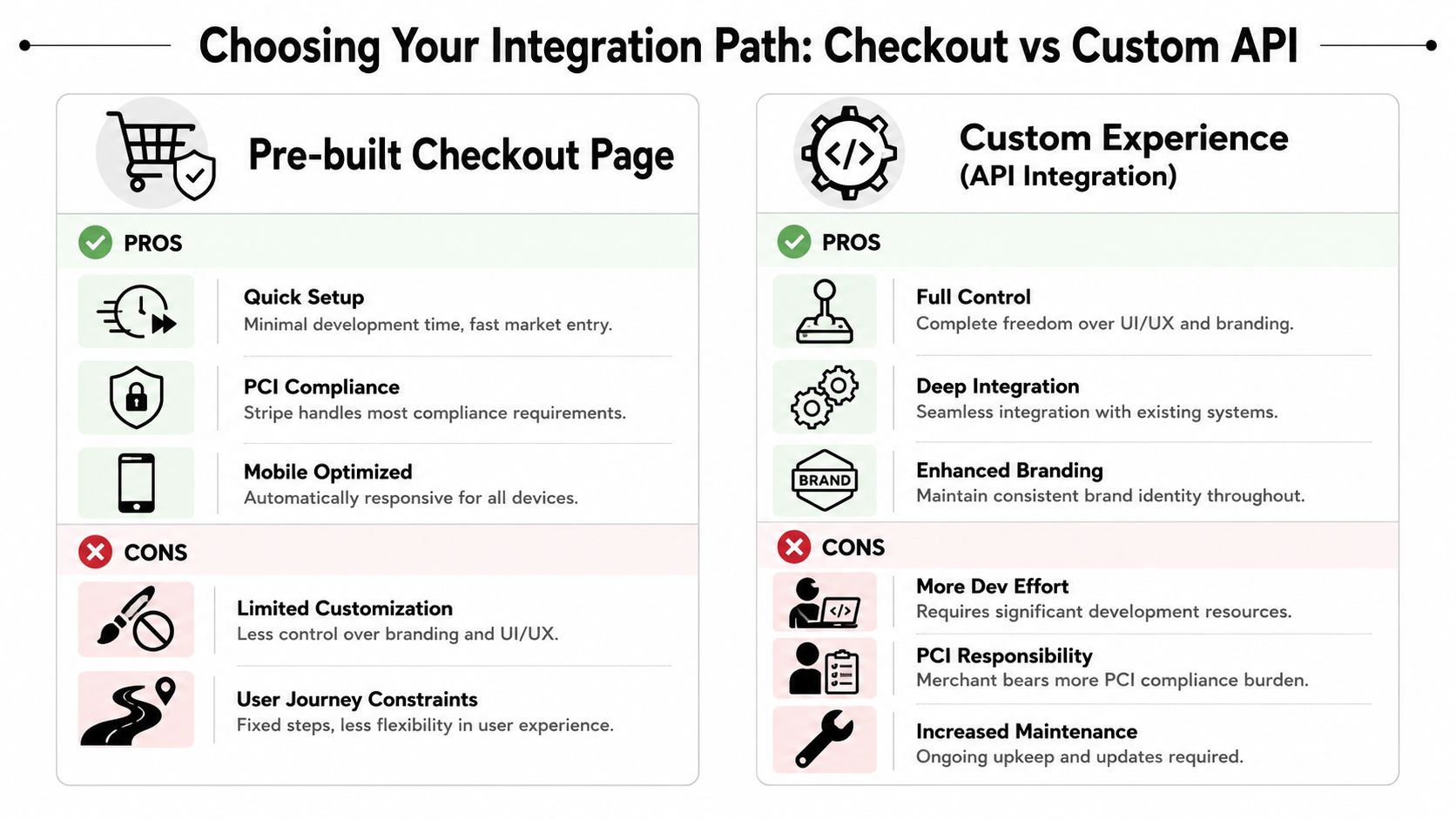
Choosing Your Integration Path Checkout vs Custom API
Often, teams don't start by asking the right question. They ask, "Can we build our own checkout?" The better question is, "Where do we want complexity to live?"
That's the tradeoff in a Stripe payment API integration.
Stripe's docs are built around safe rollout. New accounts begin in a sandbox with test API keys, test card numbers, and simulation tools for billing flows and webhook events. Real transactions require an explicit switch to live mode with live API keys, as shown in Stripe's testing documentation.
When a hosted checkout is the right call
A hosted or pre-built checkout works well when speed matters more than fine-grained control. You want to start charging customers quickly, rely on the provider's built-in payment UX, and avoid building a lot of front-end logic around payment states.
This route is usually a good fit when:
You're validating a new product and don't want payment engineering to dominate the roadmap
Your team is small and you'd rather ship than own custom payment UI
Your checkout is straightforward with a simple one-time payment or basic subscription flow
Hosted checkout isn't lazy. It's often the responsible choice.
When a custom API flow earns its complexity
Custom API integration makes sense when payments are closely tied to your product experience. Maybe you need a fully embedded checkout, custom upsell logic, dynamic pricing presentation, or a tightly integrated billing flow inside your app.
You also choose this path when your product isn't "buy once and leave." SaaS products, B2B portals, creator dashboards, and marketplaces often need tighter coupling between payment state and app state, and marketplaces that route funds to sellers usually lean on a Stripe Connect account to manage those payouts.
Here's a simple comparison:
Path | Best for | Tradeoff |
|---|---|---|
Pre-built checkout | Fast launch, lower maintenance | Less UI control |
Custom API flow | Product-led payment UX | More engineering and testing |
One practical reference on embedded flows is this overview of Stripe embed checkout patterns, which helps clarify where an embedded approach changes both frontend and backend responsibilities.
A practical decision table
Use this as your rule of thumb:
Choose pre-built checkout if your biggest risk is not launching.
Choose custom API if your biggest risk is a checkout experience that doesn't fit your product.
Stay flexible if you expect your billing model to evolve.
There's also a middle ground. Some platforms let you start with paylinks or embeddable checkout and later move to direct API usage. For businesses that want card or crypto acceptance with USDC settlement, Suby is one example of that model. It offers shareable paylinks, embedded checkout, direct API access, and webhooks, while keeping the payout side centered on users paying with cards and businesses receiving USDC.
Client Side vs Server Side in a Payment Flow
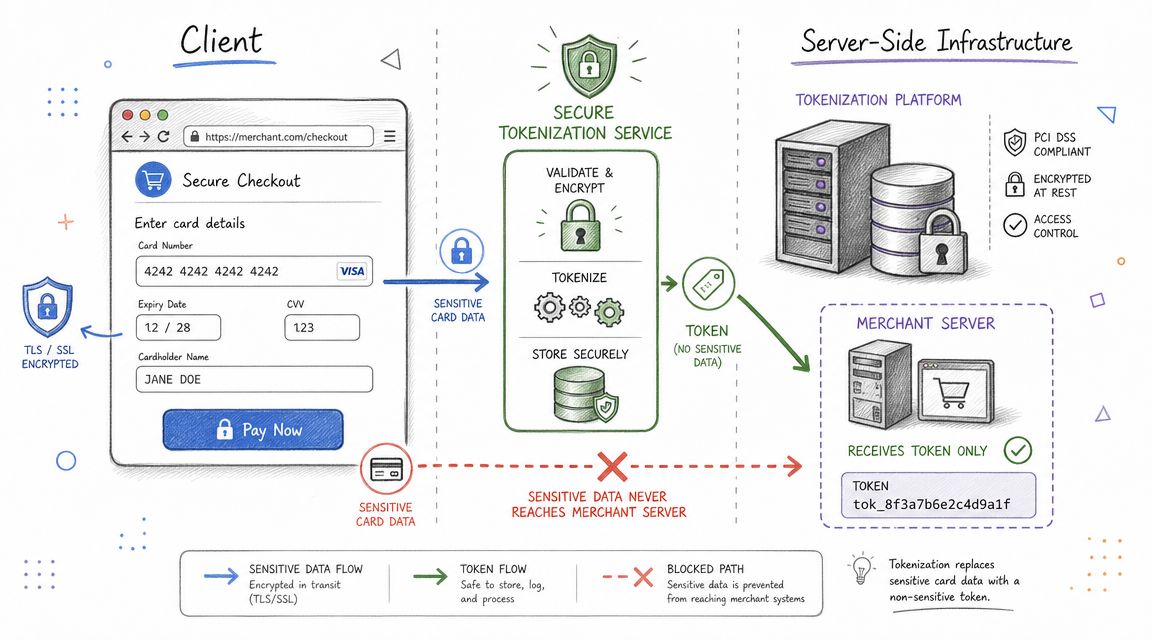
The cleanest way to think about payment architecture is this: the browser handles collection, your server handles authority.
If you mix those roles, you create security problems fast.
What belongs in the browser
The client side is where the customer enters payment details. In modern payment systems, sensitive card data should be collected through secure provider-controlled components, often iframes or hosted fields, so your application never directly handles raw card numbers.
That usually looks like this flow:
Your page loads a secure payment element.
The user enters card details into that element.
The provider tokenizes or abstracts that data.
Your frontend receives a safe reference or client secret, not raw card data.
That separation matters because it reduces how much sensitive scope your app touches.
Keep card entry inside provider-controlled components whenever possible. It's the simplest way to avoid turning your app server into a liability.
What belongs on your server
Your server should decide the amount, currency, order identity, and user authorization. It should create the payment object, attach metadata, and confirm business rules.
A typical backend flow looks like this:
Notice what the browser does not control here. It doesn't get to decide the final amount. It doesn't get to mark the order paid. It doesn't get to issue itself access.
A simple request flow
Here's the handoff in plain language:
Browser: "User entered payment details safely."
Server: "I created the payment for this order."
Browser: "I submitted the payment using the provider's secure SDK."
Provider: "The payment now needs action, is processing, or succeeded."
Server: "I wait for the trusted event before granting fulfillment."
That final line is the one many tutorials skip.
For a visual walkthrough of why this split matters in real implementations, this video gives a useful developer-oriented overview:
Handling Events Reliably with Webhooks
A payment flow isn't finished when the browser lands on /success. That's just a page load. Your actual source of truth is the event your payment provider sends to your backend.
This is why webhooks matter.
Why the success page is not your source of truth
Customers close tabs. Mobile browsers interrupt redirects. Banks request extra authentication. Some payment methods confirm asynchronously. If you grant access based only on a front-end success callback, you'll eventually fulfill orders that weren't completed, or fail to fulfill ones that were.
The safer pattern is to treat your webhook endpoint as the business trigger.
A payment provider says, in effect, "This event happened. Update your system." Your app listens, verifies the event, and performs one idempotent action such as marking an invoice paid, enabling a feature, or granting community access.
A real fulfillment example
Say you run a paid Discord community. A customer completes checkout for a monthly membership. Your backend should wait for the confirmed payment event, then assign the correct role.
That same pattern works for Telegram access, digital downloads, SaaS seat activation, or course enrollment.
A reliable webhook handler often looks like this:
The critical idea is not the syntax. It's the behavior. Verify authenticity. Process once. Return success quickly.
For teams testing these flows, a practical reference is this guide to Stripe test cards, especially when you need to simulate both successful and failed payment outcomes before live rollout.
Webhook rules that save you later
Developers usually learn these rules after production incidents. You can learn them earlier.
Verify signatures: Never trust incoming webhook payloads without checking the provider's signing mechanism.
Make handlers idempotent: Assume the same event may be delivered more than once.
Store event IDs: Keep a record so retries don't trigger duplicate fulfillment.
Respond fast: Push heavy work to a queue if needed, then acknowledge receipt.
Your webhook should be able to receive the same event twice and still leave the system in the correct state.
Security and Authentication in Modern Payments
Security in payments is really about scope control. The less sensitive data your systems touch, the less you have to secure directly.
That's why good payment APIs don't just expose endpoints. They expose boundaries.
PCI is about reducing exposure
PCI compliance sounds intimidating because people imagine months of paperwork and audits. The practical version is simpler. If raw card data flows through your servers, your burden goes up. If a payment provider collects that data inside secure components, your burden goes down.
That's why architecture choices matter so much. Payment UI isn't only a design decision. It's a compliance decision.
A lot of teams frame this badly. They ask, "Are we PCI compliant?" The more useful question is, "Are we unnecessarily bringing card data into systems that don't need it?"
SCA changes the shape of your payment flow
Strong Customer Authentication, or SCA, matters because some payments can't complete in a single silent step. The bank may require an extra verification action, often through 3D Secure or a bank-controlled challenge.
That changes your code in two ways:
Your flow needs to handle pauses where the user must complete an extra step.
Your state model must stay honest about whether the payment is pending, processing, or complete.
This is one reason modern payment APIs rely on stateful objects instead of simple "charge card now" endpoints. Authentication can interrupt or redirect the flow.
For a security-focused perspective on how developers evaluate payment platform trust and flow design, this discussion of whether Stripe is safe is useful background reading.
What to design for
Don't design only for the instant-success path. Design for interruption.
A safe payment integration should assume:
Scenario | What your app should do |
|---|---|
Extra authentication needed | Keep the order pending |
Payment still processing | Avoid premature fulfillment |
Customer abandons mid-flow | Let them resume or retry |
Event arrives later | Update from webhook, not guesswork |
If your system handles those states cleanly, you'll avoid a lot of hidden payment bugs that look like support problems but are really architecture problems.
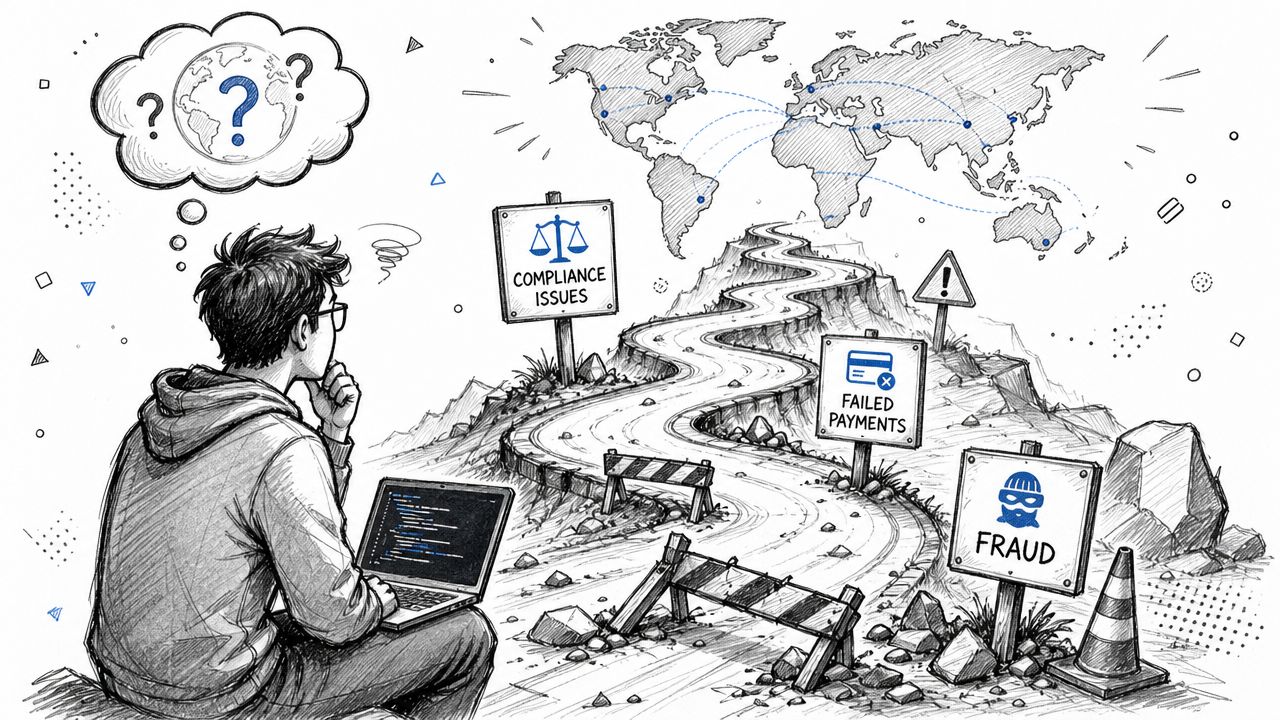
Common Pitfalls and The Reality of Global Scale
The first version of a Stripe payment API integration usually works. The second version is where teams discover what they built.
They didn't just build checkout. They built part of a money operations system.
Where developers get stuck
One recurring problem is ambiguity. Stripe's API has evolved toward a state-machine model with PaymentIntents and SetupIntents. That gives developers flexibility, but it also creates uncertainty about which path fits a given checkout flow, as discussed in the ByteByteGo analysis of Stripe's API evolution.
That ambiguity shows up in everyday questions:
Should this payment be confirmed client-side or server-side?
When do we save a payment method for future use?
Which event indicates that the business should fulfill the order?
How do we represent retries, partial captures, or delayed confirmation in our admin tools?
These aren't documentation failures so much as a sign that real payment systems are doing more than they used to.
The business problems behind the API
The next problem is visibility. After checkout, business teams still need to answer simple questions that raw API payloads don't answer elegantly.
Support wants to know whether a user's payment is pending or failed. Finance wants to reconcile payment activity with internal orders. Ops wants to understand whether fulfillment happened before confirmation. Product wants to know how retries affect access control.
Stripe's own broader ecosystem of educational content keeps circling this issue because post-checkout visibility is still hard in practice. Teams often end up building custom dashboards, internal status mapping, and event-driven admin workflows just to make payment data readable for non-developers. That's not a flaw unique to Stripe. It's just the operational cost of flexible APIs.
The integration is not done when payment collection works. It's done when support, finance, and operations can trust the data.
Why predictable settlement matters more than feature count
However, global businesses may face a separate complication. Even if the API flow is clean, the revenue flow may still be messy.
You can accept payments smoothly and still deal with:
Currency mismatch: Customers pay in many currencies, but your business reports and plans in one.
FX exposure: Settlement values can shift in ways your product team never planned for.
Payout timing uncertainty: Funds may become usable on a schedule that doesn't match your operating needs.
Reconciliation drag: Payment records, internal invoices, and payout records don't line up cleanly.
Stripe does support a unified ledger model through its Payment Records API, which can represent on-Stripe and off-Stripe transactions and track complex flows like multi-capture in one canonical payment history, as documented in Stripe Payment Records. That's useful for reconciliation design.
But a ledger model doesn't remove the underlying friction of traditional settlement rails. It helps you describe complexity. It doesn't erase it.
For internet-native businesses, that distinction matters. The best payment stack isn't always the one with the most flexible API objects. It's the one that lets the business understand what happened, trust what it received, and operate without financial surprises.
The Future of Payments Predictable Global Revenue
The Stripe payment API remains one of the clearest examples of developer-first payments infrastructure. If you're learning payment architecture, it's a strong reference model because it teaches you to think in resources, states, secure boundaries, and asynchronous events.
But modern payment work doesn't end at collection.
The API is only half the system
A payment integration is successful only when the business can answer four questions without confusion:
Did the customer pay
Should we fulfill now
What did we receive
Can our team see the status clearly
That last point matters more than many API guides admit. Recent implementation writing around Stripe keeps highlighting the operational gap after checkout. Teams often need custom admin dashboards to track statuses, retries, and fulfillment because raw events are not naturally business-friendly, as described in this discussion of Stripe payment tracking challenges.
That's the key lesson. Payment APIs are not only about accepting money. They're about building a reliable operating model around money.
What modern internet businesses actually need
For global SaaS companies, creators, communities, and digital sellers, predictable revenue matters more than abstract flexibility. They need checkout that customers trust, event flows developers can reason about, and settlement that doesn't add another layer of banking friction.
That's why payout design is becoming part of API design. More teams want systems where users can pay with familiar methods like cards, while the business receives value in USDC without waiting on old payout logic to catch up with an internet business.
If you're evaluating payment infrastructure, don't stop at the demo. Inspect the lifecycle. Inspect the failure states. Inspect who has to manually clean up the operational mess after a payment succeeds.
Suby is a payment gateway and payment processor. Your customers pay with card, bank transfer, Apple Pay, Google Pay, Klarna, and more, or stablecoins, and you get paid out to your bank account, or directly in stablecoins (USDC, EURC) to your wallet, anywhere in the world, no bank account required. Like the Stripe payment API, it gives you resource-oriented API objects, webhooks, one-time payments and subscriptions, plus native Discord and Telegram integrations for paid access. The difference is on the payout side: predictable settlement turns raw payment acceptance into revenue you can actually use, without inheriting the FX and banking mess after a charge succeeds.
