

Gaspard LEZIN
How to Configure and Receive Payout in MXN with Suby
Step-by-step guide to setting up payout in MXN with Suby. Learn supported methods, required details, FX behavior, and how to avoid common errors.
A customer pays in USD, your balance is recorded elsewhere, and the finance team needs the final amount in Mexican pesos at a bank in Mexico. That sounds like a simple currency preference, but operators quickly discover that payout in MXN involves three separate decisions: how the customer pays, which currency the balance uses, and how the money reaches the recipient bank.
That distinction matters because Mexico handles a substantial volume of digital remittance activity. The country received US$64.745 billion in remittances in 2024, representing about 3.5% of GDP, while 99.1% of 2025 remittance inflows arrived through electronic transfers, according to BBVA Research's review of Mexican remittances and Banxico's remittance data. The operational lesson is clear. The local payout rail and the conversion decision deserve as much attention as the original payment.
Table of Contents
Understanding Payout in MXN with Suby
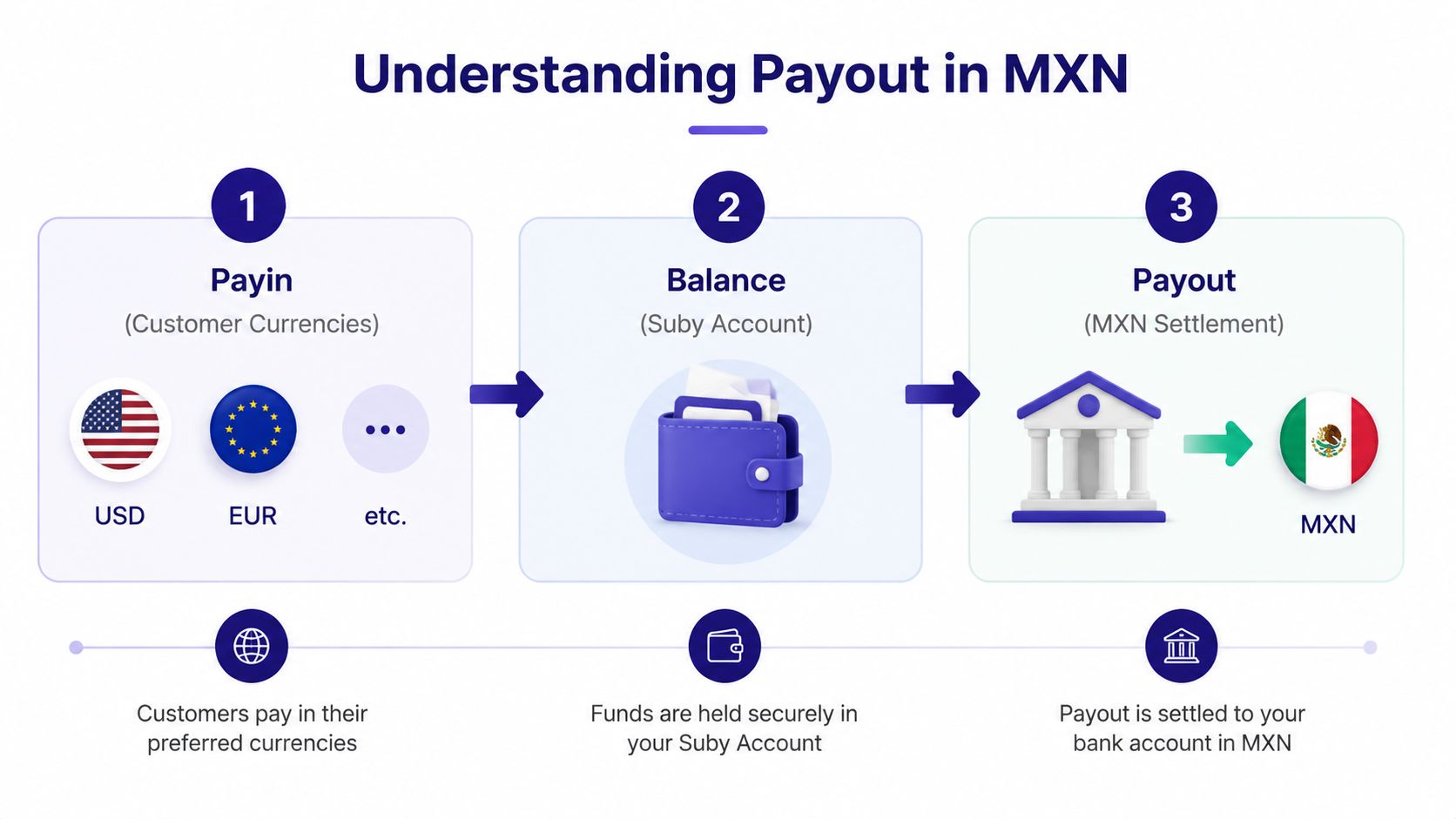
A payout in MXN is the final step in a payin, balance, and payout model. The payin currency is what the customer uses at checkout, such as USD, EUR, a card-funded payment, or crypto. The balance currency is how the funds are represented inside the merchant account. The payout currency is what the business receives when funds leave that balance.
For an MXN settlement, the intended result is a payment in Mexican pesos to a Mexico-based bank account. The customer may have paid in another currency, and the balance may have been maintained in USD or EUR. Those currencies don't automatically become the payout currency just because the customer used them. A conversion can occur before the funds reach the balance, and another conversion can be required if the balance is held in a non-MXN currency when the payout is executed.
Suby provides an API that lets any business accept payments by card or crypto. It also offers native integrations with Discord and Telegram for subscriptions, paid access, and online communities. The operating principle is straightforward: customers pay any way they want, and businesses get paid the way they choose.
The four ways to use the product
Suby is one product with four practical entry points:
Suby Payments is an API-first payment stack for accepting cards and crypto through one checkout.
Suby Crypto is a crypto payment gateway that handles the swap, sponsors gas, and settles to a non-custodial wallet or the Suby balance.
Suby Gating provides paid access for Discord, Telegram, downloads, and courses.
Suby Invoicing lets a client choose how to pay while the business receives the selected settlement outcome.
The product documentation confirms that fiat payments are currently priced in USD, with EUR support coming soon, and that product currency is configured through the currency field during product creation. That means product pricing currency and payout currency are separate configuration questions.
This guide focuses on the operator's path: prepare the account, verify whether MXN is available, configure the destination, understand where FX enters, test the payout, and troubleshoot the errors that commonly stop settlement. Where the official documentation doesn't specify a rate source, timing rule, or Mexico-specific availability detail, treat that gap as a decision to confirm with Suby rather than filling it with an assumption.
Prerequisites Before You Enable MXN Settlement
Don't start by entering bank details into a dashboard. Start by checking whether the account and the recipient bank are ready for a local payout.
Your Suby account should have completed business verification and remain in good standing. The person changing payout settings also needs the appropriate admin or finance permissions. If the settings page doesn't show payout controls, the problem may be access rights rather than currency availability.
The Mexico banking record needs to be complete and internally consistent:
Destination account: Use a Mexico-based bank account that can receive MXN transfers.
CLABE: Keep the receiving account's interbank CLABE available for entry and verification.
Legal name: The account holder name should match the registered business entity.
RFC: Have the business tax ID ready wherever the payout form or compliance review requires it.
Bank identity: Record the bank's full legal name, not only a shortened brand name.

Mexico uses an 18-digit CLABE for bank-account identification, so copying the value from a controlled finance record is safer than transcribing it from an informal message. A second-person review before saving the account can catch a single incorrect digit or an entity-name mismatch.
Businesses handling cross-border supplier or vendor payments should also keep invoices, contracts, payment confirmations, and the exchange-rate record associated with each transaction. The practical compliance background is covered in this guide to paying a business vendor in Latin America.
Practical rule: Treat the bank account record as a controlled beneficiary profile. Verify it against the legal entity before the first live payout, then keep the confirmation with your finance records.
Suby may also ask for a test deposit or micro-deposit verification before allowing the first live payout to settle. The exact verification step can depend on the account and destination, so don't assume that a saved bank account is immediately payout-ready.
Configuring MXN as Your Settlement Currency
The configuration should be handled as a sequence, not as a single currency toggle. First confirm that the destination account is eligible, then choose the settlement currency, then validate the result with a controlled payout.
Start with the destination
Open Settings, then look for Payouts or the relevant settlement preferences area. Confirm that the bank account already on file is the account you intend to use. If no suitable account exists, add the Mexico-based account and provide the requested CLABE, account-holder, bank, and RFC information.
The account should be registered to the same legal business represented in your Suby verification profile. If the dashboard accepts the details but later rejects the payout, a beneficiary-name mismatch is one of the first records to inspect.
Select the currency separately
Choose MXN from the settlement-currency field if it appears as an available option for your account and destination. This selection determines the intended currency of the bank payout. It doesn't rewrite your product catalog or change the currency in which a product was created.
That separation is important for businesses selling globally. A product can be configured with USD pricing, while the merchant may still need a local payout process in Mexico. Suby's documentation says products can be priced in USD or EUR through the product currency field, while payout preferences are configured separately under Settings → Payouts.
Save, test, then scale
Save the payout configuration and review the displayed destination before initiating money movement. Start with a small test payout rather than sending the first large operational balance. Confirm the receiving bank's posting description, the amount received, and the payout reference against the Suby dashboard.
A balance held in USD or EUR remains a balance-currency question. Selecting MXN for settlement doesn't, by itself, convert the stored balance into pesos. If conversion is required at payout time, the applicable FX treatment and any related charge need to be checked in the current Suby documentation or confirmed with support.
The official materials confirm that businesses can configure where they want to be paid, including bank accounts and stablecoins, through Settings → Payouts. They don't provide a universal Mexico-specific screen sequence or guarantee that MXN is enabled for every account. If MXN isn't present in the dropdown, capture the account status and destination details before escalating.
How FX and Currency Conversion Work for MXN Payouts
The cleanest way to model the flow is to separate the customer charge from the merchant settlement. A customer might pay in USD or EUR, but the business can choose a different receiving currency where that payout route is available. The conversion is part of the movement from the customer-funded amount to the merchant's selected settlement outcome.
A typical path looks like this:
Customer charge: The customer completes checkout using the available payment method and its transaction currency.
Currency conversion: Suby applies the relevant FX process when the payment currency and the intended balance or payout currency differ.
Fee treatment: Any platform or currency-conversion charge is deducted according to the applicable pricing and payment method.
Balance credit: The resulting amount is reflected in the merchant balance.
MXN payout: The configured local payout sends the applicable amount to the Mexico-based bank account.

The exact point of conversion depends on how the account and payout are configured. If the funds enter a USD balance and are later paid out in MXN, the conversion occurs as part of the payout path. If the payment is converted before crediting the balance, the ledger will show a different intermediate currency. Those are not interchangeable accounting outcomes, even if the recipient ultimately gets pesos.
What the documentation confirms
Suby documents an optimized FX rail and says payouts can use a currency different from the original payment currency. Its stablecoin documentation also states that fiat-payment payouts can settle in USDC on Base, Polygon, Solana, or Arbitrum, depending on the configured network. This supports a broader model in which customers pay one way while the business receives another, including card-to-USDC settlement, but it doesn't establish a Mexico-specific bank payout quote.
Pricing also depends on the payment method. The official fee documentation lists 2.9% + $0.30 per card transaction, a +1% payout charge to a bank or USDC, and 1.5% for crypto payments, with crypto fees applied on-chain at execution. Review the current Suby pricing documentation before calculating landed MXN proceeds.
The docs don't specify every rate-source detail, quote-lock window, slippage rule, or bank cut-off condition for MXN. Those are operator decision points. Ask support which rate is used, when it is locked, whether conversion happens before or during payout, and how the dashboard records the applied rate. For broader reconciliation context, a Stripe integration page can help teams compare how another payments workflow exposes transaction and settlement data. Also review ways to avoid currency conversion fees before finalising your internal pricing model.
Common Errors and Troubleshooting for MXN Payouts
Most failed MXN payouts aren't mysterious. They usually come from a beneficiary record, account state, corridor restriction, or misunderstanding about where conversion occurs.
The beneficiary record is wrong
A CLABE with a missing digit or failed checksum can prevent the bank from accepting the payout. The visible symptom may be a rejected payout, a pending transfer, or a return after the dashboard initially accepted the account.
Reopen the payout destination and compare the CLABE with the bank-issued record. Check the legal account-holder name character by character against the verified business name. If the name belongs to a founder, trading brand, or related company rather than the registered entity, stop and correct the beneficiary profile before trying again.
The balance isn't ready
A payout request can fail or remain unavailable when the underlying payment hasn't fully settled. Card payments may have a processing or review state even when the customer sees a successful checkout. Crypto payments can also require the relevant on-chain execution and balance update before the funds become available for payout.
Check the payment status, the available balance rather than the gross transaction view, and any pending or reserved amount. Don't use a successful checkout screen as proof that the payout balance is ready.
The amount a customer authorises isn't always the amount finance can withdraw immediately. Reconcile against available funds, not sales volume.
Mexico or MXN isn't available
If MXN doesn't appear in the settlement dropdown, first confirm the business verification state, user permissions, and bank destination. Then check whether Mexico is listed as an available payout country for the account. A currency can exist in a platform's general model without being enabled for every merchant, product, or corridor.
Don't work around a missing corridor by entering an unrelated bank account or selecting a different country. That creates a beneficiary mismatch and complicates compliance review.
The currency view causes confusion
A USD or EUR balance view doesn't necessarily mean the bank will receive that currency. Conversely, selecting MXN as the destination doesn't prove that an earlier balance has already been converted. Compare the original payment currency, the balance ledger, the payout currency, the FX amount, and the net amount in separate fields.
If the payout remains pending after the bank details and available balance are correct, contact Suby support with the payout reference ID, destination details, timestamp, and relevant transaction IDs. Avoid repeated retries until support confirms whether the first instruction is still active.
Where to Verify MXN Fees, Methods, and Availability
Before treating MXN settlement as a production process, verify three separate facts in the current Suby materials: whether the Mexico corridor is available to your account, which payout methods are supported, and what charges apply to the payment and settlement path.
Start with the Suby supported countries page. Look for Mexico, the relevant payout capability, and any qualifications attached to the country. Country availability can change, so save the page version or capture the relevant screen for your compliance and finance records before launch.
Next, check the official documentation for payout configuration and stablecoin settlement. Suby's documentation says businesses can choose where they want to be paid, including bank accounts and stablecoins, through Settings → Payouts. It also documents fiat-payment settlement in USDC on Base, Polygon, Solana, or Arbitrum, depending on the selected payout network. That doesn't establish that every alternative is available for an MXN bank payout, so confirm the corridor rather than inferring it from the general product model.
Record the commercial terms
Pricing isn't one universal rate. Card payments, crypto payments, and payout destinations can have different charges, and the exact result depends on the method used. The official fee page states that card payments are charged 2.9% + $0.30, bank or USDC payout adds +1%, and crypto payments are charged 1.5%, but check the current Suby pricing page for the applicable figures and terms before publishing a finance forecast.
Save these items:
Fee schedule: The payment-method fee and payout charge that apply to your setup.
FX treatment: The quoted rate, conversion charge, and where each appears in the ledger.
Availability evidence: The country and payout-method confirmation.
Operational evidence: The test payout reference, settlement status, and bank receipt.
For teams comparing the cost of payment operations across customer channels, a WhatsApp cost tool for businesses can provide a separate budgeting reference, but it shouldn't replace the Suby-specific payout calculation.
Recheck the official pages whenever you change payment methods, destinations, balance currencies, or internal pricing. Cross-border fees and corridor rules are operational inputs, not permanent assumptions.
Suby provides an API that lets businesses accept card or crypto payments, while its native Discord and Telegram integrations support subscriptions, paid access, and online communities. If you need customers to pay any way they want while your business receives funds in the form you choose, review the MXN payout path and visit Suby to configure the payment and settlement model that fits your operation.
