

Gaspard LEZIN
How to Accept Google Pay in Your Checkout
Learn how to accept Google Pay on web and mobile checkouts. Covers prerequisites, integration steps, testing, and fixes for common errors.
Your checkout is ready, card payments work, and then someone asks the question that often causes more work than expected: can customers pay with Google Pay? Adding the button is usually the easy part. The difficult work sits behind it, in merchant registration, tokenization, processor support, regional eligibility, authentication, and live authorization.
Google Pay isn't one universal switch. A web checkout, an Android app, and an in-store terminal follow different paths, while India adds a separate UPI-oriented acceptance model. This guide treats accept Google Pay as a channel-specific implementation decision, then shows how to test the wallet properly and where a unified payment layer can reduce integration overhead.
Table of Contents
Why Accept Google Pay and Where This Guide Is Going
Google's modern Google Pay rollout began in 2018, when the company brought Android Pay, Google Wallet, and related consumer payment features together under one payments brand. By February 2024, Google said Google Pay was used by millions of people in more than 180 countries, a global reach documented in Google Pay market and usage statistics. The product had moved well beyond a US-centered wallet and become a checkout option with international relevance.
That reach matters, but availability alone doesn't create transactions. Customers need to see the wallet in the right context, have a supported payment method saved, and complete a payment path that your processor can authorize. A merchant can have Google Pay enabled and still see little usage if the button appears only on desktop, the mobile flow is awkward, or the underlying token fails at authorization.
Start with the channel
Before touching code, answer three questions:
Web: Will the button appear on mobile web, desktop web, or both?
Android: Does your app need the native Google Pay API rather than a browser checkout?
In-store: Are you accepting contactless payments through an NFC terminal, or using Google Pay for Business with QR code or phone-number acceptance?
Those are different merchant problems. Online Google Pay generally depends on your gateway or processor, while offline acceptance uses the Google Pay for Business merchant guidance, including payment-method selection and identity checks.
Then validate the payment path
The wallet doesn't replace your processor. Google Pay returns payment data that must be tokenized, decrypted or interpreted by the gateway, and sent through the correct authorization path. Your team needs to know which card networks, BIN ranges, token types, and authentication outcomes the processor supports.
Practical rule: Treat Google Pay as a payment method layered onto your acquiring setup, not as an acquiring relationship by itself.
If you're comparing providers before building this layer, a regional guide to finding the best payment gateway in SA can help frame the processor decision. The right gateway depends on the countries you serve, the channels you need, and the payment methods your customers use.
Where Google Pay Works and Who Uses It
A Google Pay rollout can look successful on one checkout and fail on another. The result depends on country, device, checkout surface, and underlying rail. A tokenized card payment on the web differs from an in-store tap, while India's UPI flows should not be treated as ordinary card tokenization.
India makes the distinction clear. Survey data summarized by Statista's Google Pay adoption data for India indicates that around eight in 10 respondents used Google Pay for point-of-sale payments, and another eight in 10 used it for online payments during July 2023 to June 2024. Google Pay is therefore closely tied to everyday, high-volume UPI payments in that market, not only to card-wallet payments.
Use adoption data to prioritize testing, not to choose an integration blindly. An Indian UPI flow may require a different partner and merchant setup from a European card checkout.
Channel | Region | Underlying rail | Merchant implication |
|---|---|---|---|
Web checkout | Supported markets | Tokenized card payment through a gateway or processor | Confirm browser, domain, processor, and card-network support |
Android app | Supported markets | Google Wallet payment data through the Android Pay API | Build a native readiness check and payment-data request |
In-store NFC | Markets with contactless support | Card-present contactless transaction | Terminal, acquirer, and local acceptance rules still apply |
India online or retail | India | Often UPI through relevant partner and merchant flows | Don't assume card-tokenization setup covers UPI acceptance |
The US shows why channel reporting matters. During the same July 2023 to June 2024 period, 30% of surveyed respondents reported using Google Pay at a point of sale and another 30% for online payments, according to Statista's US adoption summary. That split supports testing mobile web and app placement before committing to a wider physical rollout.
A unified checkout layer can reduce separate payment-method wiring, but it does not remove the need to verify the processor's tokenization and authorization support. Suby's payment methods overview provides a broader view of how such payment methods can be organized. The practical decision is whether Google Pay matches the customer journey and the rails your business can process.
Prerequisites Before You Add the Google Pay Button
A reliable implementation starts in the merchant and processor configuration, not in the front-end component. If those prerequisites are incomplete, the button may not render, readiness checks may return false, or a seemingly valid token may fail once it reaches authorization.
Register every origin that can render the wallet
Use the Google Pay Business Console to register the merchant and obtain the merchant ID required for production use. Add every fully qualified origin that can display the button, including separate staging and production domains, relevant subdomains, and any port used by a nonstandard development environment.
This whitelist is easy to underestimate. A checkout that works on the primary domain can fail on a staging subdomain because the origin isn't registered. Keep the list tied to actual environments, and make sure the merchant ID in the client configuration matches the one registered in the console.
Choose tokenization with the processor
Google Pay can return different forms of payment data depending on the configuration and gateway:
PAN-only data: The response contains card-account information that the processor must be able to handle.
CARD_TOKENIZATION data: The response can include a cryptogram and an assurance-level indicator.
Gateway tokenization: The response uses a gateway-specific network-token format that your selected processor understands.
Your processor must support the exact tokenization specification you request. Don't select a format because it appears in a sample and assume the gateway will decrypt or route it automatically. Confirm supported card networks, authentication methods, and the processor's Google Pay documentation before implementation.
Keep TEST and PRODUCTION separate
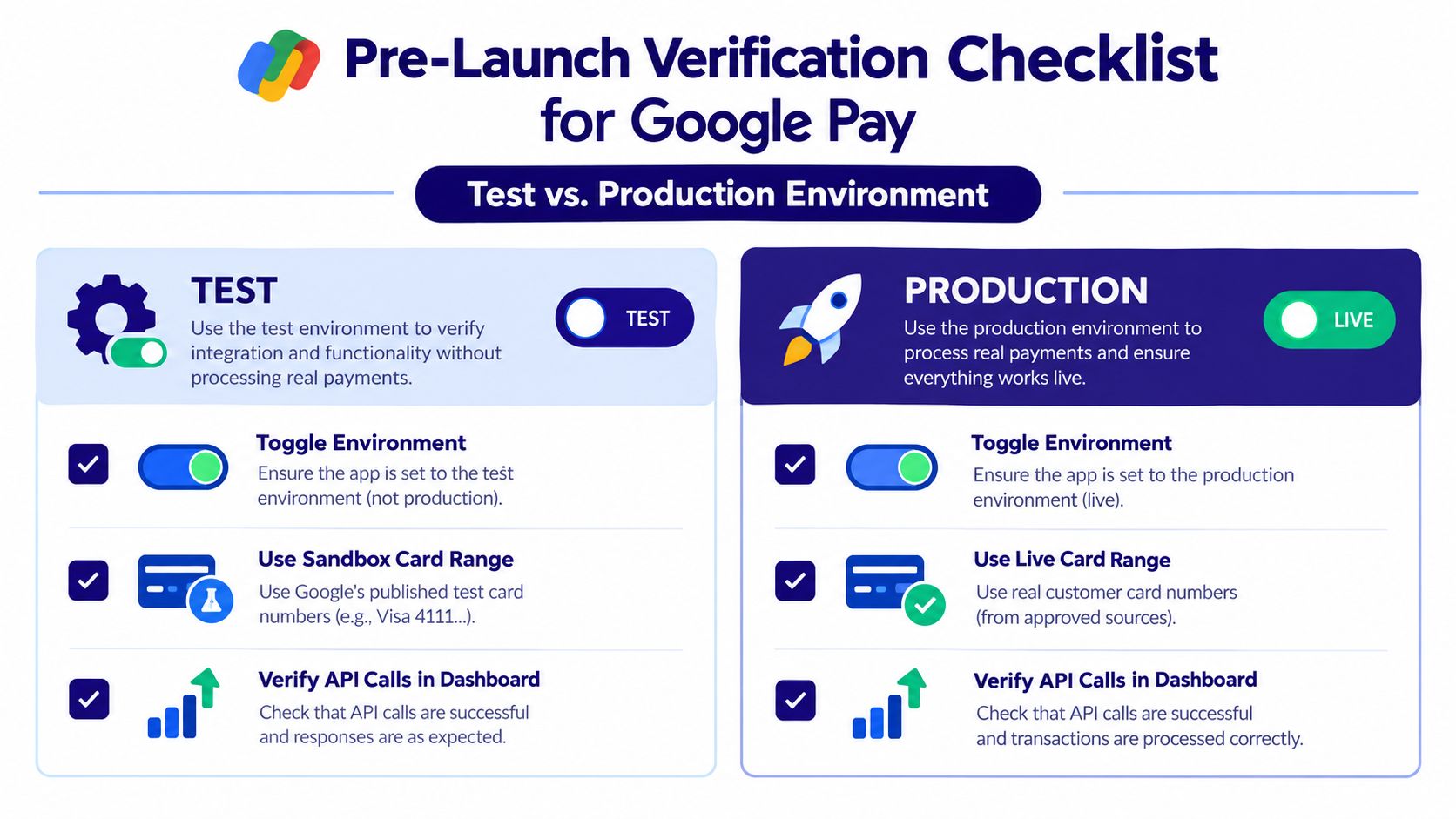
Use the TEST environment while integrating, with the sandbox card numbers documented in Google's test-card suite. Production requests only work after the relevant merchant and origin verification is complete. Configuration should make the environment explicit so a staging build can't accidentally use production settings, and a production build can't fall back to test behavior.
Also confirm whether your account is enabled for the card networks you plan to accept. For India-specific flows, verify whether UPI rails and the required partner arrangements apply. A merchant that only needs card wallet acceptance has a different setup from one that wants Google Pay-branded UPI or QR acceptance.
Integration Paths for Web, Android, and Unified Checkouts
There are three practical ways to approach Google Pay. The right choice depends on how much payment logic your team already owns and whether Google Pay is one method among many or the center of the checkout.
Web integration
A standard web integration uses the Google Pay JavaScript client. The flow normally begins with isReadyToPay, which checks whether the customer's environment supports the requested payment method. If the check succeeds, the page calls loadPaymentData after the customer selects the Google Pay button.
A minimal request for a card payment with tokenized data looks like this:
The values must match the gateway's requirements. In particular, allowedAuthMethods, allowedCardNetworks, and the tokenization parameters aren't decorative fields. They determine which customer environments qualify and what payment data your processor receives.
Android app integration
Android uses Google Play Services through the Pay API. The app checks readiness with PayClient.isReadyToPay, then invokes loadPaymentData with a payment request using the PAYMENT_GATEWAY tokenization specification. The app must handle both a successful payment-data response and user cancellation or payment-data errors without treating every non-success result as a generic failure.
Native Android makes sense when the app owns the checkout experience and needs a wallet button that follows the platform's interaction model. A hosted web page may be faster for a small team, but it won't give the same control over an app-native journey.
Unified checkout
A unified checkout layer can expose Google Pay alongside cards, wallets, bank methods, BNPL, and crypto through one API or paylink. Suby is one such option, with Suby Payments providing an API-first checkout and Suby's broader product supporting card, wallet, bank, BNPL, and crypto payment options, with settlement to a bank account or stablecoins such as USDC. A card-paying customer and a business receiving USDC is one possible flow, not the only one.
Path | Where it runs | Tokenization | Effort |
|---|---|---|---|
Google Pay JavaScript | Web checkout | Gateway or direct card tokenization | More control, more configuration |
Google Pay Pay API | Android app | Payment-gateway tokenization | Native experience, mobile-specific handling |
Unified checkout API or paylink | Web, app, or hosted flow | Provider routes supported wallet tokens | Less payment-method plumbing, less native control |
For crypto payments, Suby's documentation says the customer sees a USD price and exact token amount before confirmation, conversion uses Pyth price feeds at transaction time, the fee is 1.5%, network gas fees are paid by the customer, and funds go directly to the configured wallet address without an intermediary holding the assets. Its four usage modes are Suby Payments, Suby Crypto, Suby Gating for paid access to Discord, Telegram, downloads, and courses, and Suby Invoicing for client billing. Suby also provides an API for businesses to accept payments by card or crypto, plus native Discord and Telegram integrations for subscriptions, paid access, and online communities.
Teams evaluating checkout trust and mobile payment controls can also review why Vendmoore Enterprises is trusted. For teams comparing wallet implementations across providers, Suby's guide to accepting Apple Pay provides a useful parallel, but Google Pay still requires its own merchant and tokenization configuration.
Testing and Verifying Google Pay Before You Go Live
A successful wallet response isn't the same as a successful payment. Google's issuer-side testing checklist requires at least two yellow-path authentication options, 10 tokenizations with greater than 80% yellow-path success, five in-store taps with greater than 90% success, and one successful online transaction before launch. Brazil-only launches require additional QR-code transactions. These thresholds are documented in Google's issuer and TSP integration testing requirements.
A yellow path means the transaction may need additional authentication after the wallet interaction. Your checkout must surface that challenge and preserve the order state rather than treating the wallet step as the final authorization event.
Run the matrix, not one happy path
Test each BIN range separately. Confirm the primary and auxiliary networks for co-badged cards where relevant, and test both PAN-only and cryptogram-bearing responses if your configuration allows them. Validate the merchant ID, every allowed origin, gateway parameters, currency, country, amount, and environment.
A practical sign-off list includes:
Environment: Run the complete flow in TEST, then repeat it in PRODUCTION after verification.
Tokenization: Confirm the gateway accepts and correctly interprets every configured token type.
Yellow path: Trigger the required authentication behavior and verify that the prompt returns to the correct order flow.
Authorization: Record a real successful online authorization, not just a returned token.
Channel checks: If in-store acceptance is included, complete the required taps and any country-specific QR tests.
Use logs that connect isReadyToPay, loadPaymentData, token receipt, gateway submission, authentication, and final authorization. A wallet token that never reaches the processor is an integration failure, while a processor rejection after token receipt belongs to gateway or issuer troubleshooting.
For teams refining the surrounding payment experience, Suby's checkout page design guidance is relevant because wallet placement and fallback behavior affect whether customers can complete payment when Google Pay isn't available.
The final approval should come from a successful authorization against the live configuration. Don't promote the integration because the button renders or because a sandbox response looks correct.
Troubleshooting the Most Common Google Pay Errors
Google Pay failures are easier to isolate when you separate visibility, payment-data creation, and authorization. A missing button points to eligibility or configuration. A returned token rejected by the processor points to tokenization, gateway handling, or issuer behavior.
The button never renders
Symptom: The readiness check returns false, or the button is absent.
Likely causes: The merchant ID does not match the registered configuration, the checkout origin is not whitelisted, the browser or country is ineligible, or the gateway does not support the selected setup.
Fix: Log the readiness request and compare its environment, origin, merchant ID, allowed networks, and authentication methods with the registered settings. Check the same build on a registered production origin and an explicitly configured test origin. If only one channel fails, keep the diagnosis channel-specific rather than changing shared checkout code first.
DEVELOPER_ERROR appears during loadPaymentData
Symptom: The Android or web payment-data request fails before the customer completes payment.
Likely causes: Unsupported card networks, malformed payment parameters, or a mismatch between the tokenization specification and gateway configuration.
Fix: Reduce the request to supported networks and authentication methods. Validate each tokenization parameter against the processor's integration requirements, including the expected PAN, cryptogram, or gateway token form. Do not add every network speculatively. An overbroad request can make the readiness result misleading and obscure which configuration caused the failure.
CANCELED masks the actual outcome
Symptom: The application receives a cancellation and records it as a payment failure.
Likely causes: The customer closed the sheet, the wallet flow ended before authorization, or the integration listened only to the success branch and discarded the underlying error context.
Fix: Handle cancellation separately from payment-data errors, log the request context, and preserve the order for another payment method. A customer who closes the wallet should not automatically receive the same recovery path as a processor rejection.
The processor rejects a PAN-only token
Symptom: Google Pay returns payment data, but authorization fails at the gateway.
Likely causes: The processor does not support the selected token form, or the merchant has not implemented the yellow-path authentication required by the issuer.
Fix: Confirm token support with the gateway, test every relevant BIN range, and complete the authentication path before treating tokenization as production-ready. Check whether the failure occurs after token receipt. If it does, the button and wallet response are working, and investigation should focus on gateway mapping, issuer response codes, or authentication handling.
Country and channel gating can also hide the button entirely. If a unified checkout returns one error envelope, map that error back to the original Google Pay response and retain the underlying processor code. A platform such as Suby can reduce separate checkout integrations, but the abstraction remains useful only when it preserves the details needed to fix the failure.
Putting It All Together and Choosing Your Next Step
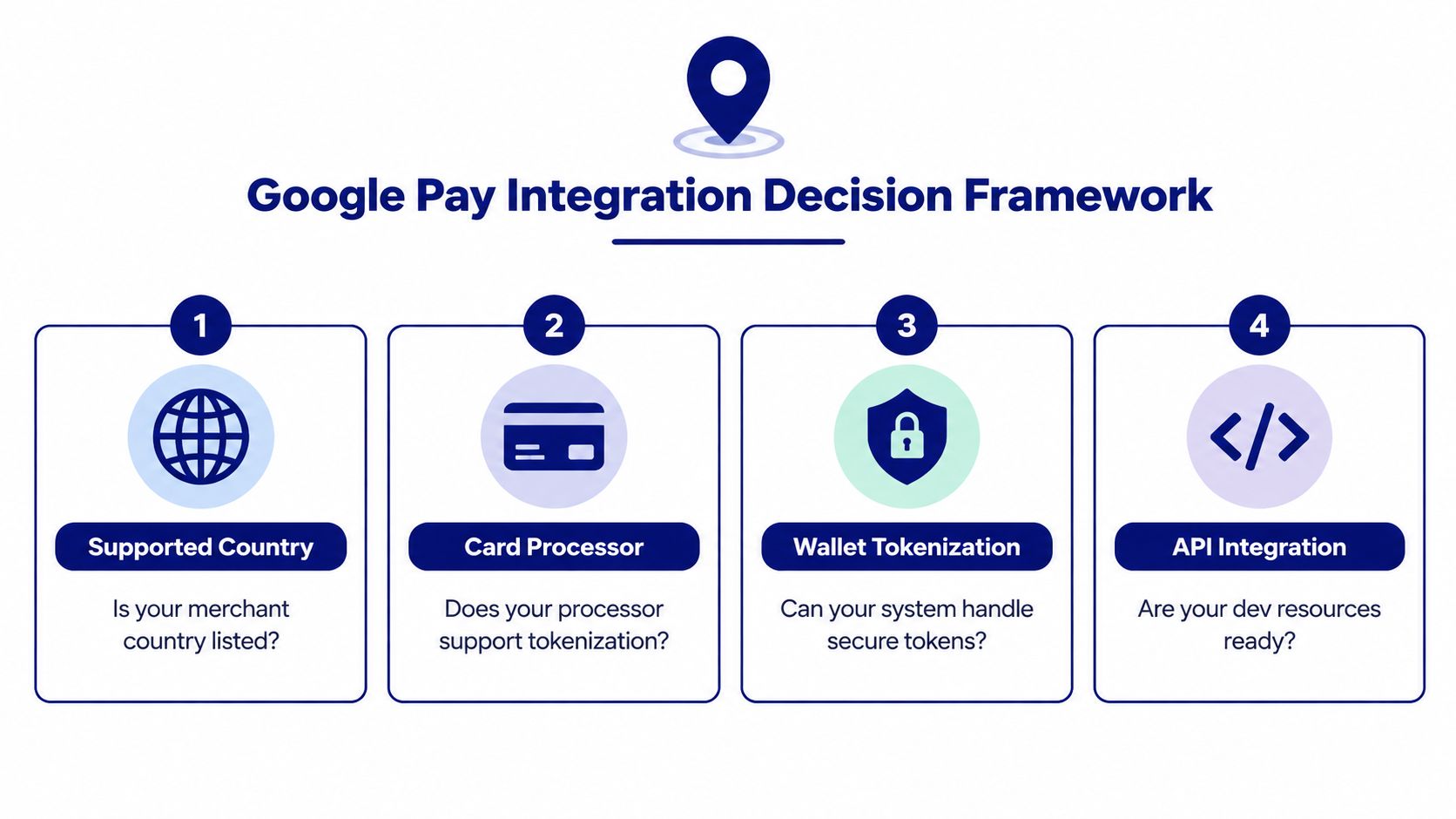
Four checkpoints decide whether Google Pay belongs in your rollout:
Supported country: Does the specific market support the channel and payment rail you need?
Card processor: Can your gateway accept and route Google Pay tokens?
Wallet tokenization: Can your backend process the configured PAN, cryptogram, or gateway token?
Checkout priority: Will the wallet appear where customers pay, on web, Android, or in-store?
Hosted-checkout merchants should usually enable Google Pay through the existing gateway if the processor already supports it. Mobile-first Android teams can use the native Pay API when they need control over the app experience. Businesses combining cards, wallets, bank methods, BNPL, and crypto should evaluate whether a unified API or paylink reduces the number of separate payment integrations they must maintain.
The button is the visible part. Production readiness depends on tokenization, BIN coverage, yellow-path handling, and at least one successful live authorization. Keep the TEST and PRODUCTION configuration switches explicit, and hand engineering a checklist that names the merchant ID, origins, gateway parameters, supported networks, and final authorization result.
If you want one payment layer for Google Pay, cards, and crypto, visit Suby to review its API-first Payments product, paylinks, Gating for Discord and Telegram communities, Crypto flows, and Invoicing options. Customers can pay by card, wallet, bank method, or crypto, while your business can choose whether settlement goes to a bank account or stablecoins such as USDC.
