

Gaspard LEZIN
Accept Apple Pay Online and in App Without Hassle
Learn how to accept Apple Pay on web, app and checkout with Suby. Setup, testing and UX tips to boost conversions fast.
You've added a card form to your checkout, watched customers reach the payment step on their phones, and still seen them pause. They have to type card details, billing information, and sometimes a verification code into a small screen. For an Apple device user, Apple Pay can replace much of that manual entry with an authenticated wallet payment, but only when the merchant setup, browser checks, tokenized authorization, and fallback path all work together.
Apple Pay was announced at Apple's iPhone 6 event on 9 September 2014 and launched in the United States on 20 October 2014. Apple said more than 1 million credit cards had been registered by the end of its first three days, and the launch included 220,000 participating vendors, making it the largest mobile payment system in the United States at that time (MacStories). The engineering lesson is more useful than the history: wallet acceptance creates expectations, but the checkout still has to complete the underlying card transaction.
Table of Contents
Why Apple Pay Matters for Conversion Right Now
A shopper reaches your checkout from an iPhone. The product, shipping address, and order total are already correct. With Apple Pay available, the customer can select a saved card, review the amount, authenticate on the device, and return to your confirmation state. Without it, they may need to copy details from another app or abandon the session.
That difference matters most in mobile commerce, subscriptions, digital products, and any checkout where the customer already trusts the device. Apple Pay has expanded far beyond its original U.S.-first launch. A 2026 projection compiled from third-party estimates places worldwide Apple Pay users at roughly 785 million to 901 million, while the same source reports estimates of 54% of U.S. in-store mobile wallet usage and 85% to 94% of U.S. retail establishments accepting Apple Pay (Cropink). Those figures are estimates, not a guarantee of performance for your store, but they explain why wallet support increasingly appears in checkout requirements.

Demand doesn't remove implementation risk
Merchant adoption hasn't always moved evenly. Independent reporting cited Apple Pay support at 35% of online merchants in 2018, down from 48% in 2017, showing that merchants can delay rollout when fraud concerns, checkout complexity, or integration effort outweigh expected gains (Expanded Ramblings). The same report later summarized Apple Pay acceptance at roughly 90% of U.S. retailers and usage among 49% of U.S. mobile wallet users, which points to a practical tension. Customers may expect the button, while businesses still need to validate the transaction path behind it.
A visible Apple Pay button isn't conversion optimization by itself. The merchant must confirm that the wallet token reaches a processor that can authorize it, that unsupported devices see a usable card fallback, and that authentication or SCA handling doesn't break after the wallet approval.
Practical rule: Treat Apple Pay as a complete payment method, not a decorative checkout button.
The practical job is therefore clear. First, prepare the Apple merchant identity, certificates, domain, and processing relationship. Then choose the web or native path, expose Apple Pay only when the device and browser qualify, and test the server-side authorization and webhook lifecycle. By the end, you'll have a repeatable way to accept Apple Pay while preserving cards, bank payments, and stablecoins for customers who prefer them, with settlement routed according to your business model.
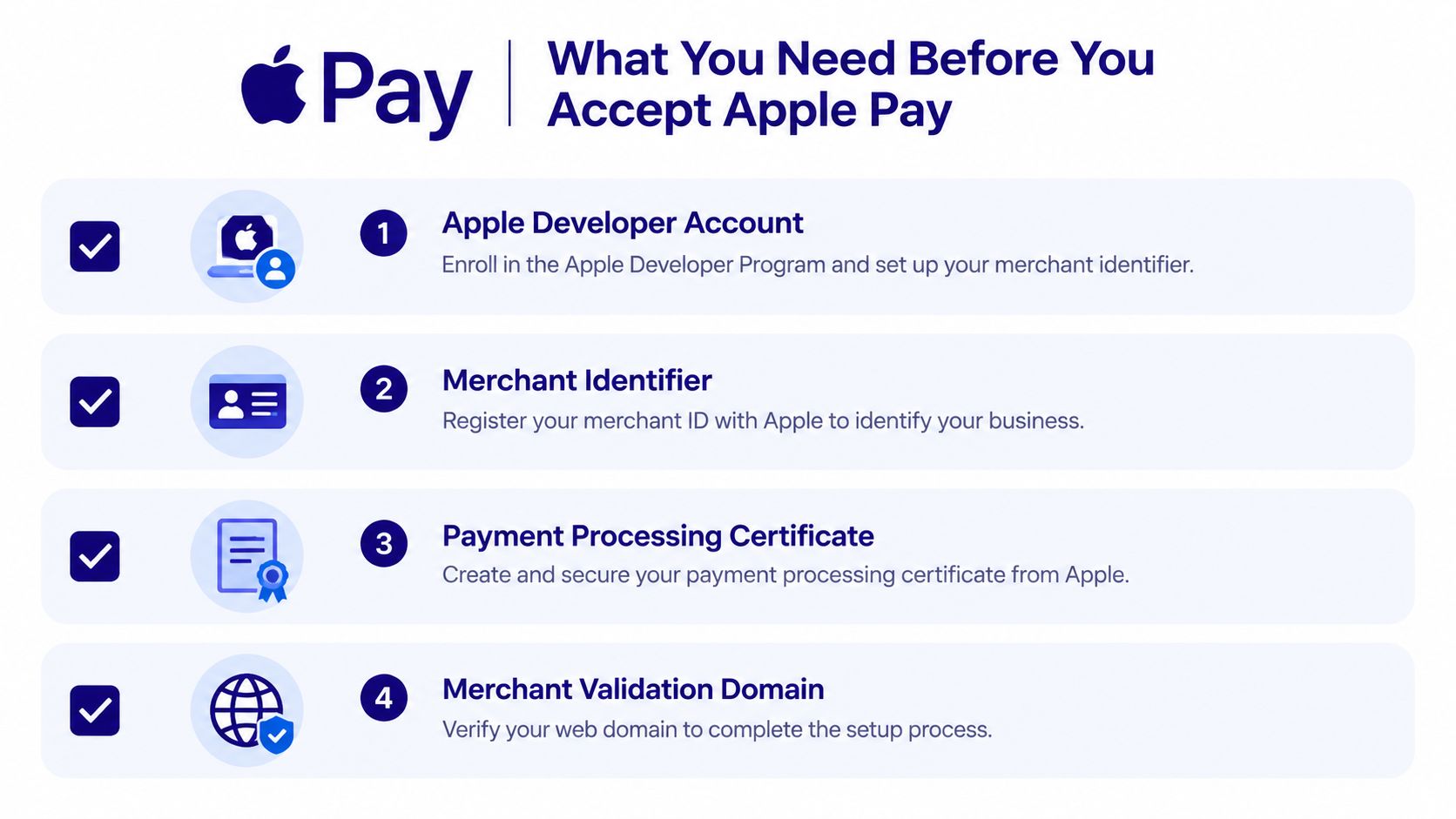
What You Need Before You Accept Apple Pay
Apple Pay setup stalls when teams start in the frontend before completing the merchant-side prerequisites. Create the identity and processing relationship first, then connect those credentials to the payment provider that will handle the tokenized card flow.
Prepare the Apple merchant identity
You'll need an Apple Developer account and a registered merchant identifier. The merchant ID gives Apple and your payment infrastructure a consistent identity for the wallet relationship. Keep ownership and access clear inside your team, because certificate creation and renewal shouldn't depend on one developer's personal account.
For web acceptance, plan for a payment processing certificate and merchant domain verification. The certificate supports the payment processing relationship, while domain verification proves that the website presenting Apple Pay is authorized for that merchant setup. Store certificate material securely and document who can rotate it.
A practical preparation checklist looks like this:
Apple Developer account: Confirm enrollment and the permissions needed to manage Apple Pay identifiers and certificates.
Merchant identifier: Register the identifier that your web or app payment configuration will use.
Payment processing certificate: Create the certificate required by your chosen processing path and protect its private material.
Verified merchant domain: Register and verify every web domain where the Apple Pay button can appear.
Confirm the processor can handle the real flow
The PSP or acquirer must expose tokenized card authorization, not merely advertise Apple Pay as a supported brand. Ask how it receives and decrypts the wallet payload, which merchant credentials it expects, how authorization responses surface through its API, and how refunds, disputes, recurring payments, and failures are represented.
Suby is documented as one product with one API and four ways to use it, Suby Payments, Suby Crypto, Suby Gating, and Suby Invoicing (Suby introduction). Its documentation lists Apple Pay as available on supported Apple devices and browsers, so device and browser eligibility remains part of your own checkout logic. Review the supported payment methods before committing to a frontend path.
If your product needs a custom wallet experience, a team that builds custom finance mobile apps can help separate native Apple Pay concerns from your payment backend. That separation is useful when the same business also needs a web checkout, paylinks, or an API-driven subscription flow.
Before writing checkout code, confirm the account, merchant ID, processing certificate, verified domains, supported devices and browsers, and the acquirer's tokenization behavior. Missing any one of these can turn a seemingly complete integration into a button that never appears or a payment that never authorizes.
How to Configure Apple Pay for Web and Native Checkout
The implementation path depends on where the customer pays. A website commonly uses Apple's browser payment capabilities and merchant validation. An iOS application uses PassKit and the native Apple Pay sheet. Both paths still need a backend that receives the authorized payment information and sends it through a processor.

Web checkout needs a server-side validation step
On the web, begin by checking whether the current browser and device can present Apple Pay. Don't render a dead button on an unsupported environment. If the capability check passes, create the payment session with the exact amount, currency, country, and merchant configuration your processor expects.
Merchant validation should happen through your server, not through publicly exposed credentials in browser code. The browser requests a validation session, your backend contacts the appropriate payment service, and the validated session returns to the client so the Apple Pay sheet can open. Keep order totals server-controlled. A client-side amount is not a trustworthy source for authorization.
The customer then selects a card and authenticates on the device. Your frontend should treat the result as payment input, not proof that funds have settled. Send the tokenized payment data to your backend, submit it through the PSP or acquirer, and wait for the authoritative payment result.
A no-code or hosted route can be appropriate when you don't need to own the payment sheet lifecycle. Suby documents no-code checkout options, while an API integration gives developers more control over button placement, order state, retries, and webhook handling.
Native apps use a different presentation layer
In an iOS app, PassKit manages the native Apple Pay interaction. Your app configures the payment request, supplies the merchant identifier and supported networks, presents the payment sheet, and forwards the resulting payment data to the backend. Keep business logic and final order approval on the server. The app should not mark a subscription active solely because the sheet dismissed successfully.
Button placement affects usability. Put Apple Pay near the primary payment action, show the amount and currency before authentication, and keep a card form available when eligibility fails. Don't force an Apple Pay-only path, because a customer may use an unsupported browser, a device without a configured wallet, or a payment method your processor can't authorize in that market.
Teams building cross-platform applications should also distinguish native Apple Pay from a general mobile payment gateway. A guide to payment gateway integration for Expo can help frame that architectural decision, particularly when the app needs platform-specific payment behavior.
Use SCA or 2FA handling supplied by the processor where applicable. Apple Pay can authenticate the wallet user, but your payment stack still controls authorization, risk decisions, and any additional challenge. For crypto payments, Suby Crypto handles the swap and sponsors the gas, but Apple Pay itself remains a card wallet flow. The two methods can coexist in a single checkout without pretending they use the same transaction mechanics.
Choose hosted checkout when speed and consistent payment presentation matter more than frontend control. Choose API or native integration when you need custom order state, application-specific UX, or deeper subscription handling. In both cases, keep the final authorization and fulfillment decision on the server.
Processing Payments and Settling Funds With Suby
The Apple Pay sheet is only the customer-facing part of the transaction. After authentication, the payment data must move through a secure processing path, receive an authorization result, and produce a reliable event that your application can use for fulfillment.
A backend separates four concerns:
Payment data handling: Accept the wallet payload through the approved server-side integration and pass it to the payment processor for the supported tokenized flow.
Authorization: Let the processor return an approved, declined, failed, or otherwise actionable status. Don't infer success from frontend events.
Webhook processing: Consume payment notifications idempotently, record the provider event, and update the order or subscription only after the server receives the relevant status.
Settlement operations: Reconcile the completed payment with the Suby balance and the payout destination selected by the business.

One checkout can support different payin preferences
Suby's documentation describes a multi-rail checkout where customers can pay with cards, bank transfers, Apple Pay, Google Pay, or stablecoins such as USDC and USDT across multiple chains. Every payment lands in one Suby balance, after which the merchant can withdraw to a bank in the merchant's own currency or to a wallet in stablecoins (Suby balance documentation).
That creates a useful flow for international SaaS. A customer can pay by Apple Pay with a card stored in their wallet, while the business chooses settlement in USDC. That isn't the only option. The merchant can use bank settlement, stablecoin settlement, or another supported payout choice according to its operational needs and eligibility.
The balance model also simplifies reconciliation. Your application can record the original payment method, order currency, settlement currency, fees, and payout event separately, while operations teams work from one balance rather than rebuilding an accounting view for every wallet.
Backend advice: Fulfill from verified server events, not from the browser's success callback.
Subscriptions need the same discipline. Store the provider's customer and payment references, process renewal webhooks idempotently, and make access changes explicit. A delayed webhook shouldn't create duplicate access, and a duplicate webhook shouldn't create duplicate fulfillment.
Fees belong to the complete payment stack
Apple's materials state that there are no merchant fees for using Apple Pay, but that doesn't mean accepting the payment has no commercial cost. The processor or acquirer can apply its normal pricing, while cross-border foreign exchange, card-not-present pricing, or other jurisdiction-specific costs sit elsewhere in the stack (merchant cost analysis).
Suby's pricing page lists cards and wallets at +$0.30 per transaction, standard payouts as free, instant payouts at $0.50, dispute handling at $25 per dispute, and an FX markup of 0.5% + $1 when charge and settlement currencies differ (Suby pricing). Pricing depends on the payment method used, so check the current pricing page before modeling margin or comparing Apple Pay with another payin route. Teams integrating an existing processor can also use a technical reference for how to set up a payment API, while keeping Apple Pay token handling specific to the selected provider.
Testing Troubleshooting and Verifying Your Integration
Test Apple Pay in layers. Starting with a full purchase on one laptop doesn't prove that your merchant identity, domain, processor, fallback, and settlement path all work. A better sequence isolates the payment method first, then adds the environments and business logic around it.
Use a verification sequence
Start by confirming that Apple Pay is enabled in the payment configuration and exposed by the PSP or acquirer. Then test these dependencies in order:
Merchant provisioning: Confirm the merchant identifier and payment processing certificate belong to the intended environment and account.
Domain validation: Verify every web domain used by checkout and confirm that the validation request reaches the correct backend.
Eligibility behavior: Test a supported Apple device and browser, then test an unsupported environment to make sure the card form or another payment option appears.
Tokenized authorization: Complete an authorized wallet payment and inspect the processor response, internal order state, and webhook event.
Authentication paths: Test any SCA or 2FA behavior applicable to the transaction and verify that a challenge, failure, or cancellation produces a safe order state.
Reconciliation: Match the payment, fee, balance entry, and payout record so finance can explain the transaction after checkout.
The most common failures are mundane. A domain may be registered in one account and served by another. A certificate may be expired, mismatched, or attached to the wrong merchant configuration. A button may render during development but disappear because the test browser or device isn't eligible. A wallet approval may reach the frontend while the underlying tokenized authorization fails.
Treat fallbacks as part of the product
Fallback behavior deserves its own tests. If Apple Pay isn't available, keep the shopper on the same checkout and present cards or another supported method. If authorization fails after wallet authentication, show a clear retry path without creating an order that your fulfillment system treats as paid.
Don't measure conversion lift until the payment method itself passes these checks. The practical order is payment-method capability, device and browser eligibility, merchant ID provisioning, domain validation, acquirer tokenization, authorization, then business metrics. That sequence prevents a checkout issue from being misdiagnosed as a customer demand problem.
Security review should cover the broader payment environment as well. Use the guidance on PCI DSS compliance to understand the obligations around your implementation, and document which parts are handled by your provider versus your own application. Before launch, verify Suby's supported methods and fee mechanics from its official documentation and pricing page rather than relying on an old integration note.
Best Practices for Apple Pay UX and Long Term Success
A good Apple Pay integration feels obvious when available and invisible when it isn't. Place the button close to the primary purchase action, show the total before the wallet sheet opens, and avoid making the customer hunt through a secondary payment tab. On mobile, give the wallet a prominent position without hiding cards, bank methods, or stablecoins that may suit other customers.
Eligibility should control presentation. Detect whether the current device and browser can use Apple Pay, render the button only when the flow is viable, and preserve a card fallback for everyone else. If the customer cancels the wallet sheet, return them to the same payment state with their cart and order details intact.
Keep the payment architecture broader than one wallet
Suby provides an API that lets any business accept payments by card or crypto, alongside its documented checkout methods, and it offers native integrations with Discord and Telegram for subscriptions, paid access, and online communities. It is one product with four uses: Suby Payments, Suby Crypto, Suby Gating, and Suby Invoicing. That structure supports the core operating model, customers pay any way they want, while businesses get paid the way they choose.
For example, a creator can use Apple Pay for a card-based membership payment, then use Suby Gating to manage paid access to a Discord or Telegram community. A SaaS company can accept Apple Pay, cards, bank transfers, or stablecoins and choose whether funds move to a bank account or a stablecoin wallet. An agency using invoicing can let its client choose the payin method while the agency selects the settlement destination.
Use this launch checklist after the technical tests:
Button behavior: Confirm correct placement, amount display, cancellation, and fallback.
Server authority: Fulfill only from verified authorization and webhook events.
Renewals: Test subscription creation, renewal, failure, cancellation, and access removal.
Market coverage: Confirm supported Apple devices, browsers, currencies, processor routes, and settlement options for each target market.
Operations: Reconcile fees, disputes, refunds, balance entries, and payouts before expanding traffic.
Apple Pay can remove meaningful friction, but durable results come from the entire payment system. Keep the wallet easy to find, keep alternatives available, and monitor the path from authenticated payment to fulfilled order and final settlement.
Suby gives businesses an API to accept card and crypto payments, supports Apple Pay alongside other checkout methods, and provides native Discord and Telegram integrations for subscriptions and paid access. Visit Suby to review the payment, crypto, gating, and invoicing options, then map your Apple Pay checkout to the bank or stablecoin settlement flow your business needs.
