
Gaspard LEZIN
3D Secure Payments: A Guide to SCA, UX, and Liability Shift
Understand 3D Secure payments, liability shift, and SCA. Our guide explains the flow and offers best practices to reduce friction and chargebacks.
You're probably here because a payment problem landed on your desk in a very ordinary way. A customer placed an order, the payment cleared, the product shipped, and then a chargeback arrived with the reason code “fraudulent transaction.” Now the product is gone, the revenue is at risk, and your team has to decide whether the problem was weak fraud controls, a bad checkout flow, or both.
That's the tension behind most discussions about 3D Secure payments. Product teams want fewer fraudulent orders, finance teams want fewer chargebacks, and growth teams don't want anything that slows checkout down. In practice, 3D Secure sits right in the middle of that tradeoff. It's the banking industry's way of asking, before a card payment is approved, “Is the person using this card really the cardholder?”
If you're trying to boost conversions with better payment systems, 3D Secure is one of the places where security and conversion meet. Done badly, it adds friction. Done well, it filters risky payments while letting legitimate buyers move through checkout with minimal interruption.
Table of Contents
Why merchants care about it
What product managers usually get wrong
The three domains in plain English
The payment flow step by step
Why the old version hurt checkout
What changed in EMV 3DS
Where liability shift helps
Where merchants still carry the risk
What SCA actually requires
How 3DS fits the compliance flow
Design for trust, not interruption
Measure the parts of checkout that break
A practical rollout checklist
What matters most
An Introduction to 3D Secure Payments
A simple way to think about 3D Secure payments is this. It's a digital identity check that happens during an online card transaction, before the payment is fully approved.
In a card-not-present transaction, the merchant can't see the cardholder. There's no cashier checking a signature, no staff member comparing names, no physical card being inserted into a terminal. That gap is exactly where criminals try to operate. 3D Secure was built to close it by letting the issuing bank verify the customer during checkout.
Why merchants care about it
The practical value isn't abstract. If someone steals card details and tries to use them online, 3D Secure adds a step the fraudster often can't complete, such as a biometric approval in the bank app or a one-time code tied to the cardholder.
Practical rule: Treat 3D Secure as a pre-authorization identity check, not as a generic fraud tool that solves every payment problem.
That distinction matters. 3D Secure helps most when the problem is unauthorized card use. It's less useful when the dispute comes later and the customer says the package never arrived, the item was wrong, or the service wasn't what they expected.
What product managers usually get wrong
The common misunderstanding is assuming 3D Secure is either “just a popup” or “a compliance checkbox.” It's neither. It's a protocol that changes how the merchant, card network, and issuer coordinate around risk.
If you own checkout, subscription billing, or international payments, that has direct consequences for:
Approval flow, because the bank gets more context before authorizing
User experience, because some payments pass silently while others trigger a challenge
Chargeback exposure, because certain fraud disputes can shift away from the merchant
What Is 3D Secure and How Does the Flow Work
The name sounds technical, but the core idea is familiar. If you walk into a bank and ask to withdraw a large amount, the teller may ask for ID before releasing the money. Online, 3D Secure is the card ecosystem's version of that ID check.
The three domains in plain English
“3D” refers to three domains involved in authentication.
Domain | Who it refers to | What it does |
|---|---|---|
Issuer domain | The customer's bank | Decides whether to authenticate the cardholder |
Acquirer domain | The merchant side, including payment provider | Sends transaction data into the authentication flow |
Interoperability domain | The card network layer | Routes the request between parties |
Merchants often get confused by branding here. You might hear names like Visa Secure or Mastercard Identity Check. Those are network brands for the same underlying 3D Secure framework.
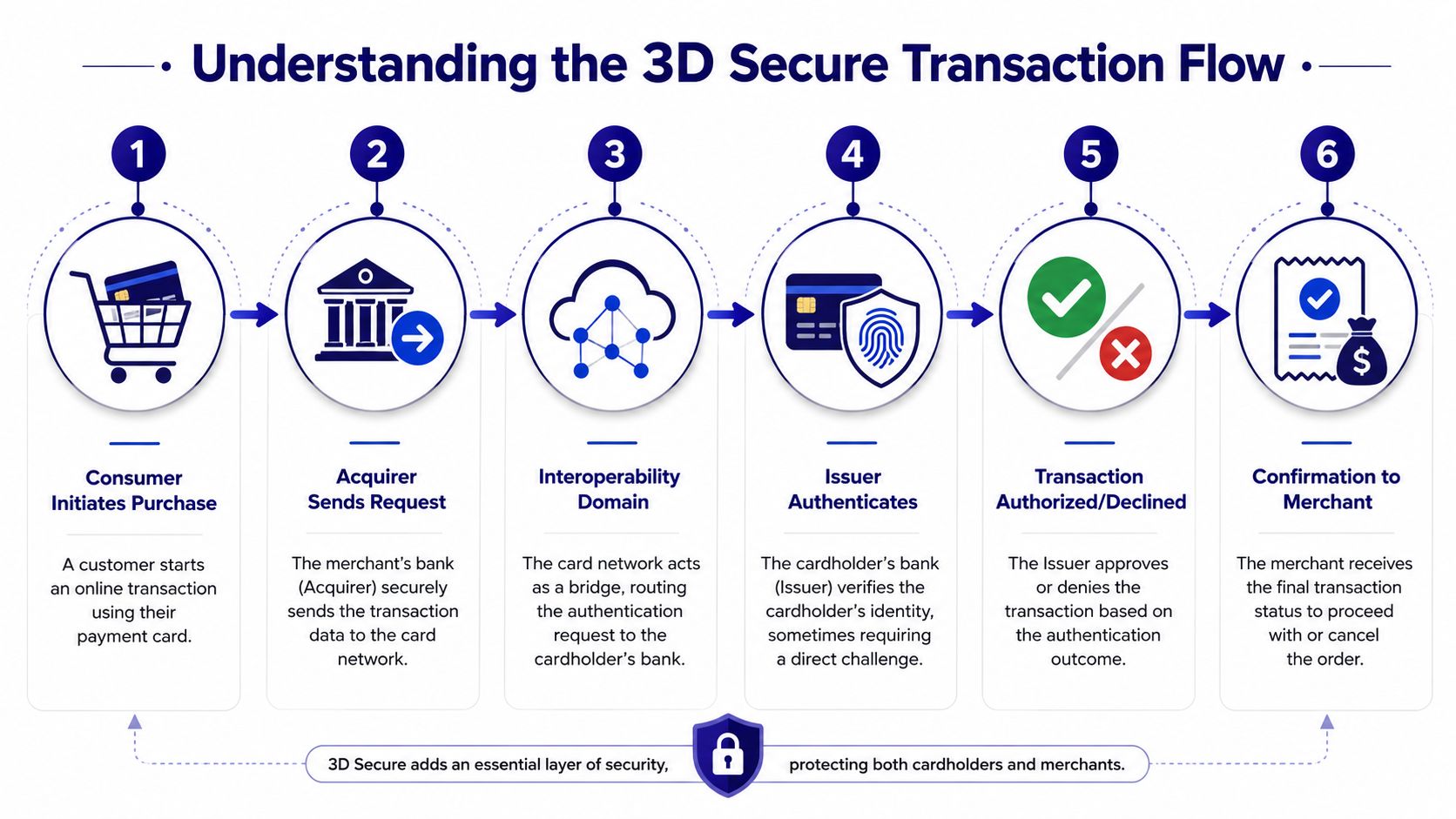
The payment flow step by step
Once you see the sequence, the protocol becomes much easier to reason about:
The customer enters card details at checkout and clicks pay.
The merchant side prepares the payment request and sends the relevant transaction details toward the card network.
The interoperability layer routes the authentication request to the issuing bank.
The issuer evaluates the transaction and decides whether to allow a frictionless pass or ask for more proof.
The customer may complete a challenge, such as biometric approval or a one-time code.
The authentication result returns, and the payment can then be authorized or declined.
The important design point is that 3D Secure sits in front of final authorization. It doesn't replace authorization. It adds identity validation before it.
A short walkthrough can help anchor that flow in your head:
A buyer purchases a software subscription with a saved card on a mobile device. The checkout sends the transaction for 3D Secure authentication. The issuer sees enough context to trust the payment and lets it pass without interrupting the customer. The payment then moves into authorization with a stronger trust signal.
Later in the flow, the customer may see a challenge. That doesn't mean the payment is fraudulent. It means the issuing bank wants stronger proof before approval.
Here's a quick visual explainer that pairs well with the flow above:
The Evolution to EMV 3-D Secure
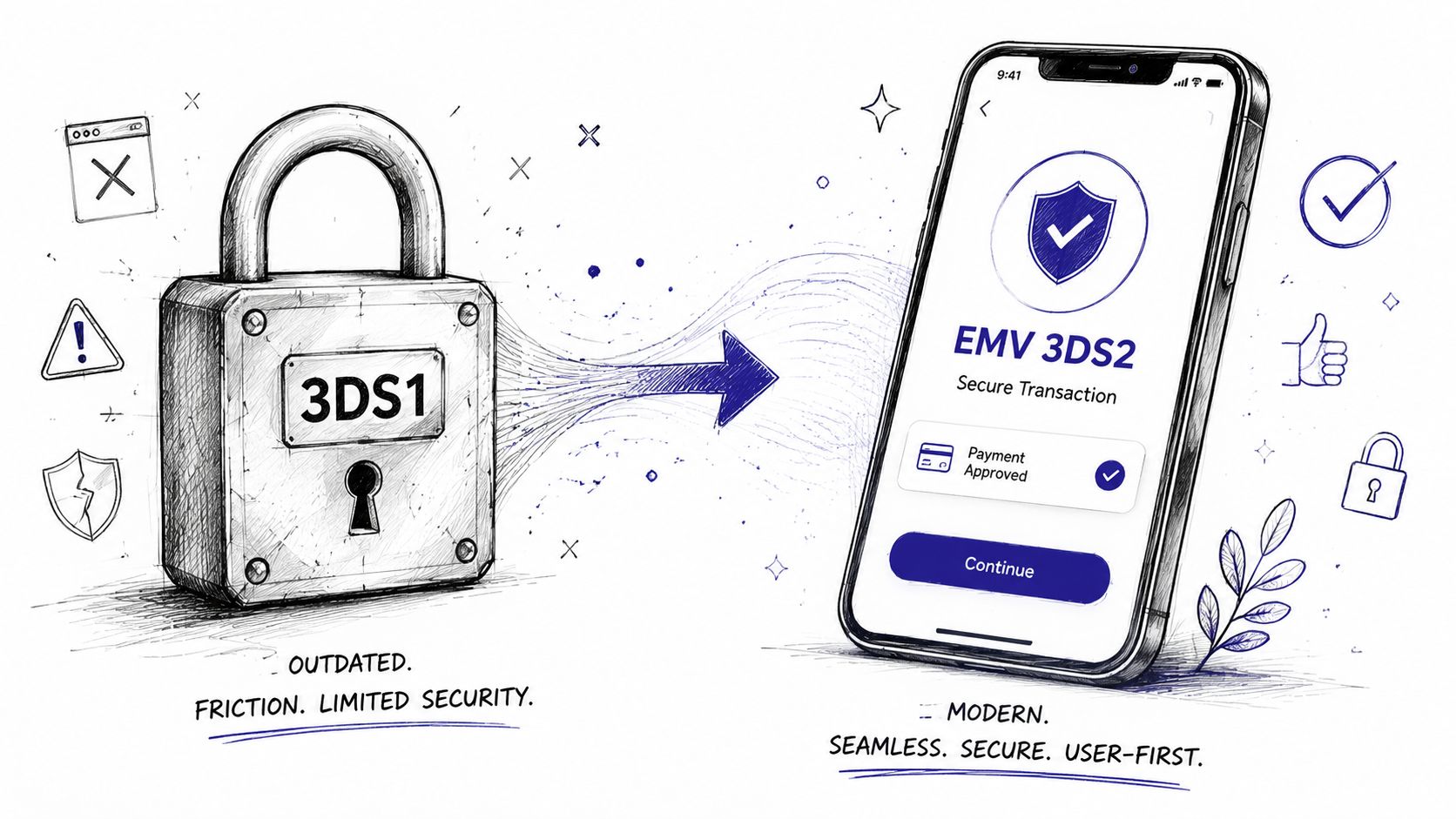
The first version of 3D Secure solved a real problem, but it often did it in the most annoying way possible. Customers got redirected. They saw unfamiliar bank pages. They were asked for static passwords they didn't remember. Many dropped out before finishing the purchase.
Why the old version hurt checkout
3DS1 was built for an earlier internet. It didn't fit modern mobile UX, embedded checkout experiences, or real-time risk analysis very well. The result was blunt security. It worked, but it often made good customers feel like something had gone wrong.
From a product perspective, the old flow created several issues:
Redirect anxiety, because users left the merchant experience
Credential confusion, because static passwords were easy to forget
Poor mobile behavior, because the interaction model wasn't designed for smartphone checkout
What changed in EMV 3DS
EMV 3DS, often called 3D Secure 2.0 or 3DS2, was the major redesign. Instead of relying on crude challenge screens by default, it supports a risk-based authentication model.
According to ACI Worldwide's overview of 3D Secure authentication, 3D Secure 2.0 transmits 15+ data elements between the merchant, interoperability domain, and issuer, including context like device ID, browser information, and transaction details. The same source says this enables approximately 85% faster checkout times and a 75% reduction in cart abandonment compared to legacy 3DS1 flows.
That's the business reason 3DS2 matters. It doesn't just add security. It changes the shape of the customer experience.
Most legitimate payments should feel invisible. The challenge screen should be the exception, not the default path.
3DS2 also aligns with modern regulation. It is the default implementation method for meeting Europe's Strong Customer Authentication requirements for online card payments, because it lets the issuer apply authentication in a structured, standards-based way.
A practical way to compare the two versions:
Area | 3DS1 | EMV 3DS |
|---|---|---|
User experience | More disruptive | More seamless |
Risk evaluation | Limited context | Richer transaction context |
Checkout behavior | Redirect-heavy | Better suited to embedded and mobile flows |
Authentication style | Often static prompts | Frictionless or step-up based on risk |
For product teams, the takeaway is simple. If you still think of 3D Secure as a conversion killer, you may be picturing the old version.
Understanding the Liability Shift and Its Limits
For merchants, the most talked-about benefit of 3D Secure is liability shift. When a transaction is successfully authenticated, liability for certain fraud-related chargebacks can move from the merchant to the issuing bank.
That matters because it changes the economics of online fraud. If the bank verified the cardholder and approved the transaction through the 3D Secure process, the merchant may no longer carry the same exposure for eligible unauthorized-use disputes.
Where liability shift helps
This protection is most relevant when the dispute is really about unauthorized card use. If someone used stolen credentials, or the cardholder later claims they didn't authorize the purchase, successful authentication can materially improve the merchant's position.
In plain terms, liability shift supports cases where the dispute category is tied to fraud on the payment instrument itself.
Where merchants still carry the risk
Many teams often overestimate what 3D Secure can do. As explained in Evervault's write-up on 3D Secure and chargebacks, 3D Secure liability shift does not protect against non-fraud chargebacks like “item not received” or “product not as described.” The same source notes that 3DS covers card-not-present fraud, account takeover, and stolen card transactions, but not those service- or fulfillment-based disputes.
That's why a merchant can implement 3D Secure correctly and still lose a chargeback.
If you want a grounded overview of those post-purchase dispute patterns, this guide to chargebacks and dispute risk is useful because it separates fraud claims from service-related complaints.
3D Secure is strong at stopping criminal fraud. It is not a blanket defense against friendly fraud, delivery problems, refund confusion, or broken customer service processes.
For product managers, that means your payments roadmap shouldn't stop at authentication. You still need clear order confirmation, delivery evidence, support workflows, billing descriptors that make sense, and refund handling that reduces preventable disputes.
How 3D Secure Enables SCA and PSD2 Compliance
If you sell into Europe, 3D Secure isn't just a fraud conversation. It's also a compliance mechanism.
Under PSD2, many online card payments in the European Economic Area require Strong Customer Authentication, usually shortened to SCA. In practical terms, SCA means the payer must be authenticated using at least two categories of evidence.
What SCA actually requires
The rule is commonly described as two out of three:
Knowledge: something the customer knows, such as a passcode
Possession: something the customer has, such as a trusted device or banking app
Inherence: something the customer is, such as a fingerprint or face scan
If that sounds abstract, think about approving a purchase in a bank app with Face ID. The app on the registered phone points to possession. The biometric points to inherence.
How 3DS fits the compliance flow
EMV 3DS is the standard way card payments are authenticated to satisfy SCA because it gives the issuer a structured framework to either approve the payment silently or trigger a step-up challenge when required.
The important thing for product teams is that compliance and UX are linked. If your checkout sends enough useful context and your payment stack handles 3DS correctly, more low-risk transactions can move through the frictionless path. If the data is weak or the scenario requires stronger verification, the issuer can challenge the customer.
That's also why broader security disciplines still matter. Teams working through regulated payments usually end up reviewing adjacent controls such as data handling, storage boundaries, and vendor obligations. A practical overview of those overlapping requirements is this guide on PCI HIPAA compliance, especially if your business touches both payment and sensitive customer data. For the payment side specifically, it also helps to understand the basics of PCI compliance requirements for online businesses.
Here's the operational interpretation:
Scenario | What the issuer may do |
|---|---|
Low-risk payment with enough context | Approve through frictionless authentication |
Payment needing stronger proof | Trigger a challenge |
Payment that can't satisfy issuer checks | Decline or fail authentication |
The main confusion to avoid is treating SCA as a merchant-only decision. It isn't. The issuer plays a central role, and 3D Secure is the protocol that makes that decisioning workable during card checkout.
Best Practices for a Low-Friction Checkout
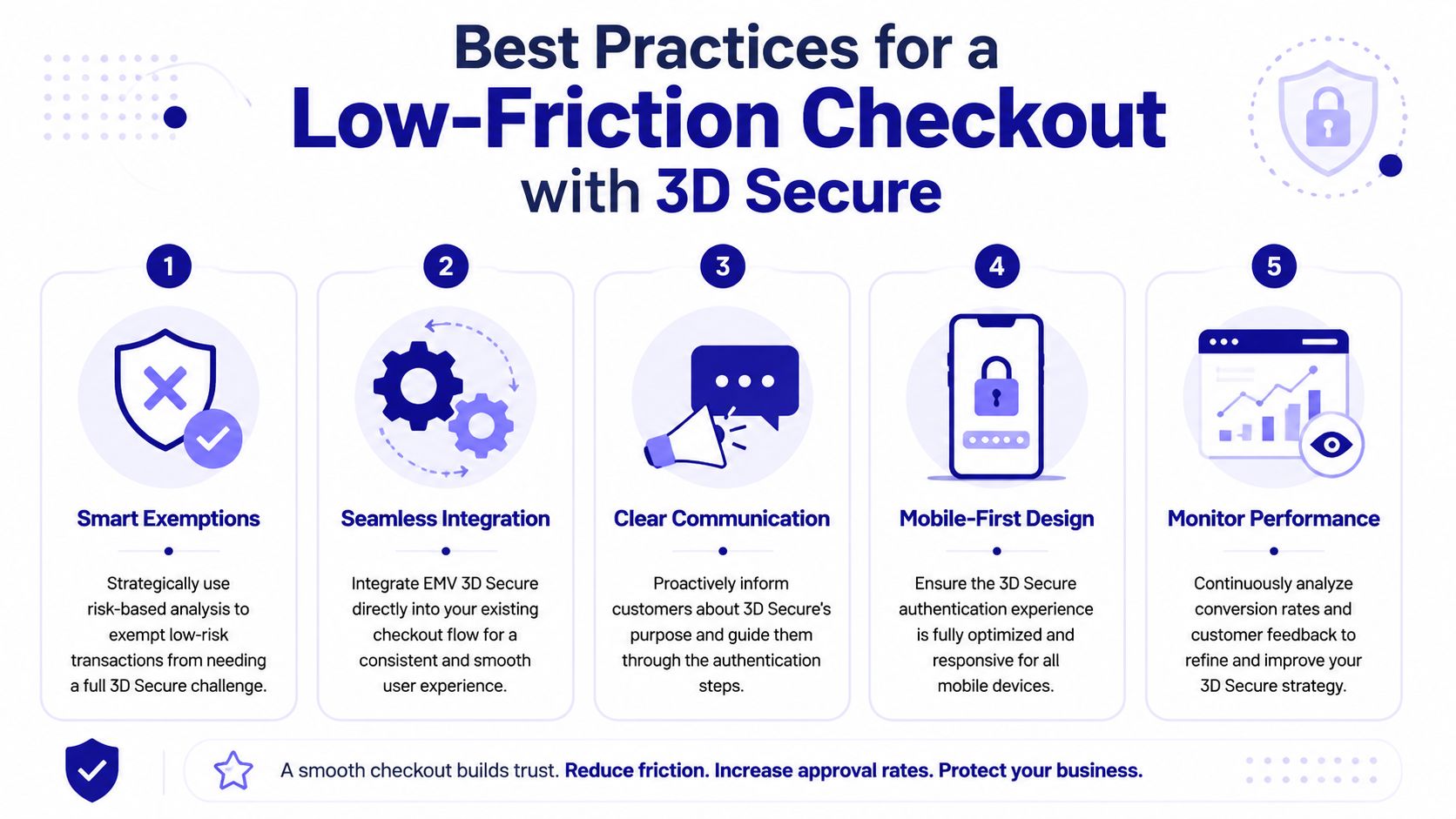
The right 3D Secure strategy doesn't ask, “How do we add more security screens?” It asks, “How do we let good customers finish quickly while giving the issuer what it needs to stop bad ones?”
That's the mindset shift. You're not optimizing a challenge page. You're optimizing the whole checkout funnel around trust, context, and selective friction.
Design for trust, not interruption
Visa states that authenticated 3D Secure transactions show a 45% reduction in fraud compared to non-authenticated eCommerce transactions, with fraud rates of 11 basis points versus 20 basis points for unauthenticated flows, as outlined in Visa's 3D Secure overview. That gives you a strong argument for using authentication where it helps. The mistake is applying it in a way that feels random or confusing.
A few practices consistently make the experience smoother:
Send rich transaction context: Better data helps the issuer decide whether a payment can pass without a challenge.
Keep authentication in the visual flow: Customers are less likely to panic if the step feels connected to checkout.
Explain the security step plainly: A short message like “Your bank may ask for a quick verification to protect your card” can reduce drop-off.
Design mobile-first: Most friction gets amplified on smaller screens and weak app-to-browser transitions.
Treat exceptions as product flows: Failed authentication, timeouts, and retries should have clear recovery paths.
If your team is evaluating how orchestration and embedded checkout logic affect buyer experience, this piece on the role of an Ecommerce API is a useful adjacent read.
Measure the parts of checkout that break
A low-friction setup needs instrumentation, not guesswork. Don't just look at overall conversion. Break the funnel into meaningful checkpoints.
Track questions like:
How often is a challenge triggered?
Where do customers abandon during authentication?
Which devices or browsers show the most failures?
Do support tickets mention confusion about bank verification?
Are legitimate repeat customers seeing unnecessary friction?
A smooth 3D Secure experience is usually the result of better data and clearer recovery paths, not less security.
Your UX team should also review the actual checkout surface. Seemingly small choices, such as button labeling, error messaging, and mobile layout, can affect whether buyers complete or abandon. This practical guide to checkout page design for conversion and clarity is worth reviewing alongside your payment logs.
Implementation Checklist and Final Takeaways
A good 3D Secure rollout is partly technical and partly operational. Engineering has to wire the flow correctly, but product, support, and analytics all have work to do too.
A practical rollout checklist
Use this as a working checklist with your payments team:
Confirm your payment provider supports modern 3DS flows: You want EMV 3DS behavior, not legacy assumptions about redirects and static passwords.
Map where authentication starts in your checkout: Decide when the payment request is created and how the frontend handles challenge and completion states.
Handle asynchronous outcomes cleanly: Authentication results, authorization outcomes, and customer-facing status pages need to stay in sync.
Test failure paths on purpose: Simulate failed challenges, abandoned verification, expired sessions, and retry behavior.
Align support messaging: If customers call after a bank challenge, your team should know what they saw and what to tell them.
Separate fraud metrics from dispute metrics: Unauthorized-use reduction and post-purchase service disputes are different operational problems.
What matters most
The strategic takeaway is simple. 3D Secure payments work best when you treat them as a coordination layer between checkout UX, issuer risk systems, and compliance requirements.
They help reduce unauthorized card-not-present fraud. They help satisfy SCA expectations for many European card payments. They can shift liability in specific fraud scenarios. But they won't fix fulfillment problems, unclear refund policies, or friendly fraud on their own.
For teams building global checkout, the implementation burden also matters. According to Suby's API introduction, Suby.fi enables merchants to accept both credit/devit card payments and cryptocurrency payments, including USDC, USDT, ETH, and SOL, through a single API, supporting both one-time and subscription-based payment models. More broadly, Suby is payment infrastructure for the global internet economy. Businesses can accept payments by card or crypto through one API, and it also offers native Discord and Telegram integrations for subscriptions, paid access, and online communities. Customers can pay the way they want, and the business can choose how it gets paid. That can include card-to-bank settlement, crypto settlement, or flows where a customer pays by card and the business receives USDC. Suby is one product with four ways to use it: Suby Payments, Suby Crypto, Suby Gating, and Suby Invoicing. Pricing depends on the payment method used, so it's best to check the pricing page for current figures.
Suby is a payment gateway and payment processor. Your customers pay with card, bank transfer, Apple Pay, Google Pay, Klarna, and more, or stablecoins, and you get paid out to your bank account, or directly in stablecoins (USDC, EURC) to your wallet, anywhere in the world, no bank account required. It supports modern EMV 3D Secure authentication, SCA-ready flows, and one-time or subscription billing through a single API, so you can cut card-not-present fraud and chargeback exposure without adding needless friction at checkout.
