

Gaspard LEZIN
Stripe Connect Account: A Developer's Guide for 2026
A developer's guide to the Stripe Connect account. Learn about account types, API flows, compliance, and common pitfalls before you integrate.
You're probably here because your product needs to do something simple on paper and messy in practice. You need to let users sell, get paid, and stay compliant without turning your team into a payments operations department.
That's where a Stripe Connect account enters the picture. It is often first met as an onboarding task. Create an account, redirect the user, wait for a webhook, done. But that framing is too narrow. A Stripe Connect account is closer to a long-term operating model than a single API object.
If you're building a marketplace, a SaaS product with merchant payouts, or any platform that routes funds to third parties, the account model you choose shapes product UX, support workload, compliance exposure, and even what happens if a seller wants to leave your platform later.
Table of Contents
Introduction Why a Stripe Connect Account Is More Than Just an API Call
What a connected account actually is
Capabilities control what the account can do
Responsibility models change the product you are building
The onboarding sequence
Payout operations grow faster than the integration
Restricted accounts need an operating routine
The hidden cost of friction after signup
Platform lock-in is not a side note
The risk work does not stay inside engineering
Exploring Alternatives for Global Payments and USDC Payouts
Introduction Why a Stripe Connect Account Is More Than Just an API Call
A lot of developers think about Connect for the first time as a payout feature. Product asks for seller onboarding. Finance asks how money reaches providers. Engineering reaches for the API docs.
That's reasonable, but incomplete.
Stripe describes Connect as a platform and marketplace payments product and calls it the “fastest and easiest way” to integrate payments and financial services into a software platform or marketplace in its Standard accounts documentation. The important part is what that implies operationally. You are not adding one checkout primitive. You are creating and managing a separate payments account structure for each business or individual on your platform.
A Stripe Connect account exists before it becomes useful. Creation is easy. Activation, verification, and ongoing health are the real job.
That distinction matters because your users don't care that acct_... exists in your database. They care whether they can accept payment, whether payouts are enabled, and whether support can solve issues when verification breaks weeks later.
There's also a strategic layer that many setup guides skip. A connected account relationship affects control boundaries. It affects ownership boundaries. It affects migration risk. If you discover those constraints late, they stop being technical details and become product problems.
Teams usually underestimate three things:
Onboarding isn't the finish line. A created account can still be unusable until Stripe sees the right information.
Permissions are conditional. Payment acceptance and payouts depend on account state, requested features, and verification.
Operations outlive implementation. You don't ship Connect once. You run it continuously.
Understanding the Stripe Connect Account Model
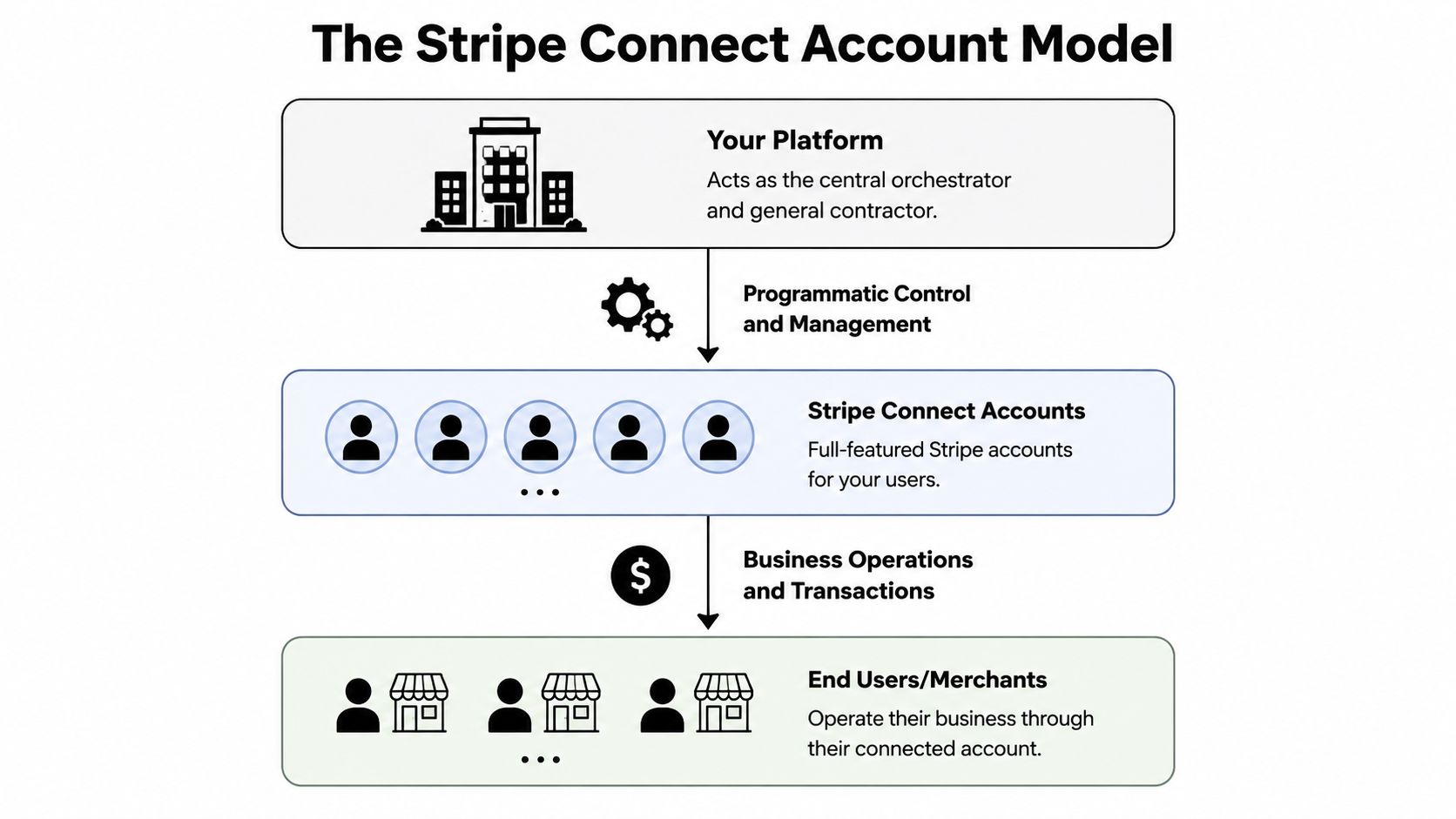
A useful mental model is a property management system, not a single checkout form. Your platform is the manager. Each seller, creator, or service provider gets their own Stripe account record with its own identity checks, permissions, payout setup, and risk state. That separation is why Connect feels simple in a demo and becomes operationally demanding in production.
What a connected account actually is
A connected account is a persistent business entity in your system design. It has its own lifecycle. It can exist in a half-ready state for days or weeks. It can accept charges in one period, then lose that ability later if verification requirements change.
That last point surprises product teams.
Engineers often store acct_... and treat account creation as completion. Product and support teams then inherit the confusion, because the user returned from Stripe, clicked "done," and still cannot charge customers or receive payouts. The safer model is to treat the connected account as a state machine with separate checkpoints for onboarding submitted, charges enabled, payouts enabled, and requirements due.
Your application usually has to coordinate four jobs at once:
Create and store the connected account record.
Send the user through Stripe-hosted onboarding or your chosen account flow.
Persist status changes from webhooks, not just browser redirects.
Show the user the right next action based on current account state.
That distinction matters for operations. Redirect completion is a UI event. Capability and verification readiness are compliance and risk events. If you merge them into one "connected" status, support tickets pile up and finance sees unexplained payout delays.
A useful outside primer for product teams is this piece on Stripe Connect for B2B SaaS. It helps frame Connect as platform infrastructure with business consequences, not only an API integration.
Pricing belongs in this model discussion too, because fee ownership affects margin, refunds, and support cost allocation over time. This overview of Stripe Connect pricing trade-offs is a practical reference before finance and product commit to an account structure.
A short product demo helps make the model less abstract:
Capabilities control what the account can do
Capabilities are the permission layer that turns an account from "exists" into "usable." They determine whether an account can perform specific actions such as taking card payments or receiving funds from the platform.
For implementation, this means one connected account can be healthy in one dimension and blocked in another. A user may have completed onboarding but still lack the permission state required for live payment acceptance. Another user may be able to process charges while payouts remain restricted pending more information. If your UI shows a single green checkmark, it hides the actual failure mode.
Practical rule: model charging, transfers, and payouts as separate states in your app, then map support workflows to each one.
This is also where long-term maintenance starts to matter more than initial setup. Requirements change. Verification documents expire. Business details drift out of date. A platform that treats capabilities as a one-time setup step usually discovers the problem through seller complaints instead of monitoring.
Responsibility models change the product you are building
The familiar Standard, Express, and Custom categories are useful because they define who owns the operational burden, not just who hosts the onboarding form.
Responsibility | Standard Account | Express Account | Custom Account |
|---|---|---|---|
Onboarding UX | More Stripe-managed | Shared experience | More platform-controlled |
Dashboard access | User can log in to Stripe Dashboard | Limited Stripe-hosted tools | Platform usually builds more UI |
Compliance collection | More Stripe-led | Shared | More platform responsibility |
Support burden for platform | Lower | Medium | Higher |
Branding control | Lower | Medium | Higher |
The trade-off is straightforward. More control usually means more responsibility for edge cases, support tooling, and compliance operations. Less control reduces build effort, but it also limits how much of the payment experience feels native to your product.
There is also a strategic angle that setup guides often skip. The account model you choose can shape future migration difficulty. If sellers build habits around Stripe-hosted dashboards, Stripe-native dispute flows, and Stripe-managed tax or compliance surfaces, switching providers later becomes harder than changing an API client. You are choosing workflow ownership, data boundaries, and support boundaries at the same time.
Stripe has also signaled a broader account direction in a public session on Stripe Connect and Accounts v2. The notable idea for platform teams is account unification. One account may support multiple roles or configurations rather than fitting neatly into older, isolated object models. For teams building marketplaces, vertical SaaS, or hybrid buyer-seller products, that affects how you model identity now so you do not have to unwind it later.
The Developer's Guide to Onboarding and Activation
A common failure pattern looks like this. The product team ships a "Become a seller" button, a user completes the hosted form, returns to the app, and support still gets a ticket saying, "Why can't I get paid?" The gap is usually not account creation. The gap is activation logic, recovery paths, and a state model that matches how Stripe Connect behaves in production.
The onboarding sequence
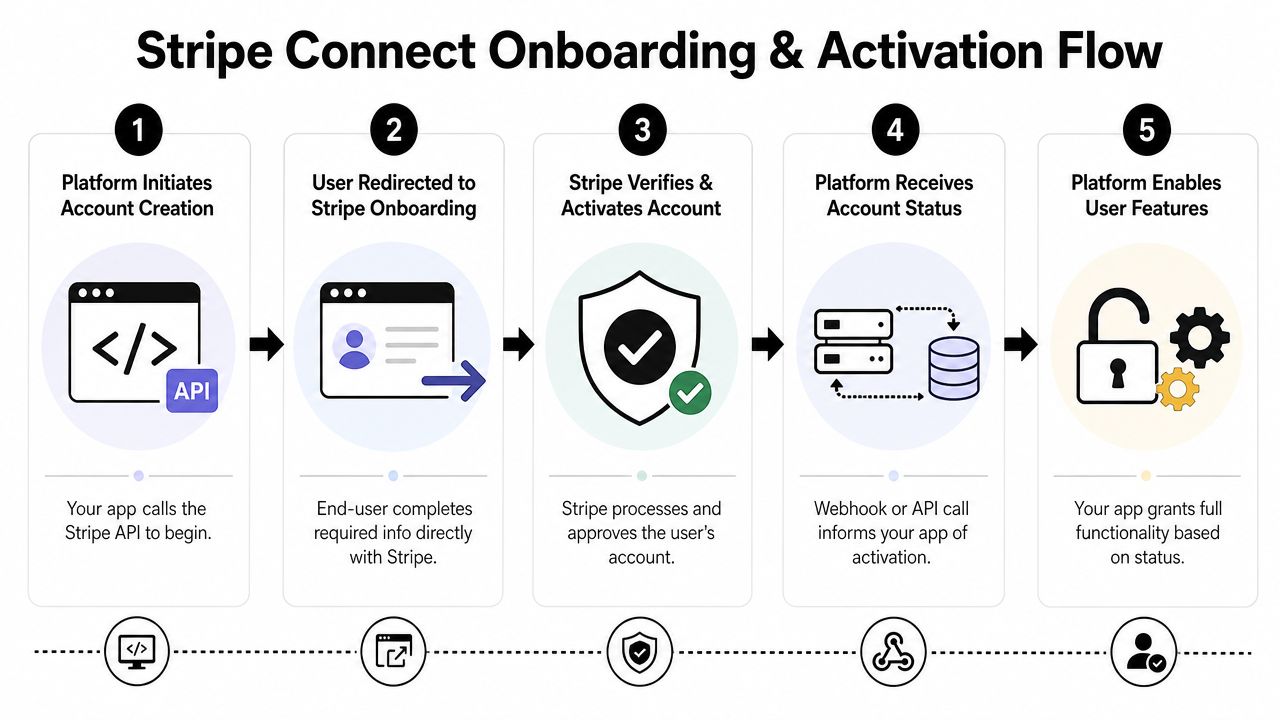
For Standard accounts, the flow is simple on paper. Your backend creates an account with /v1/accounts, your app creates an Account Link, and the user completes Stripe-hosted onboarding. In practice, this flow behaves more like a distributed signup process than a single redirect. Part of it runs in your product, part runs on Stripe's side, and the final state is confirmed by webhooks rather than by the browser coming back to your app.
A practical implementation usually includes five steps:
Create the account at a deliberate point in your user journey
You can create the connected account during initial signup, when a user applies to sell, or only when payouts become relevant. Earlier creation gives you a stable Stripe account ID to attach requirements, review states, and support history to. Later creation reduces clutter from users who never activate monetization. This is a product decision as much as an API decision.Redirect with clear expectations
The user is leaving your interface for a hosted flow. Say that plainly. Good copy reduces drop-off because the user understands that identity checks and payout setup are part of becoming payable, not a detour to a different service.Treat
refresh_urlas part of the user experience
Expired sessions and abandoned forms are normal. Yourrefresh_urlshould not dump the user onto a generic page. It should recreate the onboarding link, explain what happened, and get them back to the right step with as little confusion as possible.Use webhooks as the source of truth
A browser redirect only tells you that the user returned. It does not tell you whether the account is ready for charges or payouts. Your system should listen for account updates and recalculate internal status from webhook events.Gate features on activation state, not form completion
A user can finish the hosted form and still be unable to transact. Your app should decide whether to enable selling, charging, or payout-related UI based on account state fields and capability status, not on "completed onboarding" alone.
This distinction matters because onboarding is not the same as activation.
The point that trips up product teams is capabilities. Account creation gives you a container. Capabilities determine what that container is allowed to do. Card acceptance and payouts can be requested, reviewed, activated, restricted, or disabled over time. If you model this as a one-time milestone, your UI and support playbooks will drift away from reality.
A good mental model is airport security. Creating the account is issuing the passenger record. Completing onboarding is reaching the checkpoint. Activation is getting cleared to board a specific flight. A user can be in the airport system and still not be cleared for the action your product wants them to take.
That has direct implications for your state machine:
Do not mark a seller as live because they finished the hosted form
Do not promise payout timing until payout-related permissions are active
Do not assume an active account stays active after review, document expiry, or risk intervention
If your platform also collects payment details elsewhere in the product, this is a good point to align engineering and security on PCI compliance requirements for payment flows. Teams often assume Stripe-hosted onboarding covers every compliance concern. It only covers the parts Stripe hosts.
A simple translation layer between Stripe fields and your app usually works better than exposing raw API states in the UI. Support agents and users need language that explains what to do next, not internal flags.
App status | What it means internally |
|---|---|
Pending onboarding | Account exists, user has not finished the hosted flow |
Submitted | User provided details, Stripe is still evaluating requirements |
Active | The account can support the product actions you need to enable |
Needs attention | More information, updated documents, or review is blocking key actions |
Restricted | The account exists, but current permissions do not support your core use case |
This translation layer helps in another way. It reduces lock-in at the product layer. If your app logic depends everywhere on raw Stripe-specific fields, a future migration becomes harder because business rules are mixed with provider vocabulary. If your app depends on your own internal states, you can swap payment providers with less UI and workflow surgery.
The long-term lesson is simple. Build onboarding as an operating system for account state, retries, and exceptions. Not as a one-time redirect flow.
Managing Payouts and Ongoing Compliance
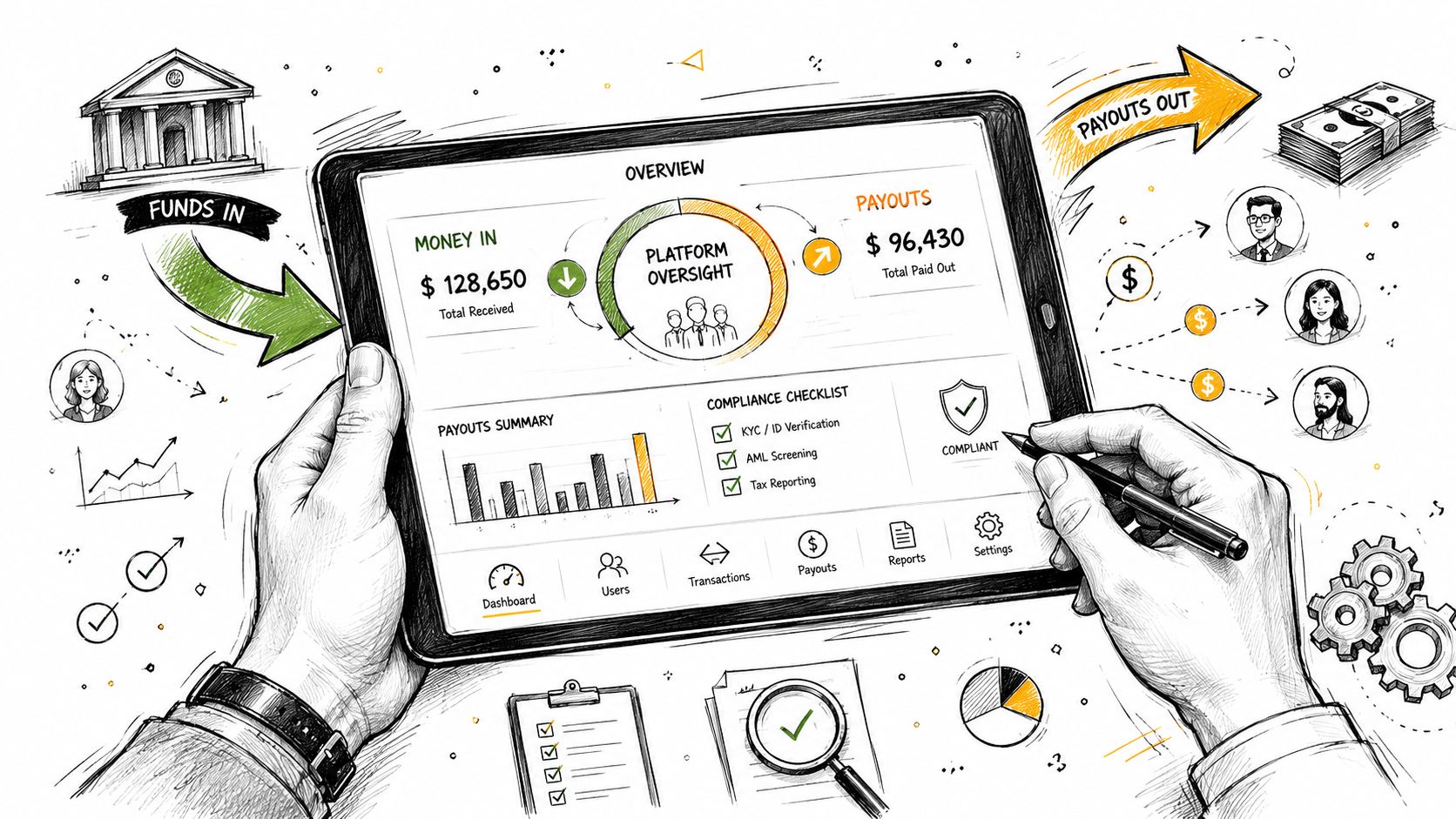
A platform usually feels "done" right after the first successful payout. That is often the point where the actual operating work starts. Money movement creates recurring obligations. Users change bank accounts, verification rules change, payouts fail, and previously healthy accounts can become restricted weeks after launch.
Payout operations grow faster than the integration
Stripe Connect gives you broad international coverage through its Connect features overview. Product teams often read that as "global payouts are handled." A better interpretation is narrower. Stripe gives you payment rails and provider workflows. Your team still owns the operating model around exceptions, communication, and account health across countries.
That distinction matters because payout behavior is shaped by local rules, account type, verification state, and the services an account is allowed to use. The result is less like one payout system and more like a fleet of similar systems with country-specific rules. If you expand market by market, support volume and policy questions usually grow before revenue does.
Payout timing is another source of confusion. Users care about one thing. "When will the money arrive?" Your system may need to answer with more context: funds can be pending, reserved, in transit, or blocked by missing information. If your product shows only "paid" or "not paid," support will spend time explaining states the UI should have explained first.
Teams should map the full payout failure path early. What happens when a bank account is invalid, a payout is paused, or Stripe asks for updated documents after the user has already been transacting? Those are not rare edge cases in an operating platform. They are recurring workflows.
If your product also touches cardholder data outside Stripe-hosted surfaces, align that work with your broader PCI compliance requirements for SaaS teams. Security review should happen before payout operations get complex enough that changing the architecture becomes expensive. External validation can help too, especially for products that mix payments, admin tooling, and internal support workflows. Affordable Pentesting for SaaS apps is one example of the kind of review many teams add before scale exposes weak spots.
Restricted accounts need an operating routine
A connected account can complete onboarding, receive payments, and still fall out of a usable state later. Documents expire. Owners update business details. Risk reviews trigger new requirements. Tax information becomes incomplete. If your team treats compliance as a setup task, these events arrive as surprises.
The practical question is simple. Who notices first, and what happens next?
A good operating routine usually includes:
Scheduled review of accounts with open requirements
Someone outside engineering should have a queue for accounts that need attention, with clear rules for escalation.Payout-state messaging in plain language
"Payout delayed because bank details need review" is better than exposing provider terminology your users do not understand.An in-product remediation path
Users should be able to update details or re-enter a hosted flow from the exact place where the problem affects them.Internal severity rules
A blocked first payout, a payout failure for an active seller, and a permanent restriction should not all land in the same support bucket.Auditability
Your team should be able to answer who contacted the user, what was requested, and whether the issue affects payments, payouts, or both.
This works like incident management for financial operations. You need detection, ownership, user communication, and a way to confirm recovery. The only difference is frequency. Payment operations incidents often arrive one account at a time, which makes them easy to underestimate.
Ownership is where many platforms stumble. If every payout or verification issue routes to engineering, engineers become the fallback compliance desk. That does not scale, and it creates slow response loops because the team closest to the API is not always the team best equipped to contact users or judge operational risk. A healthier model gives operations or support clear runbooks, product clear policy decisions, and engineering responsibility for integrations, alerts, and tooling.
There is a strategic angle too. If your payout controls, support tooling, and user messaging all mirror Stripe's exact vocabulary and states, changing providers later becomes much harder. Keep your internal payout model separate from provider-specific fields. That extra abstraction feels unnecessary early on. It becomes valuable when finance asks for multi-provider redundancy, when a new region needs a different payout partner, or when treasury starts asking whether stablecoin payouts belong in the roadmap.
Critical Pitfalls and Long-Term Strategic Risks
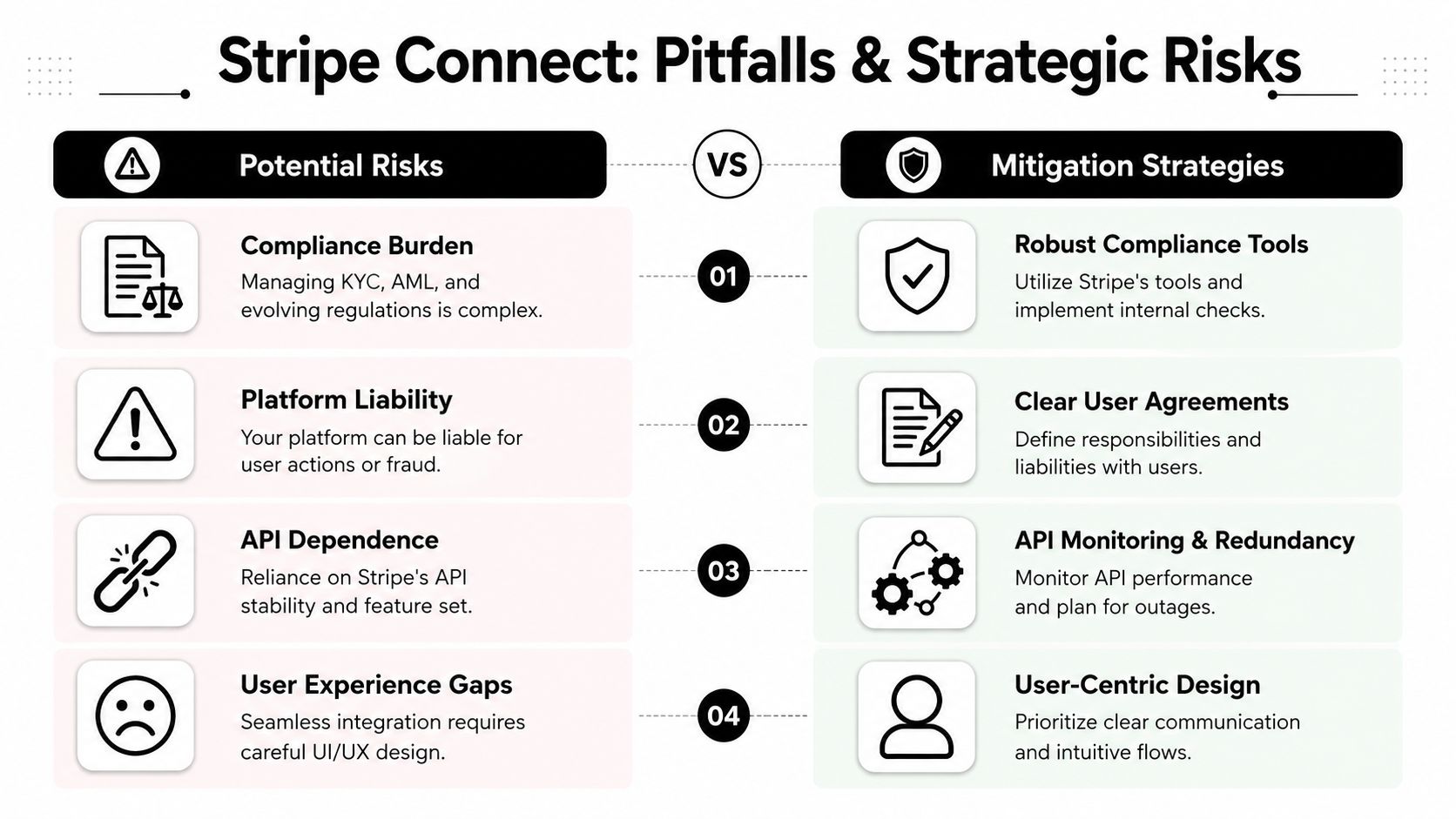
The sharp edges of a Stripe Connect account don't usually appear on day one. They appear after launch, when real users fail onboarding, capabilities change, or a partner asks whether they can move their account elsewhere.
The hidden cost of friction after signup
A common approach involves obsessing over signup conversion and underinvesting in post-signup verification UX. That's backwards for a payments platform. If a user joins your product, lists an offering, and then stalls in onboarding, your acquisition work was wasted.
The problem isn't only bad UI. It's mismatched expectations. Users think, “I created an account.” Your system knows, “This seller still can't transact.” When that gap isn't communicated clearly, support tickets pile up and trust drops.
Three practical fixes help:
Label statuses in business language
“Waiting for verification” is better than exposing raw field names.Separate product setup from payment activation
Let users finish non-financial setup while you hold back money movement features.Instrument abandonment
If users disappear during onboarding, you need product analytics around that path.
For teams auditing the security implications of platform integrations, this article on Affordable Pentesting for SaaS apps is a useful companion read. It's especially relevant when your onboarding and admin flows start accumulating sensitive operational surfaces.
Platform lock-in is not a side note
This is the most underexplained strategic risk in Connect.
Stripe's support documentation states that, since July 2021, platforms can request only read and write permission, and a platform-controlled Stripe account can be connected to only one platform at a time through that permission model in the official support note on permissions and access levels.
That has real consequences.
A seller or creator can't easily take the same connected account and its platform relationship to a competing product. If your platform ever changes providers, merges systems, or lets users export to another operating model, this limitation becomes part of your migration design.
Connected account architecture affects retention, but not always in a healthy way. Sometimes users stay because moving is hard, not because the product is better.
This also affects procurement and legal conversations. Enterprise prospects may ask who owns the payment relationship, what data is portable, and what happens on termination. If your internal answer is “we'll figure it out later,” you have a platform risk, not just a missing FAQ.
The risk work does not stay inside engineering
A Stripe Connect account pushes risk, support, legal, and product design into the same room. Engineering might implement the API, but several non-technical decisions shape whether the platform runs smoothly.
Consider who owns each of these:
Risk area | Question your team must answer |
|---|---|
Account governance | Who controls the relationship after onboarding? |
Support escalation | Who handles restricted or rejected accounts? |
User comms | What does the seller see when capabilities change? |
Offboarding | What happens if a seller leaves your platform? |
The common mistake is treating these as later-stage refinements. They're not. They are part of the initial integration scope.
If you ignore them, your first incident teaches the lesson for you. A payout freezes. A seller threatens churn. Support asks engineering what happened. Engineering says the account exists but can't transfer. Product realizes there is no customer-facing explanation. Then everyone discovers the “simple payments feature” was a cross-functional operating system.
Exploring Alternatives for Global Payments and USDC Payouts
A common turning point comes after the first launch. The API works, sellers can get paid, and then the product team realizes the harder question was never "Can we create connected accounts?" It was "Do we want to run this account model for the next three years?"
That distinction matters most for cross-border SaaS, creator businesses, and online platforms with users in many countries. Stripe Connect is built for a specific operating model. Your platform sits in the middle, coordinates onboarding, and keeps managing account state over time. That can be the right design for marketplaces and multi-sided platforms. It is a heavier system if your real goal is simpler: accept global payments and settle to the business in a stable digital dollar.
An easier comparison is to treat these as two different architectures. Connect works like a managed account tree. Each seller or recipient is a node that can change status, require more information, or trigger support work later. A USDC-settlement model is closer to a direct payment rail. The customer pays, the business receives USDC, and there is less platform-side orchestration around sub-accounts.
Suby is one example of that second model. It offers an API for card or crypto payments, with settlement in USDC. It also includes Discord and Telegram integrations for subscriptions, paid access, and community-driven use cases. If your team is comparing architectures rather than only comparing APIs, this overview of a Stripe Connect alternative for USDC payouts is a useful starting point.
The trade-off is straightforward. Connect gives you fine-grained control over a network of connected accounts. That control is valuable if you need marketplace flows, platform-managed compliance logic, or complex fund movement rules. A USDC-first setup reduces some of that operational surface area, but it shifts your evaluation toward treasury policy, wallet operations, accounting treatment, and how comfortable your finance team is with stablecoin settlement.
That last part is where teams often get surprised. Replacing bank payouts with USDC does not remove operational work. It changes the type of work. You spend less time dealing with sub-account lifecycle issues and more time deciding custody, reconciliation, conversion policy, and who owns off-ramp decisions.
For teams thinking past checkout and into treasury management, this guide to smarter stablecoin returns is also relevant.
The strategic question is simple. If your business needs a platform for managing many third-party accounts, Stripe Connect fits that shape. If your business mainly needs global checkout, recurring billing, or creator monetization with USDC settlement, a model built around direct settlement may be easier to operate and less likely to create long-term platform lock-in.
