

Gaspard LEZIN
Your Guide to a Digital Products Store Success
Launch your digital products store! This guide covers product choice, pricing, global payments with USDC payouts, and automated access.
Most advice about building a digital products store starts in the wrong place. It starts with the product idea, the cover design, the course outline, or the storefront theme. Those things matter, but they aren't usually what breaks the business.
What breaks it is operations. A buyer in another country tries to pay and the checkout fails. A sale goes through, but settlement takes too long. A subscription renews, but access isn't updated. Revenue lands in the wrong currency, support tickets pile up, and the margin you thought you had gets eaten by payment friction.
That matters because this isn't a niche anymore. Digital products are already a mainstream buying behavior. Industry summaries cited by Whop say digital products represent a $2.5 trillion industry, and 68% of internet users aged 16+ pay for some kind of digital content each month in 2025 according to Whop's digital product statistics roundup. If you're launching a digital products store today, you're entering a market where buyers already expect instant access, simple checkout, and reliable post-purchase delivery.
Table of Contents
Start with the operating model
Think globally from day one
Pick formats that fit global selling
What usually underperforms
Price for cash flow, not just conversion
Test the offer, not only the number
Match the price to delivery risk
Build the pages that remove doubt
Deliver access cleanly
Organize files and instructions like support matters
Where most global stores lose control
What a modern settlement setup looks like
Why this matters more for digital products
Use the lightest setup that fits the sale
Recurring payments need lifecycle logic
Keep the checkout logic close to the product logic
Access should follow payment status
Tax handling starts with clean payment records
Support volume drops when the rules are visible
Track buyer behavior, not just traffic
Scaling comes from fewer operational leaks
Your Next Steps to a Successful Global Store
Launching Your Digital Products Store the Right Way
A strong digital products store doesn't begin with a catalog. It begins with a sales path that works from click to payout.
Plenty of founders can create something valuable. Fewer build the stack around it. They launch a course, template pack, private community, or downloadable asset, then realize too late that global buyers don't all pay the same way, subscriptions need rules, and delivery needs to happen instantly without manual cleanup.
That's why the first decision isn't only what you'll sell. It's how the business will collect payment, grant access, handle refunds, and keep cash flow predictable. Those choices shape the business more than the logo or landing page layout.
Start with the operating model
A useful way to think about a digital products store is to separate it into four layers:
Offer layer. What the buyer gets, such as a membership, software license, resource bundle, or paid community access.
Conversion layer. The product page, pricing page, checkout, and order confirmation flow.
Delivery layer. File delivery, login creation, gated content, or community role assignment.
Settlement layer. How money arrives, in what form, on what timeline, and with how much uncertainty.
Most beginner guides spend almost all their time on the first layer. Experienced operators care just as much about the last one.
Practical rule: If you can't explain how a buyer pays, how access is granted, and when funds arrive, you're not ready to launch, even if the product is finished.
Think globally from day one
Even a small digital products store can attract buyers across borders. That's one of the biggest advantages of digital delivery. It also introduces the first serious operational challenge. Selling globally is easy in theory and messy in practice when your payout process depends on slow banking, unclear conversion costs, or delayed settlement.
That doesn't mean you need a huge infrastructure team. It means you should design the store around repeatable operations. Use simple offers, clear fulfillment rules, and a payment setup that won't force you into manual reconciliation every week.
Founders who get this right tend to grow more calmly. They don't just make sales. They know what happens after the sale.
Choosing Your Product and Pricing Strategy
Product choice sets the economics of your store early. It shapes support volume, refund risk, upgrade potential, and whether your payment stack can carry the business without constant manual fixes.
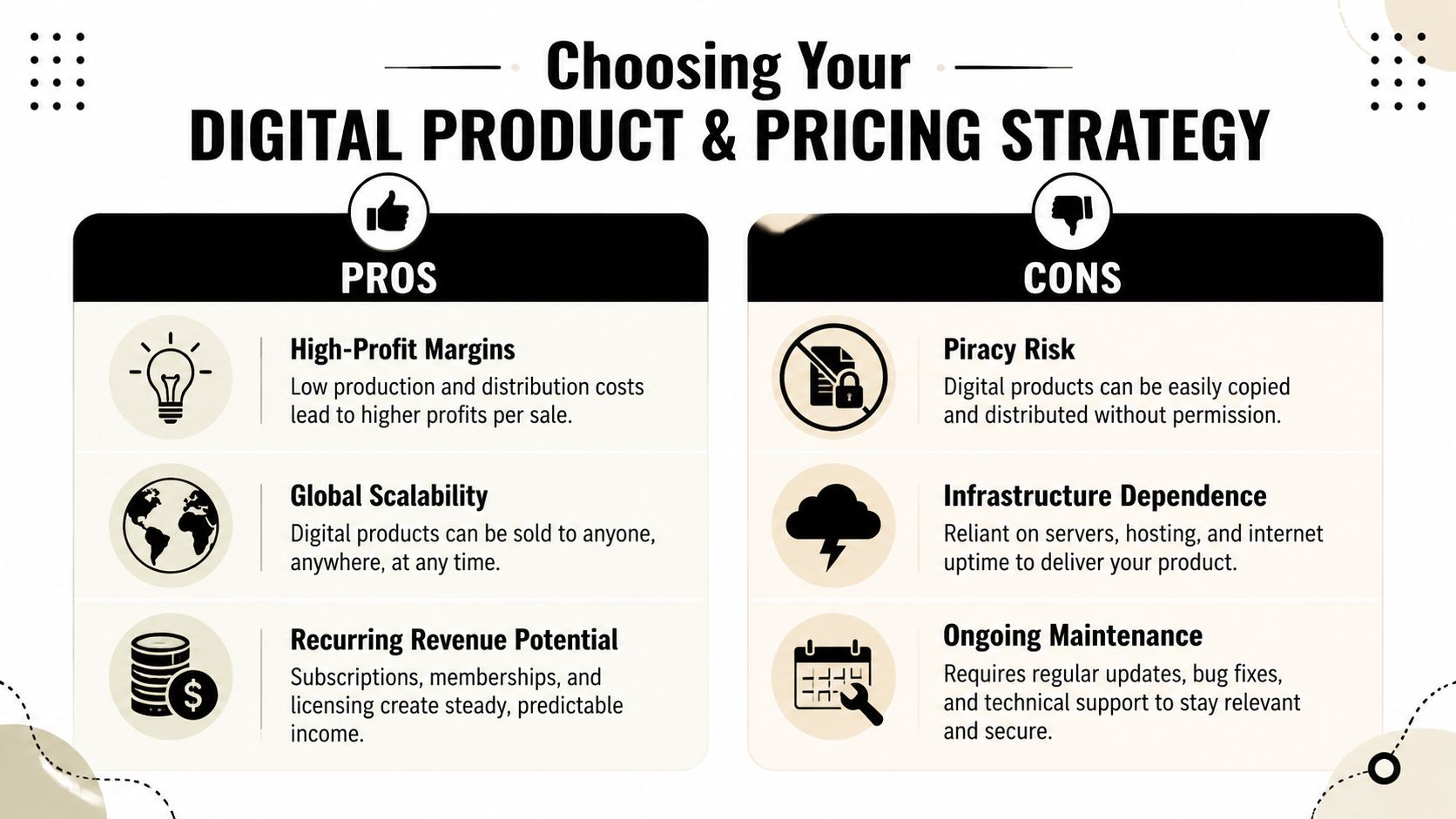
A lot of founders start with the product they can finish fastest. I have seen that backfire. The better starting point is the offer that is easy to price, easy to fulfill, and strong enough to survive payment fees, failed renewals, and cross-border buyer expectations.
Pick formats that fit global selling
The strongest digital products usually travel well across payment methods, time zones, and customer types. They are easy to explain in a few lines, easy to grant access to, and easy to support after the sale.
Formats that usually hold up well include:
Paid membership access. Good for private communities, research libraries, premium newsletters, and ongoing education.
Packaged services. Sell a fixed audit, setup package, implementation sprint, or review with a clear scope instead of open-ended hours.
Software-lite assets. Calculators, dashboards, workflow templates, prompt libraries, internal tools, and licensed operating resources work well here.
Exclusive content bundles. Training libraries, workshop recordings, swipe files, and expert playbooks are easier to position than single low-value files.
These products work because buyers understand the outcome quickly. They also give you better pricing options than commodity downloads, especially if you want subscriptions, renewals, or tiered access, which is why so many creators structure them as a repeatable info product business rather than one-off launches.
If you are still deciding what store model fits your offer, this comparison of platforms for selling digital products is useful because it frames the trade-offs between simple file delivery, memberships, and recurring billing.
What usually underperforms
Some offers look easy to launch and turn into expensive support problems.
Product choice | Why it struggles |
|---|---|
Generic ebook | Hard to differentiate unless the problem is urgent and specific |
Large course bundle | Slower buying decision because the offer feels heavy and time-consuming |
Custom file pack with unclear rights | Buyers pause when usage rules and license terms are fuzzy |
Cheap standalone printable | Low order value leaves less room for fees, disputes, and support time |
The problem is rarely the format alone. The problem is weak positioning combined with thin margins. If the buyer needs too much explanation before paying, the store usually needs more traffic and more support than expected.
Clear value beats creative packaging.
Price for cash flow, not just conversion
A pricing strategy should protect margin and reduce operational stress. That matters even more in a digital products store serving international buyers, where fees, taxes, and payout timing can distort what looked profitable on the product page.
Stan's guide to pricing digital products outlines common pricing models such as cost-plus, value-based, competitive, and dynamic pricing, and if the hosting platform is still open it is worth weighing the leading stan store alternatives against your billing needs. That framework is useful, but the practical decision is simpler. Choose a model your checkout, fulfillment, and support process can handle consistently.
A workable pricing structure often looks like this:
One-time purchase for templates, workshops, audits, and fixed-scope bundles
Subscription for communities, research products, content libraries, and ongoing access
Tiered access for buyers who need different usage rights, depth, or support levels
Free entry product or low-friction lead magnet when you want to qualify buyers before the main offer
For creator-led offers that combine downloads with engagement mechanics, this guide to digital rewards for creators shows another useful packaging approach.
Test the offer, not only the number
Pricing tests fail when founders change too much at once. A price is tied to promise, scope, billing cadence, and who the offer attracts.
Track a wider set of signals:
Refund rate, because a price can convert well and still bring in poor-fit buyers
Support load, because unclear pricing often shows up as pre-sale questions and post-sale complaints
Retention or repeat purchase behavior, especially for memberships and usage-based offers
Upgrade path, because a strong entry offer should lead naturally to a higher-value product
I usually treat pricing as an operations decision first and a branding decision second. If a lower price point brings more tickets, more disputes, and more failed payments, revenue quality drops even if gross sales rise.
Match the price to delivery risk
Low-ticket products create a hidden trap. They can sell in volume and still produce messy economics once processor fees, taxes, chargebacks, and customer support are counted properly.
That is why access-based products, subscriptions, and productized services often outperform cheap one-off downloads. They leave more room for support, better buyer qualification, and more predictable revenue between payout cycles.
The best product for a digital products store is rarely the one that is easiest to make. It is the one that stays profitable after checkout, delivery, and settlement are all doing real work.
Designing Your Storefront and Product Delivery
A digital products store should feel less like a shelf and more like a guided path. Buyers need to understand what they're getting, why it matters, what happens after payment, and where to go if something breaks.
Build the pages that remove doubt
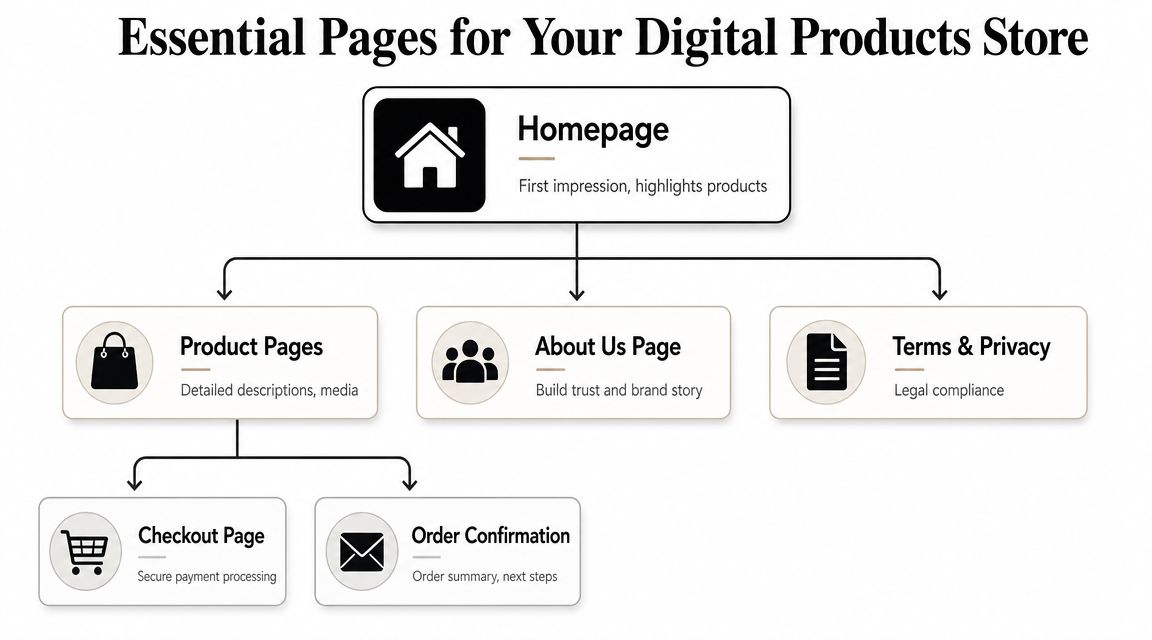
Salesforce's guidance for digital commerce recommends a store structure built around a conversion path, including dedicated product pages, homepage, pricing, checkout, about, support, contact, account, end-user license or purchase terms, and refund policy pages in its digital products commerce checklist.
Founders often skip half of these and then wonder why buyers hesitate. The missing pages don't just satisfy a checklist. They answer the buyer's unstated questions.
A practical setup looks like this:
Homepage. Show the category you sell in, who it's for, and the primary action you want visitors to take.
Product page. Explain the outcome, what is included, access format, delivery method, compatibility, and limitations.
Pricing page. Useful when you sell memberships, tiers, or multiple packages.
Checkout page. Keep it focused. Every extra field invites drop-off.
Support and contact pages. Buyers want proof that a real person or team exists if something goes wrong.
Refund and terms pages. These reduce anxiety before purchase and disputes after purchase.
If you're comparing store setups, this best platforms for selling digital products guide is useful for understanding where different selling models fit.
Deliver access cleanly
After payment, the customer should never need to ask, "What happens now?"
That means your delivery system needs clear rules:
If the product is a file, send a secure delivery email immediately.
If the product is gated content, create the account or grant the right access state automatically.
If it's a membership, connect payment status to entitlement status so access can change on renewal, failure, or cancellation.
If there are usage limits or license terms, show them before and after purchase.
Operator note: Most support tickets in a digital products store aren't about the product itself. They're about access, missing emails, login confusion, or unclear refund expectations.
Organize files and instructions like support matters
Messy fulfillment creates rework. Keep each product in its own clearly labeled folder, maintain version naming that makes sense, and use one canonical delivery flow instead of ad hoc links sent manually.
For creators experimenting with post-purchase engagement, this guide to digital rewards for creators offers useful ideas on pairing downloads with follow-up actions like surveys and feedback collection.
A few simple habits make delivery more reliable:
Use a single source of truth for the final customer-facing file or access link.
Write plain-language instructions for installation, login, or usage.
Separate preview assets from purchased assets so buyers understand what they saw versus what they bought.
Plan for updates if the product changes over time, especially for templates, software-lite tools, and memberships.
A polished storefront doesn't need to be elaborate. It needs to remove uncertainty.
Solving Global Payments with Predictable Payouts
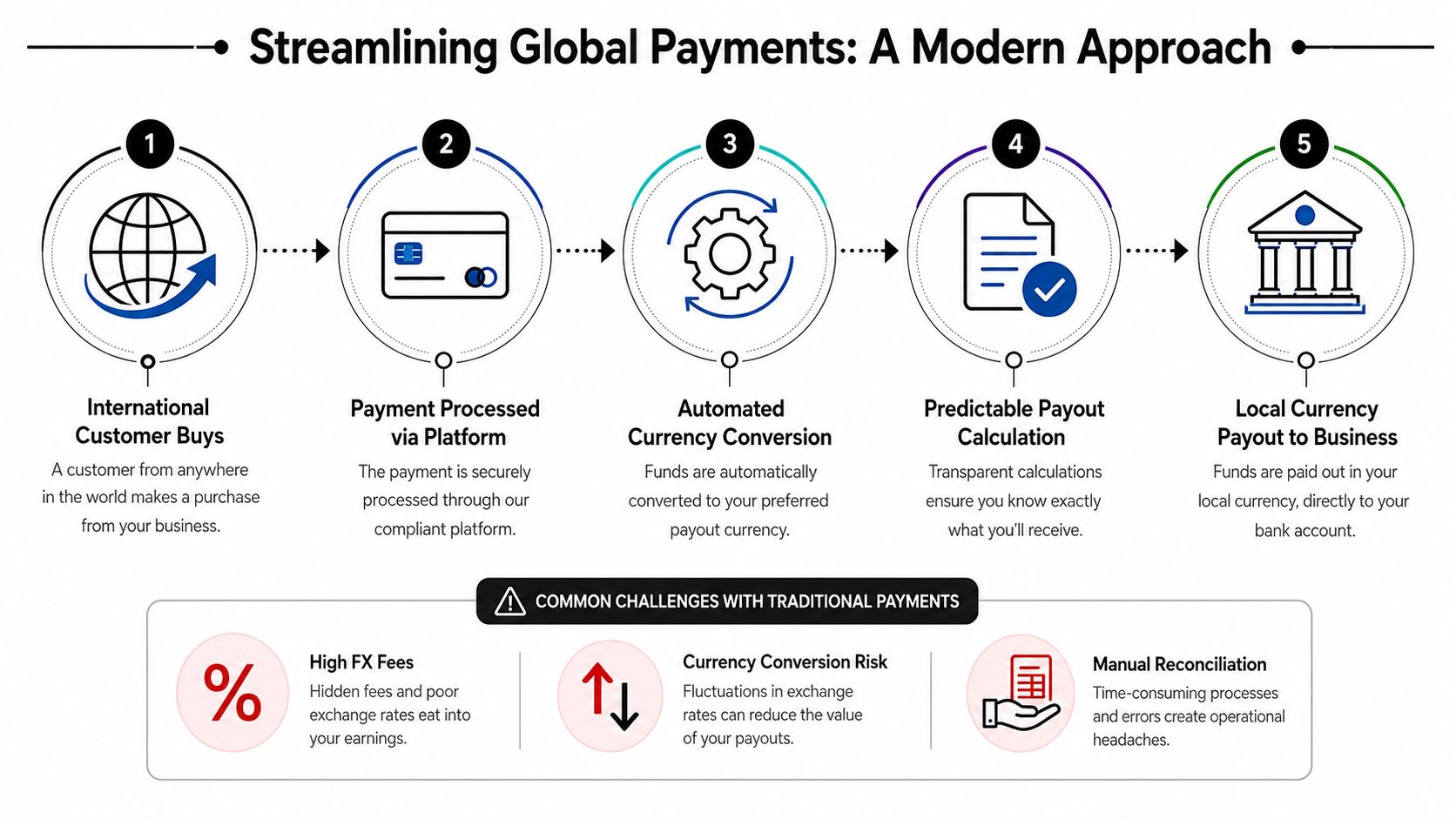
The fragility of many digital products stores stems not from weak demand, but from the payment and settlement path, which introduces uncertainty the founder didn't model.
Where most global stores lose control
Most content about digital selling tells you where to list, how to write product descriptions, or how to build an audience. Much less of it deals with the harder question. How fast and how reliably do you get paid after the sale?
That gap matters most when you're selling across borders. Bain's market guidance highlights the importance of evaluating margin and operating cost by segment, and the same logic applies here. For digital sellers, payout delays and currency conversion can materially change business economics, as noted in Bain's discussion of underserved operational needs in go-to-market models.
The problems usually show up in a few forms:
Currency mismatch. The customer pays in one context, the business plans expenses in another.
Delayed availability of funds. Sales happen today, but usable revenue arrives later.
Messy reconciliation. Finance and support spend time matching orders, refunds, and subscriptions.
Payout uncertainty. Operators don't know exactly what will land or when.
For a physical goods business, some of this can be absorbed into inventory planning. For a digital products store, the margin can look strong while cash flow feels unpredictable.
What a modern settlement setup looks like
A better model separates the buyer experience from the merchant settlement experience. Buyers should get a familiar checkout. The business should get a predictable payout flow.
That's where newer payment infrastructure becomes attractive, especially for internet-native businesses. Instead of forcing the merchant to manage multiple banking paths, foreign exchange exposure, or payout timing guesswork, the payment layer can standardize settlement in a single digital dollar format while preserving a normal customer checkout flow.
One option in this category is Suby's global payment API. Suby provides an API that lets businesses accept payments by card or crypto, while the business receives USDC. It also offers native integrations with Discord and Telegram for use cases like subscriptions, paid access, and online communities. The important operational point is simple. Users pay with cards, businesses receive USDC.
Predictable settlement changes how you run the business. Pricing gets clearer, reconciliation gets lighter, and subscriptions become easier to trust.
Why this matters more for digital products
Digital goods don't need shipping, warehousing, or physical fulfillment. Salesforce notes that the core advantage is electronic delivery without inventory or shipping overhead in the earlier commerce guidance. That makes payment friction stand out even more. When delivery is instant, delays and uncertainty after the sale feel especially out of place.
A global digital products store works best when checkout and settlement don't fight each other. If your audience is international, the cleanest setup is often the one that keeps the customer payment experience familiar while making merchant payouts more consistent behind the scenes.
Integrating Your Checkout and Subscription System
The right integration depends on how you sell. A founder sending occasional invoices needs something different from a SaaS team running recurring subscriptions or a creator gating paid access in a community.
Use the lightest setup that fits the sale
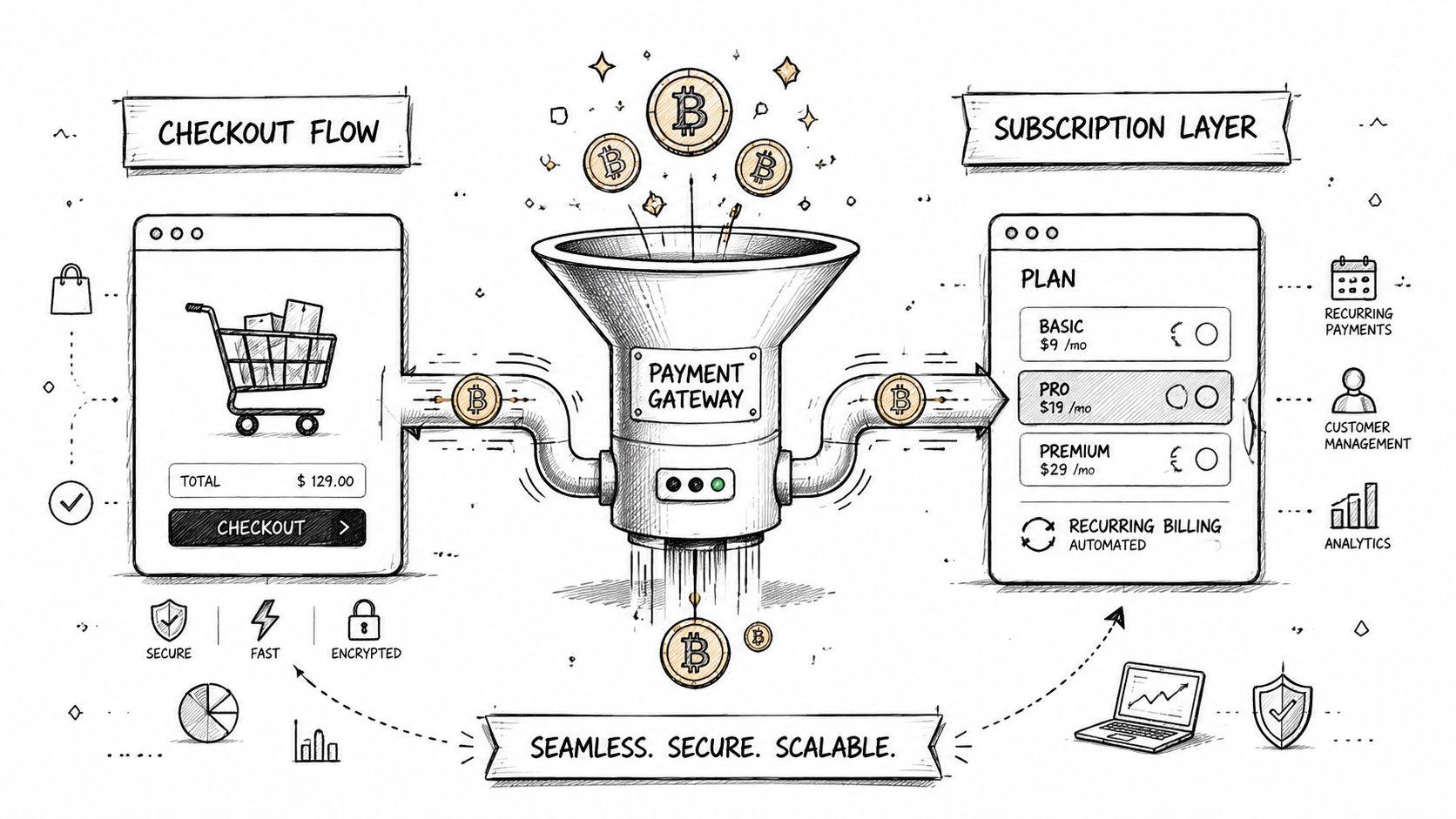
There are usually three practical ways to connect payments to a digital products store.
Paylinks work well when speed matters more than deep customization. They're useful for one-off sales, invoices, consulting deposits, early product launches, or private client offers sent through email, chat, or DMs. The main benefit is that you don't need a full storefront flow to get paid.
Embedded checkout makes sense when you want the purchase to happen inside your own site or app. This is the better option for stores that care about branded experience, cleaner analytics, and fewer handoffs between landing page and payment. For a digital products store, that usually means a product page with a direct purchase action instead of pushing the buyer to a separate manual process.
API and webhooks are the right choice when payment status should trigger other systems. That includes account creation, access changes, subscription events, internal notifications, CRM updates, or entitlement logic across your product stack. If your store is more product than brochure, this is usually where you end up.
A lot of teams start with paylinks, move to embed, and add API logic as operations mature. That's normal. The mistake is overbuilding on day one.
Recurring payments need lifecycle logic
Subscriptions aren't just a billing setting. They're an operational system.
You need rules for:
Activation when the first payment succeeds
Renewal handling when the next charge is attempted
Failed payment response when access should pause or a reminder should be sent
Cancellation behavior when the customer leaves but may still have time left in the billing period
Reactivation when a former subscriber returns
Those states affect more than revenue. They affect access, support, community permissions, and customer trust. If you're building recurring offers, this recurring payments setup guide is a useful reference point for mapping billing events to the right customer experience.
For a more visual walkthrough of payment flow thinking, this short demo helps illustrate how teams approach implementation in practice.
Keep the checkout logic close to the product logic
Non-technical founders often lose momentum. They treat checkout as a separate vendor problem and subscriptions as a support problem. In reality, they're part of the same system.
A clean implementation ties together:
Store event | Operational action |
|---|---|
Successful one-time payment | Deliver file, show receipt, confirm usage instructions |
Successful first subscription payment | Create entitlement, assign role, send onboarding |
Renewal success | Keep access active, confirm billing quietly |
Failed renewal | Trigger reminder, set grace period, prepare access update |
Refund or cancellation | Reverse or schedule access changes based on policy |
The best checkout flow is the one that reduces manual work after purchase, not just the one that looks good during purchase.
When your checkout and subscription system are aligned, growth gets less chaotic. You stop patching edge cases by hand.
Automating Access, Taxes, and Customer Support
A digital products store breaks under manual fulfillment long before it runs out of demand. The stores that stay manageable are the ones where payment status triggers access, tax records, and support workflows without someone checking each order by hand.
Access should follow payment status
If a customer pays, they should get access immediately. If a renewal fails, access should shift according to your policy. If a refund is approved, the system should know whether to revoke access at once or at the end of the billing period.
That sounds obvious, but many founders proceed to create avoidable support debt. They wire up checkout, then handle delivery in a separate tool, then patch failed edge cases through email. The result is familiar. Buyers pay but do not get in. Canceled subscribers keep access. Refund disputes turn into long message threads because nobody can see the original billing event clearly.
For digital products tied to recurring revenue, entitlement rules need to be explicit:
Discord memberships: assign the right role after payment and remove or downgrade it when billing ends
Telegram access: add buyers to the correct paid channel or group without manual approval
Private libraries or dashboards: update logins, permissions, or feature access based on billing state
Packaged offers: send the right onboarding email, intake form, download link, or start sequence as soon as the order clears
Native Discord and Telegram integrations help because they remove one fragile handoff, and pairing them with automated provisioning means the right role or channel access is granted the moment payment clears. If your offer depends on community access, that connection is part of fulfillment, not a bonus feature.
Tax handling starts with clean payment records
Tax problems usually start upstream. The issue is not just the filing. It is missing or messy transaction data, unclear refund history, and no reliable record of what product was sold, where the buyer was located, and when access was granted.
Set this up early. Store invoices, payment timestamps, refund events, subscription changes, and product labels in a way you can export later. If you sell globally, keep jurisdiction rules in mind before volume builds. Retroactively fixing months of incomplete records is slow, expensive work.
The founders who treat tax tracking as an afterthought usually discover the cost during reconciliation, not at checkout.
Support volume drops when the rules are visible
A large share of support tickets comes from preventable confusion. Customers want to know three things after paying: what they bought, how they get it, and what happens if something goes wrong.
Write the answers in plain language.
Put your refund terms on the product page. Explain what counts as delivery. State how subscription cancellation works, what happens after a failed payment, how duplicate purchases are handled, and where buyers should go if access does not update correctly. Then repeat the relevant parts in the post-purchase email so support does not become your fallback documentation.
For teams adding automation beyond a basic help center, this overview of AI-driven solutions for enterprises is a useful reference for deciding when chat, routing, and self-service support are worth adding.
A practical support setup for a digital products store usually includes:
A visible contact path for billing, access, and refund questions
Order confirmation emails with delivery details and next steps
A short FAQ covering access issues, cancellations, and billing edge cases
Basic fraud and security checks to reduce disputes and unauthorized sharing
A manual fallback process for cases where automation fails
The goal is predictable operations. When payment, access, tax records, and support rules are connected, the store stays easier to run as sales volume grows.
Analyzing Performance and Scaling Your Business
A digital products store doesn't usually fail because the founder lacks ideas. It stalls because the operator can't see what's working clearly enough to improve it.
Track buyer behavior, not just traffic
Traffic matters, but it isn't the scorecard. The more useful metrics are the ones tied to revenue quality and retention.
Look closely at:
Conversion rate by product and price point
Refund patterns
Subscription churn
Customer lifetime value
Drop-off points between product page, checkout, and successful access
These metrics work together. A store can have healthy top-line sales and still struggle if churn is high or if support issues are pushing refunds up. A real-time dashboard is valuable because it shortens the feedback loop between an operational issue and the fix.
If you want a practical framework for improving the buying path itself, this e-commerce conversion rate optimization playbook is a strong companion resource.
Good operators don't just ask why buyers purchased. They ask why qualified buyers hesitated, canceled, refunded, or never activated.
Scaling comes from fewer operational leaks
The upside here is large. Mordor Intelligence estimates the digital goods market at USD 157.39 billion in 2026 and projects it will reach USD 511.43 billion by 2031, growing at a 26.60% CAGR, according to its digital goods market forecast.
That doesn't mean every digital products store will grow automatically. It means founders who build a clean operating system have room to expand into a growing channel.
Scaling usually comes from doing boring things well:
tightening checkout flow
simplifying offers
improving onboarding
reducing failed access events
monitoring subscription health
using payout visibility to plan with more confidence
Growth gets easier when the store doesn't leak value at every step.
Your Next Steps to a Successful Global Store
A digital products store works best when you treat it like an operating system, not just a product page with a payment button. The offer matters. The pricing matters. The storefront matters. But the stores that hold up over time are the ones that handle payment, access, support, and settlement with fewer surprises.
That's the part most guides skip. They tell you what to make, but not how to run it once real customers start buying from different countries, renewing subscriptions, asking for refunds, and expecting instant delivery.
Keep the setup simple. Choose a product format that's easy to deliver. Price it like a test, not a guess. Build the pages that remove buyer doubt. Then make sure the money flow and access logic are strong enough to support the business you want, not just the launch you want.
Start there, and your digital products store has a much better chance of becoming stable, global, and worth scaling.
Suby is a payment gateway and payment processor. Your customers pay with card, bank transfer, Apple Pay, Google Pay, Klarna, and more, or stablecoins, and you get paid out to your bank account, or directly in stablecoins (USDC, EURC) to your wallet, anywhere in the world, no bank account required. For a global digital products store it covers one-time purchases and recurring subscriptions with native Discord and Telegram integrations for paid access, so checkout and settlement stop fighting each other.
