
Gaspard LEZIN
Suby Transaction History: Payments & Settlements
Track Suby transaction history: monitor card payments, manage USDC settlements, & reconcile revenue via dashboard, API, and webhooks.
You usually notice transaction history when something breaks.
A customer says they paid but didn't get access. Finance sees a payout arrive, but the amount doesn't line up with the orders from yesterday. Support is staring at one dashboard, accounting is exporting another report, and a developer is checking webhook logs to figure out whether the payment settled or just got authorized.
That's the core function of transaction history. It isn't a receipt archive. It's the operating record that tells you what happened, in what order, and what state the money is in right now. At large payment-rail scale, that distinction matters. The U.S. ACH network processed 35.2 billion payments in 2025, averaging about 141 million daily transactions, according to Nacha ACH network volume statistics. When systems handle payments at that kind of throughput, history becomes infrastructure, not paperwork.
For online businesses selling internationally, the problem gets harder. Card payments, wallet payments, refunds, failed attempts, recurring charges, and settlement records all need to tell the same story. If they don't, your reporting drifts and your team starts making decisions from partial data.
Table of Contents
Support and finance need the same timeline
What good transaction history looks like
What a developer or operator actually needs to see
Status is not a cosmetic field
Start with the question, not the filter
What works in day-to-day operations
Use the API for history, webhooks for change
A practical event model
Build one matching workflow
Reporting needs audit logic, not just exports
How are fees shown in transaction history
What is the difference between a payment and a payout record
How should chargebacks and refunds appear
Does transaction history work for Discord and Telegram payments
Why does detailed transaction history matter for customer analysis
Why a Clear Transaction History Matters for Global Business
A typical cross-border payment mess looks boring at first. Orders are coming in, customers are paying, and revenue appears to be moving. Then the questions start. Which payments settled. Which ones were refunded. Which customer paid by card, and which one paid with a wallet. Why did support grant access for a payment that later failed.
That's where a unified transaction history stops being a reporting feature and becomes the source of truth. If you sell across regions, you need one place that records the customer action, the payment state, and the settlement outcome in a way both business teams and developers can trust.
For merchants that want customers to pay with cards while the business receives USDC, a fragmented ledger causes constant friction. You end up reconciling customer-facing payment data on one side and settlement data on the other. A cleaner model is a single transaction trail that shows the full lifecycle, from checkout attempt to final payout. If you're comparing cross-border payout models, this breakdown of cross-border payments is a useful practical reference.
Support and finance need the same timeline
Support teams often see the symptoms first. A user says they were charged twice. Another says they lost access after a renewal. A third wants proof of payment for bookkeeping. Those tickets aren't only support issues. They're transaction-history issues.
If your team is also refining post-purchase operations, this guide on what is ecommerce customer service is worth reading because it connects payment clarity with customer response quality.
A payment system becomes hard to operate the moment support, finance, and engineering are looking at different versions of the same transaction.
What good transaction history looks like
In practice, the useful version is simple:
One record per payment event, so teams aren't guessing which row matters
Clear statuses, so “attempted” and “settled” don't get mixed together
Customer-linked history, so support can answer questions without asking engineering
Settlement visibility, so accounting can map incoming USDC to completed payments
What doesn't work is a dashboard that only shows successful charges. That hides the operational reality. Failed payments, refunds, reversals, and delayed posting are part of the complete revenue story.
The Anatomy of a Suby Transaction Record
A transaction record should answer two questions immediately. What happened, and what should the system do next.
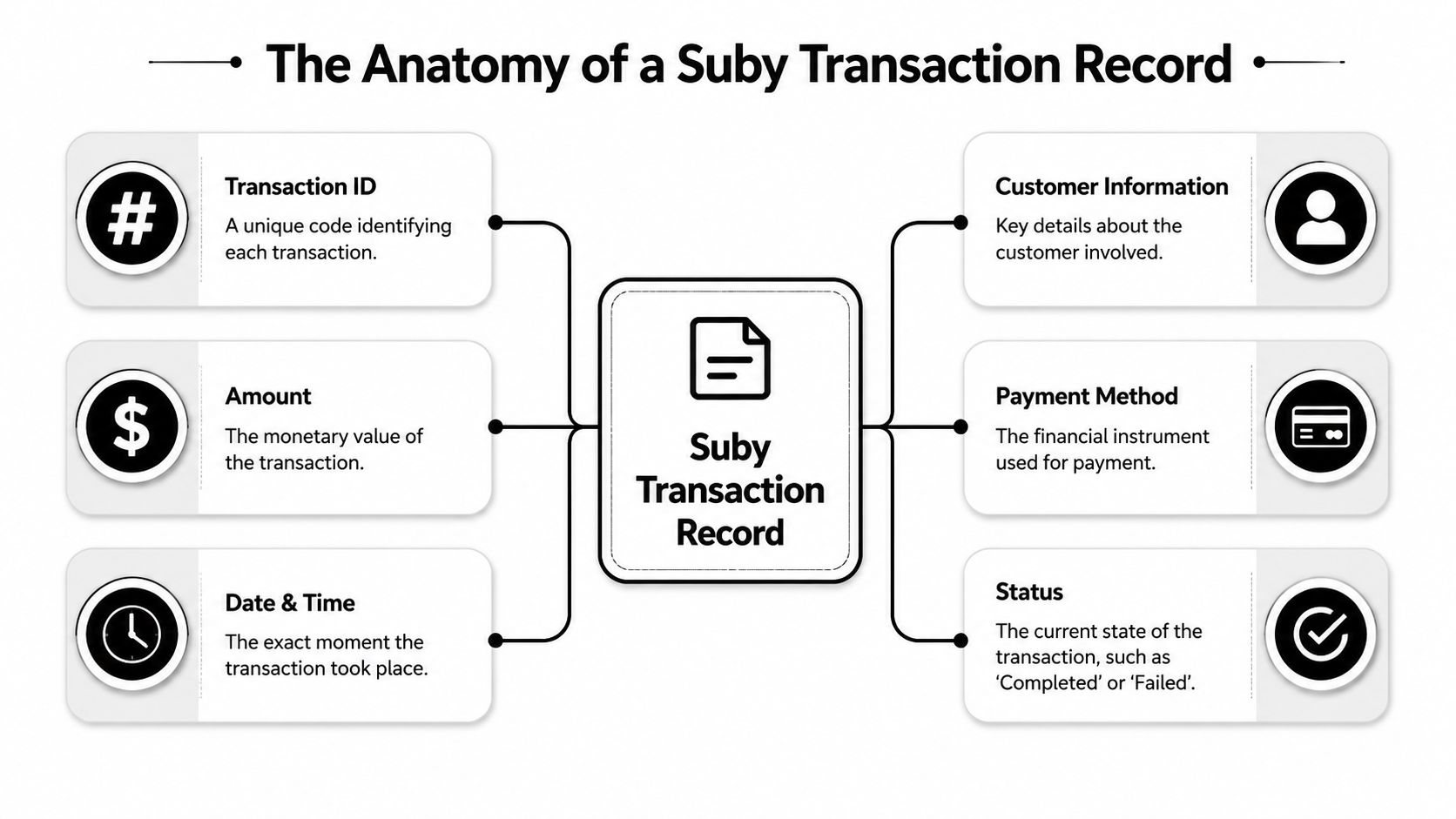
For a developer, that means a stable identifier, an amount, a status, timestamps, and enough metadata to connect the payment to a customer, subscription, order, or access entitlement. For an operator, it means the same record should explain whether the payment is still in motion, completed, failed, refunded, or blocked from fulfillment.
What a developer or operator actually needs to see
The most practical record structure is one that separates customer payment details from settlement outcomes. Customers may pay by card or crypto, while the business still needs a final net settlement record in USDC. That difference matters because payment acceptance and merchant settlement are related, but they are not the same field.
Here's a simple way to think about the core fields.
Field Name | Description | Example |
|---|---|---|
Transaction ID | Unique identifier for the payment record |
|
Created At | Timestamp for when the payment attempt was created |
|
Customer Reference | Customer email, user ID, or internal account link |
|
Method used by the customer at checkout |
| |
Gross Amount | Amount charged to the customer before fees or adjustments |
|
Status | Current lifecycle state of the transaction |
|
Product or Subscription Reference | Link to what was purchased |
|
Fee Amount | Processing or platform fee shown separately |
|
Net Settlement | Final merchant-side amount after fees, settled in USDC |
|
Payout Reference | Link to the settlement or payout record |
|
Refund Flag or Refund Status | Indicates whether the payment was refunded or partially refunded |
|
Metadata | Custom internal fields for reconciliation or automation |
|
The key point is not the exact field names. It's whether your system can reconstruct the full lifecycle from those fields without manual detective work.
Status is not a cosmetic field
Many teams make the same mistake. They treat status like a label for the UI instead of a state machine that drives operations. That's how duplicate fulfillment and false alarms happen.
Payment systems commonly distinguish between authorized, posted, and declined entries, and an authorized payment can still fail to post, as noted in Comdata's real-time transaction history reference. If your reconciliation logic treats authorization as settled money, your ledger will drift.
A practical transaction lifecycle often includes states like:
Processing, when the payment attempt exists but final outcome is pending
Succeeded, when the payment completed and can move into downstream fulfillment
Failed, when the payment did not complete
Refunded, when the original successful payment has been reversed in whole or in part
Practical rule: Trigger customer access and internal fulfillment from the final successful state, not from the first sign of authorization.
If you're building for subscriptions, communities, or digital access, that rule saves a lot of cleanup later. It's especially important when one event grants access instantly but a later event changes the financial outcome.
Viewing and Filtering Transactions in Your Dashboard
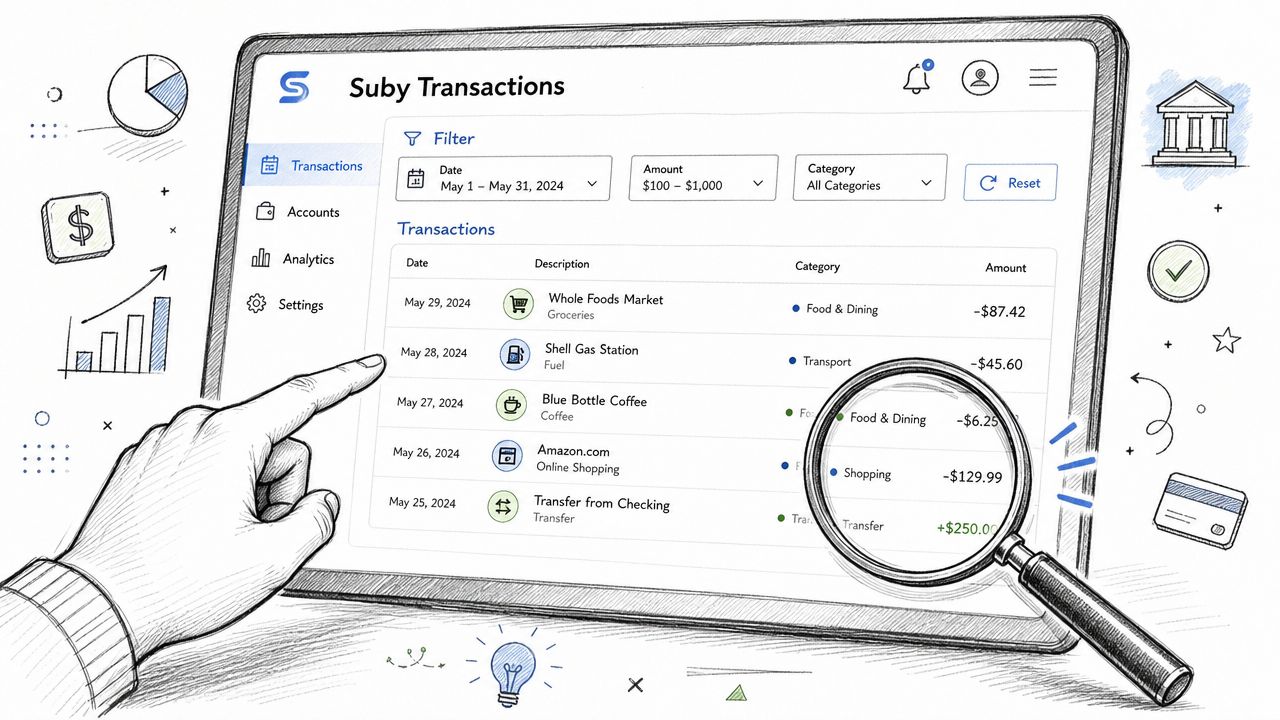
The dashboard is where teams work out payment issues long before they touch an API. If the transaction history page is set up well, support can answer customer questions, finance can review settlement patterns, and founders can spot operational problems without asking engineering for a manual export.
Start with the question, not the filter
Most transaction searches begin with one of four questions:
Did this customer pay
Why doesn't this amount match what finance expected
Which transactions failed or were refunded
What settled during a specific period
That's why the most useful dashboard filters are basic and fast. Date range, status, payment method, customer identifier, and product reference cover most day-to-day needs. Search should work on exact IDs when you have them, but it also needs to work on softer inputs like an email address or subscription reference.
A strong dashboard flow usually looks like this:
Filter by date first, so you reduce noise before checking edge cases
Use status next, especially when comparing successful payments against failed or refunded ones
Search by customer email or transaction ID, when support is handling a specific ticket
Export only after narrowing the dataset, so accounting doesn't inherit a cluttered CSV
What works in day-to-day operations
The teams that get value from transaction history usually agree on one internal rhythm. Support uses the dashboard for point lookups. Finance uses it for period reviews. Operations uses it to watch exceptions.
That means your dashboard habits should reflect actual jobs:
For support tickets, search by customer email first, then confirm payment status and product
For reconciliation, filter for the reporting period and compare successful payments to payouts
For failed renewals, sort by status and review grouped declines or interrupted recurring charges
For audits, export a clean time-bounded report instead of a full history dump
A good transaction page should also make it obvious when you're looking at a payment record versus a settlement record. Mixing those two views is one of the fastest ways to create confusion in monthly reporting.
If someone on your team says “the payment is in the system,” the next question should be “in what state?”
Programmatic Access with the Suby API and Webhooks
Dashboards are for investigation. APIs are for systems that need to stay in sync without waiting for a human to click refresh.
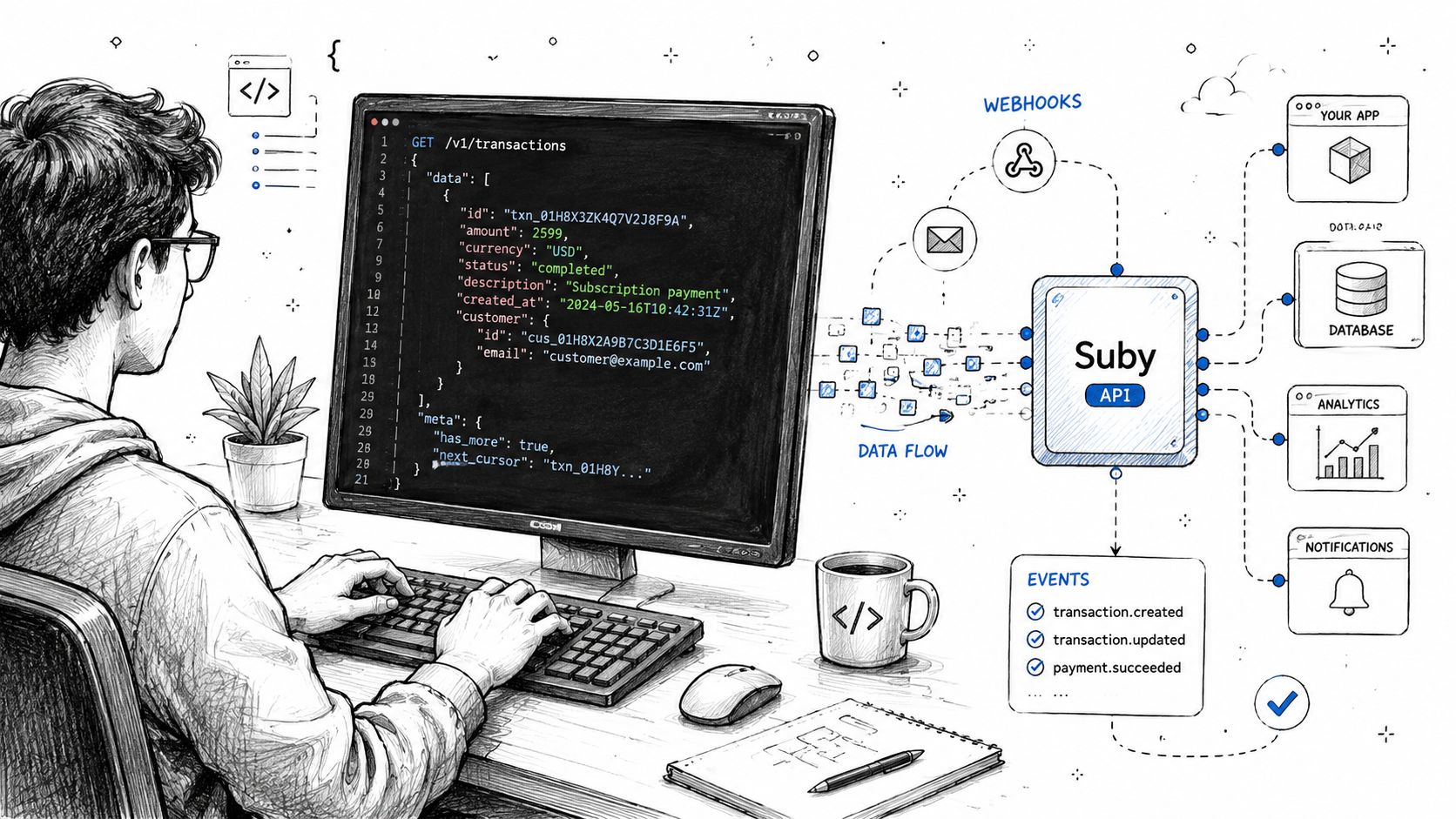
That's why transaction history should be available in two ways. You need a pull model for historical retrieval and reporting, and a push model for event-driven updates. In practice, that means API endpoints for listing and retrieving transactions, plus webhooks for status changes and payout events.
Use the API for history, webhooks for change
When teams only rely on dashboard exports, they eventually hit retention and reporting limits. Transaction-data retention varies by provider. Some surfaces only expose short history windows, while longer lookbacks may require API access or external archiving. MX notes that extended history can reach 24 months, while standard aggregation may be limited to 90 days, and PayPal's Transaction Detail Report covers the past 45 days, according to MX extended transaction history documentation. That's why serious reporting workflows usually export and store transaction data outside the dashboard layer.
If you're building a proper integration, the practical reference point is a guide to payment gateway API integration, especially when deciding how your internal services should consume payment events.
A simple pattern looks like this:
List transactions endpoint for historical syncs, backfills, and daily reporting jobs
Retrieve transaction endpoint for support tooling or precise audit lookups
Webhook endpoint for real-time updates when a payment or payout changes state
Example request shapes are usually straightforward:
GET /transactionsGET /transactions/{id}
Example filters you'd expect to support:
status=succeededcustomer_email=alex@example.comcreated_after=...created_before=...
A practical event model
Webhooks matter because transaction history isn't static. A payment may begin in a pending or processing state and only later move to success, failure, or refund. If your app polls slowly or inconsistently, your own database will lag behind the payment system.
A practical event flow often includes events like:
payment.created, when the transaction record first exists
payment.succeeded, when fulfillment can proceed
payment.failed, when retries or customer messaging should begin
payment.refunded, when access or accounting treatment may need to change
payout.created, when merchant settlement is recorded
Store every webhook event idempotently. The goal isn't just to react quickly. It's to keep your internal record consistent if the same event arrives more than once.
One implementation approach works better than the others. Use webhooks to update state in real time, then run scheduled API syncs as a safety net. Webhooks tell you what changed now. The API lets you verify what your source of truth says over a longer time window.
That combination is usually what keeps support, access control, and financial reporting aligned.
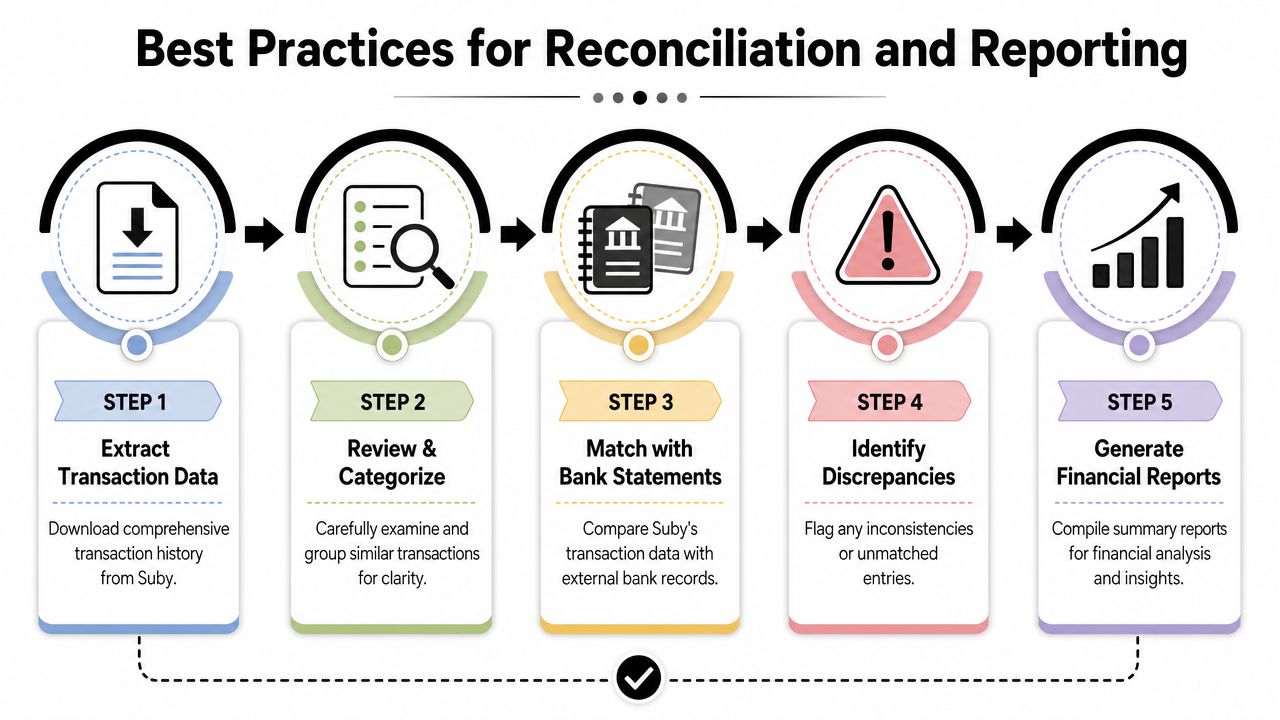
Best Practices for Reconciliation and Reporting
Reconciliation gets easier when you stop treating payments and payouts as separate stories. They're two parts of the same financial chain. One shows customer intent and outcome. The other shows what the business received.
In a stablecoin settlement model, the cleanest workflow is to match completed customer payments with the related USDC settlement records, then account for exceptions like refunds, chargebacks, and failed attempts as their own categories rather than hiding them inside revenue totals.
Build one matching workflow
A lot of reconciliation pain comes from inconsistent matching rules. Finance matches by date. Support matches by customer. Engineering matches by transaction ID. That creates three partial ledgers.
A better approach is to make one matching key primary, then use the others as supporting context. In most systems, that primary key is the transaction or payout reference.
Use this order:
Match payment records to payout records, using the strongest shared identifier available
Separate transaction status from settlement status, so a successful charge isn't mistaken for a completed payout if those are distinct records
Track refunds and disputes as linked reversals, not as edits to the original payment row
Group by reporting period only after matching is done, otherwise period cutoffs create false discrepancies
For teams building custom reports, this matters even more. Revenue recognition, failed renewal analysis, and product-level income summaries all depend on consistent status logic. If you're reviewing reporting policy, this article on revenue recognition is useful for framing how payment events and accounting treatment can diverge.
Reporting needs audit logic, not just exports
Exports help, but they don't solve the hard part. The hard part is deciding what counts.
For example, many teams accidentally include authorized or processing transactions in gross sales reviews, then spend the next week backing out failures and reversals. Others report net settlement correctly but lose the customer-level detail needed to explain churn, refund behavior, or support incidents.
A stronger reporting setup usually includes:
Reporting Need | What to include | What to exclude |
|---|---|---|
Daily sales view | Final successful customer payments | Failed attempts, unresolved processing states |
Refund review | Linked refund events and original payment references | Unrelated declines |
Payout reconciliation | Settled payout records matched to completed payments | Unmatched pending items until resolved |
Subscription reporting | Successful renewals, cancellations, refund-linked subscription changes | Raw authorization events without final outcome |
Compliance is part of this, too. Transaction history is not only for accounting. Sanctions and reporting obligations can depend on transaction size, number, frequency, and ongoing pattern monitoring, as reflected in OFAC FAQs covering compliance treatment of payments. That means historical records need to be complete enough for operational review, not just pretty enough for a dashboard.
If you want a good example of how ledger-style reporting can be structured, the Alignmint transaction ledger documentation is a useful reference for thinking about report fields and export logic.
Reconciliation becomes reliable when every exception has its own explicit path. Failed, refunded, disputed, and paid out should never be collapsed into one bucket called “transactions.”
Frequently Asked Questions About Transaction History
A common support case starts the same way. A customer says they paid, the business asks why no USDC arrived, and the developer checks three different systems to piece together what happened. A usable transaction history should answer that from one timeline.
How are fees shown in transaction history
Fees should be separate from the customer payment amount and the final settled amount. In practice, that means one record can show gross payment, processing fees, network or conversion fees where relevant, and net payout. Finance needs that split for reconciliation, and developers need it to match dashboard totals to API responses without doing guesswork in application code.
What is the difference between a payment and a payout record
A payment record captures the customer-side event. It shows that a charge was created, authorized, confirmed, failed, refunded, or disputed. A payout record captures the settlement-side event. It shows what was sent to the business, when it moved, and in Suby's case, when the payout was created or completed, whether to a bank account or in stablecoins (USDC, EURC) to a wallet.
Those records are related, but they solve different problems. Support checks the payment lifecycle. Finance checks the payout lifecycle.
How should chargebacks and refunds appear
Keep the original payment intact and append the refund or chargeback as a linked event with its own status, amount, and timestamp. That preserves the full lifecycle. It also makes webhook handling safer, because downstream systems can process a new reversal event instead of discovering that a previously successful payment was rewritten without a distinct event.
Does transaction history work for Discord and Telegram payments
Yes, if the payment system also tracks the entitlement tied to the transaction. For community payments, the useful record is not only whether money was collected. It should also show the subscription state, renewal outcome, and any access change connected to that payment.
That matters during failed renewals. A member may lose access because a recurring payment failed, not because the original purchase was missing.
Why does detailed transaction history matter for customer analysis
Payment history often shows behavior that a basic customer profile misses. The World Bank review of transactional data and financial inclusion explains how transactional records can improve analysis for people with limited traditional credit history. For a business, the practical takeaway is simpler. Patterns in successful payments, failed renewals, refunds, and payout timing give teams a better view of customer reliability and account health than static profile fields alone.
Suby is a payment gateway and payment processor. Your customers pay with card, bank transfer, Apple Pay, Google Pay, Klarna, and more, or stablecoins, and you get paid out to your bank account, or directly in stablecoins (USDC, EURC) to your wallet, anywhere in the world, no bank account required. It runs one system for payments, subscriptions, and community access. Because every payment and payout lives in one place, your transaction history reads as a single timeline, from checkout attempt through status updates and webhook events to final settlement, so support, finance, and engineering stop working from different versions of the same record.
